User Journey: See the pricing engine configurations a party holds
Table of Contents
This page documents a user journey: A market-risk owner or tenant administrator reads the pricing engine configurations the party holds, what each one prices with, which reports bind it, and what it leaves unpriced.
A user journey describes what one person is trying to do, before anything is built. It is a design document that outlives any sprint, so it names the screens, the entity fields each screen shows, and the operations and messages each step needs.
1. Goal
"Which engine prices my swaptions, and which of my reports use it?" The person owns reports for a party. A figure looks wrong, or a new product type is now traded, and the question is not about one report. It is about the configuration that decides how every report prices a product. The journey is done when the person has found the configuration, read the model and the engine it gives each product, read which reports bind it, and knows whether any product the party trades has no row.
2. Actor and trigger
A market-risk owner or a tenant administrator runs this journey. The person acts inside their own tenant and reads the configurations their party owns. A configuration is party-scoped by row-level security, so nobody sees another party's.
The trigger is one of three. A figure disagrees with the desk and the person suspects the pricing. A report binds a configuration and the person wants to know what is in it. Or a new product type is booked and the person wants to know if anything prices it. The journey starts on the list and ends on a configuration's page, or on one of the three journeys that change a configuration.
This journey reads. It writes nothing. Adding, changing and importing are the journeys it links to.
3. This is not the engine run settings
Two configurations carry the word "engine" and a person must not confuse them. This journey is about the first only.
| Pricing engine configuration | Engine run settings | |
|---|---|---|
| Question | Which model and engine price this product, and how are they set? | How does the engine run this report? |
| ORE document | pricingengine.xml |
ore.xml, the Setup block |
| Unit | One product type | The whole run |
| Holds | Product rows, each with a model, an engine and their parameters | Three groups of fixed settings: fixings, building, execution |
| Journey | this page | See and change the engine run settings a party holds |
A change here applies to one product type. A change to the engine run settings applies to every product of the run. The record page of each configuration carries a Related configurations card that lists the other configurations the same report binds, with a link.
No screen, card or journey calls this configuration pricing engines, pricing model config or the pricing engine alone. Its page has no Parameters tab: the parameters of a product live in its workbench, and the document's global parameters have a tab of their own.
4. Official, approved and draft
A party does not hold many official pricing configurations. Model risk controls
the model settings: the quant team, market risk and model validation sign them
off. A party therefore holds one official configuration for each cycle, usually
intraday and eod, and every official report of that cycle binds it. The
other configurations are drafts. A draft is a place to try a change, and no
official report can bind it.
Each configuration shows one of four statuses:
| Status | Meaning |
|---|---|
| Approved | A version of it was signed off. The latest signed-off version is the version in force. |
| In review | A candidate for a cycle waits for sign-off. It is not in force. |
| Draft | It changes in place and needs no sign-off. No official report can bind it. |
| Retired | It is no longer in force. Its history stays. |
An approved version never changes in place. A change to it is a proposal for a new version. The version in force stays in force until the sign-off completes. Sign off a pricing engine change draws that flow. The configuration that is official for a cycle shows an Official for tag. The list is short on purpose, and the screen says so.
5. Steps
5.1. Step 1: the list
- Open the list. The person opens Pricing engine configurations under the reporting area. The screen is a record list as the Record screen standard draws one: breadcrumb, the plural as the title, one sentence, Refresh and Add, a search, a filter, a paged table, and the four states.
- Read a row. A row is one configuration: its name, its status, the cycle it is
official for, its variant tag, the count of products it covers, the count of
reports that bind it, and when it last changed. A configuration with an open
proposal carries a tag that says so. The variant tag is the ORE file family the configuration came from,
such as
AMC,SABRordelta-gamma; a configuration with no variant shows a dash. - Find one. The search runs on the server over the name and the description. A filter narrows by variant. A second filter narrows by status. A third filter, Used by reports, shows only the configurations a report binds, or only the ones no report binds.
- Start a change from the list. Add opens Author a pricing engine configuration. The Workflows menu offers Bring in a pricing engine configuration file and the queue of Sign off a pricing engine change.
5.2. Step 2: one configuration
- Open the page. A click opens the record page: the name as the title, the lead line with the status, the cycle it is official for and the version, the access mark, and the actions for a person who may take them. On an approved configuration the action is Propose a change, not Edit, and Delete is not offered. On a draft the actions are Edit and Delete. A banner states a pending proposal, how many approval parts have approved it, and that the version in force stays in force. The tabs are held in the address.
- Read Details. The name, the status, the cycle it is official for, the version in force and the approval parts that signed it off, the description, the variant, and the last-changed line. A configuration carries a link to the reporting configuration row it is bound through, and the page names it, because that row is what a report definition binds.
- Read Products. One row for each pricing engine type the configuration
covers, in
positionorder: the product type with its description, the model, the engine, and the count of parameters the row carries. The product type is a code from the pricing engine type vocabulary, and the row shows the instrument type it maps to. The tab is a tree by asset class beside the product: the product takes the rest of the width, with its model group and its engine group, each with a definition, a select, a description and its parameters. The page is read-only until Propose a change, which draws the controls and the change fields. - Read the global parameters. The document-level parameters, each with its value in force and its documentation collapsed under it. Advanced adds the ORE argument, the format and the release. The product's own parameters are not here: they sit on the product in the Products tab.
- Read Reports. The report definitions that bind this configuration, each with a link to its page, its cycle, its portfolio, the product types it needs, what this configuration leaves unpriced for it, and the version it runs with. A report whose cycle differs from the configuration's is marked. The tab states the rule: a report needs a price for every product type in its portfolio, and a configuration that several reports bind must cover all of their portfolios together. It also states the reach: a change reaches the next run of each of these reports once it is approved, and a run already produced keeps what it ran with.
- Read History. The shared timeline of the configuration and its products, newest first. Each version in force shows the approval parts that signed it off. A proposal that waits shows at the top and is not a version in force. On an approved configuration, Propose a revert replaces Revert: it writes an older version's values as a new proposal, which needs the same sign-off.
5.3. Step 3: what the configuration leaves unpriced
- Read the coverage strip. Above the Products table, one line states how many of the product types the reports that bind the configuration need have a row here. With no report bound, it counts the product types the party trades. A product type that is needed and not covered is named, because a product with no row has no model in a run: the run fails or skips it, and the result is smaller than the book. The strip is a reading, not a fix. It links to Add on the Products tab, and to Change how a product is priced.
- Leave. The person goes to a report that binds the configuration, or on to change it.
6. Screens and wireframes
Two screens: the list, and the record page with five tabs, Details, Global parameters, Products, Reports and History. The sign-off has its own screen, in its own journey. A journey is one screen composed around a goal, so the Products tab carries the coverage line in its card foot and the Reports tab carries the reach, rather than a separate screen for each.
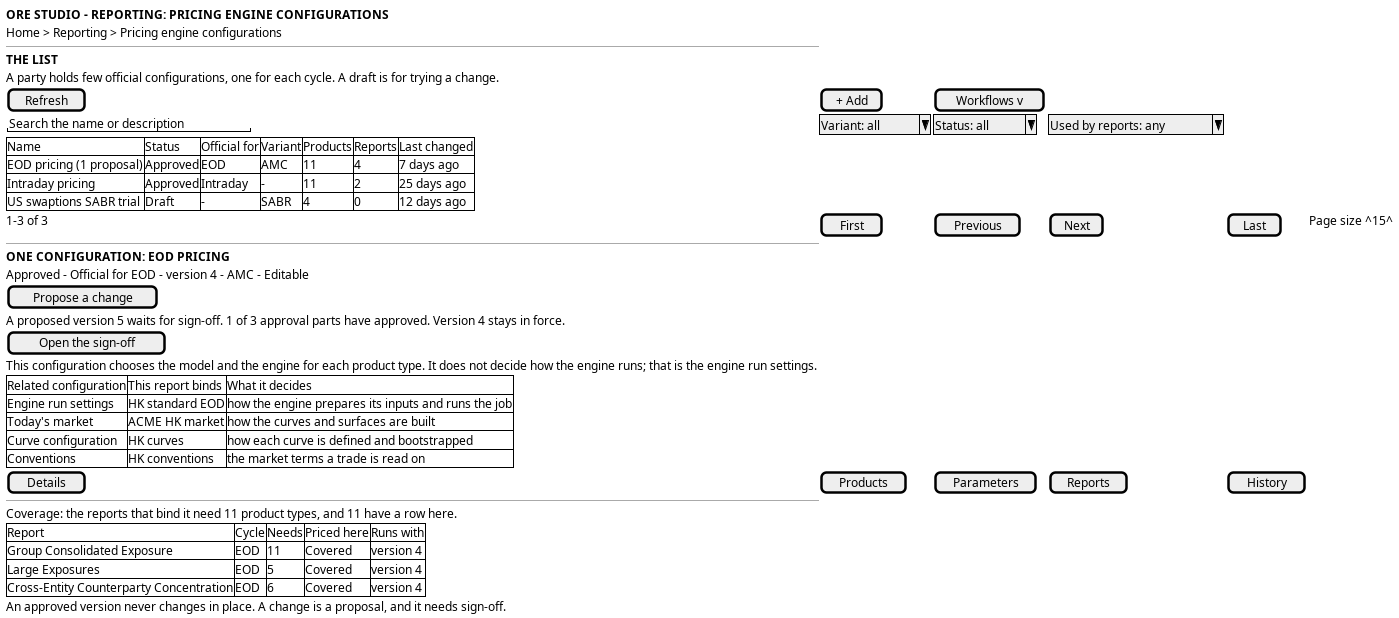
Figure 1: The product pricing list, and one configuration's page: the Products tab with the tree, the model group and the engine group.
7. Prototype
The see the pricing engine configurations a party holds prototype owns this journey, and
its design note says what it argues, which states it can reach and what is
fake. It belongs at doc/prototypes/reporting/product-pricing/. The prototype keeps its earlier file name; the screen it draws is Pricing engine configurations.
It must draw the list and the record page as the Record screen standard draws them, with no layout of its own. The list must show the name, status, the cycle a configuration is official for, variant, product count, report count and last change, a server search, a variant filter, a status filter and a used-by filter, the pager, and the states first load, empty, nothing matches and error. It must show an approved configuration that is official for a cycle, with a pending proposal, and a draft. An approved configuration must offer Propose a change and no Delete. The record page must carry Details, Global parameters, Products, Reports and History. The Products tab must carry the tree, the model group and the engine group, and the coverage line with a product type the party trades and the configuration does not cover. The Reports tab must state the rule and the reach, with a row for each report and what it leaves unpriced. Every value is a fixture and the page says so.
8. Entities composed
| Entity | What it contributes | Model |
|---|---|---|
pricing_model_config |
The configuration: name, description, config_variant and the link to the reporting configuration |
ores.analytics.pricing_model_config |
pricing_model_product |
One row for each product type: pricing_engine_type_code, model, engine, position |
ores.analytics.pricing_model_product |
pricing_model_product_parameter |
One setting: parameter_scope, parameter_name, parameter_value, position |
ores.analytics.pricing_model_product_parameter |
pricing_engine_type |
The vocabulary of product types, and the instrument type each maps to | ores.analytics.pricing_engine_type |
configuration |
The reporting row a definition binds, of type pricing_engines |
ores.reporting.configuration |
report_configuration |
The slot that binds a configuration to a definition | ores.reporting.report_configuration |
The three analytics tables are the three parts of one document. A product and a
parameter belong to one configuration. The three carry party_id and are
party-scoped.
9. Operations and messages
| Step | Operation | Subject | Status |
|---|---|---|---|
| 1, the list | List the configurations, paged and searched | analytics.v1.pricing_model_configs.list |
exists; the search and variant filter need checking against the list contract |
| 2, the page | Read the whole document: configuration, products, parameters | analytics.v1.pricing_engines_documents.get |
exists |
| 2, Products | List the product types and their instrument types | analytics.v1.pricing_engine_types.list |
exists |
| 2, Products | List the products of one configuration | analytics.v1.pricing_model_products.list |
partial; no read by configuration |
| 2, Parameters | List the parameters of one configuration | (the parameters subject for pricing_model_product_parameter) |
partial; no read by configuration |
| 2, Reports | Read the definitions that bind a configuration | reporting.v1.report_configurations.list_by_configuration_id |
exists |
| 2, Reports | Read the reporting row | reporting.v1.configurations.list_by_configuration_type_code |
exists |
| 2, History | Read the versions of a configuration and its parts | (the generic history request) | partial; one stream over the parts is missing |
| 2, Details | Read the status, the cycle and the sign-off of a version | (no operation) | missing |
| 2, Reports | Read the product types of a report's portfolio | (no operation) | missing |
| 3, coverage | Read the product types the party trades | (no operation) | missing |
| The screen | Read pricing engine configurations from the browser | GET /api/reporting/pricing-engines and GET /api/reporting/pricing-engines/:id |
exists |
10. What is missing
- The tabs. The BFF routes under
/api/reporting/pricing-enginesserve the list and the document, and the list and the page exist. The page draws Details, Products and Settings as stacked sections, not the five tabs of the prototype, and it has no Global parameters, Reports or History tab. - Reads of the parts by configuration. The document read returns the whole document, which is enough for a page. The list of configurations needs a count of products and a count of reports for each row, and no operation returns a count. Until one does, the list reads one page of configurations and the counts come from a second read, or the column is dropped.
- The reports that bind a configuration. The read exists
(
reporting.v1.report_configurations.list_by_configuration_id), and the engine run settings screen uses it for its Used by tab. The pricing page does not call it yet. - The products the party trades. The coverage strip compares the configuration with the instrument types of the party's trades. No operation returns the distinct instrument types of a party's book. Until one does, the strip is a fixture and says so.
- A variant is a tag, not a thing.
config_variantis free text. The filter offers the values the page has read, and cannot offer a vocabulary. - No status, no cycle and no sign-off. The record carries a name and a description, and nothing that says a configuration is draft, in review, approved or retired. Nothing says which one is official for a cycle, and nothing records who signed a version off. The prototype draws all three from a fixture. A build needs a status and a cycle on the configuration, and a record of the sign-off on each version.
- A report binds a configuration, not a version.
report_configurationholds the configuration, so a report runs with the latest version. A version in force needs a pointer, or the write of a proposal must not touch the rows that a run reads. The Reports tab shows the version in force, and the screen cannot show which version a run used. - The product types of a report's portfolio. The rule needs what each report holds. No operation returns it, so the tab uses a fixture.
11. Related journeys
- Author a pricing engine configuration — when the party needs a configuration that does not exist
- Change how a product is priced — when a row is wrong
- Sign off a pricing engine change — the queue, and what happens to a proposal
- Bring in a pricing engine configuration file — when the configuration lives in an ORE file
- See and change the engine run settings a party holds — when the question is how the engine runs rather than which model prices a product
- Create a report — step 4 binds a pricing engine configuration, and links here once this screen exists
- Change what a report runs — step 1 names the pricing engine configuration a definition binds, and links here
- See the reports a party runs — the reports this configuration reaches
12. Related knowledge
- Reporting journeys — the group this journey belongs to
- ORE Model Configuration — the
pricingengine.xmldocument and how it maps to these tables - Investigation: the ORE report configuration vocabulary — who owns each configuration document
- Investigation: the two engine-facing configurations — the boundary between this configuration and the engine run settings
- Record screen standard — the shape of the list and the page
- User Journeys — the index
13. See also
- User Journey Extraction Standard — the checklist this journey is written against
- UX — the standard the screen follows