User Journey: Change what a report runs
Table of Contents
This page documents a user journey: A market-risk owner or a tenant administrator reads the analytics a report configuration carries, opens the screen that manages them, and reads what the change does and does not reach.
A user journey describes what one person is trying to do, before anything is built. It is a design document that outlives any sprint, so it names the screens, the entity fields each screen shows, and the operations and messages each step needs.
1. Goal
"This report does not produce what I need any more, so I want to add one analytic, take another away, and know what that does to the runs I already have." The person owns a report definition for a party and reads its runs. A run came back with the measures they knew, and without the one they asked for. They want the missing measure produced by the next run, they want a measure they no longer read to stop costing a run, and they want one setting inside a measure adjusted. The journey is done when the definition runs the analytics the person meant, and the person has read what the change does and does not reach: which rows now carry what, which configuration moved, which runs keep the configuration they ran with, and which comparison stops being a comparison.
2. Actor and trigger
A market-risk owner or a tenant administrator runs this journey. The owner knows what the desk reads and asks for the measure; the administrator holds the definition and makes the change. The person acts inside their own tenant, on a definition their party owns, and the configurations they can change are the party's own.
The trigger is a run that came back without the measure the person asked for, or with a measure nobody reads any more, or with one setting of a measure that is wrong for the book. The person opens the definition from See the reports a party runs, and the journey ends when the analytics read the way they meant them to.
This journey reaches the analytics of the configuration the definition binds. It does not write the definition's name, its schedule, its concurrency policy, its processing phases or its bindings, and it does not run the report. The next run of the definition carries the change; nothing here makes one.
The journey is a wizard of three panels, titled What this report runs: the definition and the configurations it binds, the analytics the bound configuration carries, and what a change to that set reaches. The analytics themselves are set on Manage the analytics, one screen that owns them, and step 2 opens it. This journey is that screen's owner.
3. Steps
3.1. Step 1: the definition and the configurations it binds
- Read what the definition binds. The wizard opens on step 1, titled
The
   definition and the configurations it binds
. The panel states the definition'sname,report_type,party_id, and the configurations it binds. A definition binds configurations of exactly five types:conventions,pricing_engines,todays_market,curve_configurationandrisk_report_config. It reads them throughreport_configurationsand reads the configurations themselves, all five named on the panel. - See what each configuration supplies. Each of the five is shown with what it puts into a run: conventions supplies the calendars, day-count rules, business-day rules and currency pairs every analytic reads; pricing_engines says which engine prices which product family; todays_market carries the market data of the valuation date; curve_configuration says how each curve is built; and risk_report_config carries the analytics, their order and their parameters.
- See where each configuration's data lives, and follow it where a screen
exists. A conventions configuration is a named convention set, so the panel
shows the set this report uses and one page of the sets the party holds: a row
per set with its name, its purpose, the kinds it covers and whether it is the
one this report uses, and a radio that chooses it. One link leaves that page
for the authoring UX, and it is marked as not in this MR. The panel draws no
per-kind table, because what a set holds is decided in authoring. The names,
purposes and counts on the page are a fixture: no table stores a set's name or
purpose, nothing marks the document a run reads for a kind, and the
configuration carries no children. The other four,
pricing_engines,todays_market,curve_configurationandrisk_report_config, have no screen and no route, so the panel states the link as missing rather than drawing one that would not resolve. The panel never invents a route. - Read who else is bound to the analytics. The configurations in the first four
slots are the party's own. The one in the fifth,
risk_report_config, carries the analytics, and it is shared: three other definitions bind the same configuration in this fixture. The panel names them before offering a change, because "change this report" and "change these four reports" are different decisions.
3.2. Step 2: the analytics
- Read the set the configuration carries. Step 2, titled
The analytics, states the set of the run settings configuration the definition binds: the count that is on, every row with itsdisplay_orderand a one-line statement of what that analytic produces, and the rows that are on the configuration and off. It readsreporting.v1.configuration_analytics.list_by_configuration_idand the vocabulary withreporting.v1.analytic_types.list. The fourteen types arenpv,sensitivity,cashflow,curves,simulation,saccr,parametricVar,portfolioDetails,creditcurves,pfe,calibration,pnlExplain,historicalSimulationVarandxva. The panel names the codes in words, and it keeps three states apart: a type that is on, a type that owns a row that is off, and a type the configuration has never carried. - Read what the panel does not draw. Step 2 is read only. It draws no switch, no parameter and no add action, because the analytics are managed on one screen and this is the reading of that screen's result. A panel that also drew the controls would be a second implementation of the same interaction, and the two would drift.
3.2.1. The shared screen: manage the analytics
- Open the screen that manages them. Step 2 links to Manage the analytics,
doc/prototypes/reporting/manage-the-analytics/. That screen owns the whole analytic interaction of a run settings configuration, and Create a report hands the work there too. It opens on a switchboard: every analytic type, one row each, with the on/off control, thedisplay_orderand a one-line summary, and a type the configuration carries no row for says so and offers to add it. It then gives one step to each analytic that is on, indisplay_order, titled with the analytic's name, and it ends on a step that reads the set back. - Read what the analytic is, and set every parameter it takes. Each analytic step carries what the analytic is, how it is calculated in plain words, and every parameter it takes with a helpful control, a note on what the parameter means and what a normal value is. The control follows the parameter's shape: a number field for a count or a size, a select for an enumeration, a toggle for a boolean, and a text field for a name. An analytic that takes no parameter says so rather than showing an empty list. The fixture carries settings for the fourteen types, so almost every analytic that is on opens a step with something to set.
- Turn one off. The person sets the row's
activeto false. The row stays. An analytic is turned off by settingactivefalse, not by deleting the row, because the history must show that it was turned off: a person who reads the configuration later sees the measure, itsdisplay_orderand its parameters, and sees that it is off. Deleting the row would erase the fact that the report ever produced it. The shared screen asks first, because the parameter values leave the rail with the step, and it states the write in those words. No control anywhere on either screen removes a row. - Turn one on. Turning an analytic on, or adding one the configuration never
carried, is the switch on the switchboard, and the switch is the only way to
add one. It writes the row with the default value of every parameter at the
next
display_orderand gives the analytic a step of its own, so the person is offered the step the switch just created. A row that exists and is off is turned back on with the settings it kept. - Read where the editor is deferred.
simulationandpfeneed purpose-built editors for the cube, the shift and the time grid. The shared screen says so on the parameter itself: these are drawn as plain fields for now, each labelled a deferred editor, and the purpose-built editor is a later task. The page never presents a plain field as the final design. - Read the set back. The last step of the shared screen names the rows rather
than counting them: each active analytic with its
display_orderand its number of parameter rows, the rows kept off with their order, every parameter value with its position, and the definitions bound to the configuration that read the set. It is the final step, so it offers no Back, and it offers the way back to the report.
3.3. The rule between analytics
- See the incompatibility as a state, not as prose.
pfereads a cube thatsimulationwrites, sopfeon withoutsimulationcannot work. Both screens show that as a visible state: the rule strip names the rule and marks the set as one that cannot run, both rows are marked in red, and on the shared screen the toggle that would write either row of the pair is refused and its last step refuses to read the set back. The rule lives in the ACME seeder, ingenerate_risk_config_data.py, functioncheck_exposure_needs_simulation, and no service validates it. The write would be accepted and the run would fail later, so the shared screen refuses what the server would not, and says that is what it is doing.
3.4. Step 3: what a change reaches
- Review what a change does and does not reach. Step 3, titled
What a change
     reaches
, states the reach before anything is written. It reaches the next run of every definition bound to this configuration, including the three the person did not open. It does not reach a run already produced: a run keeps the configuration it ran with, and its outputs and its errors are that run's own record. It does not reach the definition's scheduling, its processing phases, its concurrency policy or its other four configurations. - Read that the comparison stops being a comparison. A run made after the change is not comparable with a run made before it, because the two runs did not produce the same measures. The difference between them is then a difference of configuration and not a difference of the book, and the comparison states a change that did not happen. The panel says so plainly, and names the definition's runs from before the write as the runs it makes incomparable.
- Read where the write happens. The write is the shared screen's and not this wizard's. The set is sent in one call, so a turned-on analytic, a turned-off one and a changed parameter land together and a half-written configuration is not left behind; one setting alone is written one row at a time. Step 3 names the operations, states that this page stages nothing and writes nothing, and points at the screen that does. No step anywhere deletes a row.
- See the version history. The person reads the definition's version history: the versions it has had, and what each one states. This is the record of the change, and it is also the only timeline the screen has to place a run against. It is not a complete answer. No operation says which runs were made with which configuration version. The best the screen can do is compare a run's own start time with the definition's version history and say that a run started before a version, which is an inference and not a fact, because the analytics live on the configuration and the configuration's own version history is not read here. What is missing records all of it.
- Leave, or go on. The person returns to the definition's latest run, or runs the report to see the new measures. The run is Run a report and watch it finish's page, and its figures are Read what a run produced's. This journey changes what the next run produces and nothing else.
4. Screens and wireframes
Two screens. The wizard has three panels: step 1 shows the definition header and the five configurations it binds, each with what it supplies and a link to the screen that holds its data; step 2 shows the analytics of the bound run settings configuration as a read-only summary — the count on, the display order, the rows kept off, and the pair marked when it cannot run — and links to the shared screen; step 3 shows what a change reaches and the runs it makes incomparable. The person reads the three as one answer: what this report runs, and what changing it does.
Manage the analytics is the second screen, and it owns the analytic interaction
for every journey that needs it. It is the standard steps UI: a switchboard of
the fourteen types, one rail step per analytic that is on in display_order
carrying that analytic's explanation, calculation and every parameter with a
control chosen for its shape, and a final step that reads the set back and
refuses to read a set that cannot run. The rail is computed from the set, so
turning an analytic on adds a step and turning one off removes it.
The two screens write two things and read eight. They write the analytic rows and their parameter rows, both from the shared screen. They read the definition, its bindings, the five configurations, the configuration's analytics, their parameters, the analytic types, the definition's versions, and the configurations grouped by type. They run nothing and they schedule nothing.
The wizard keeps four statements beside the summary, because a person who reads
only the wizard must still read them. Turning an analytic off sets active to
false and leaves the row. A configuration is shared, so the change can reach
definitions the person did not open. A run keeps the configuration it ran with,
and nothing says which configuration version that was. And a run after the change
is not comparable with a run before it. The wizard draws the incomparable runs by
their start times and says the placement is an inference.
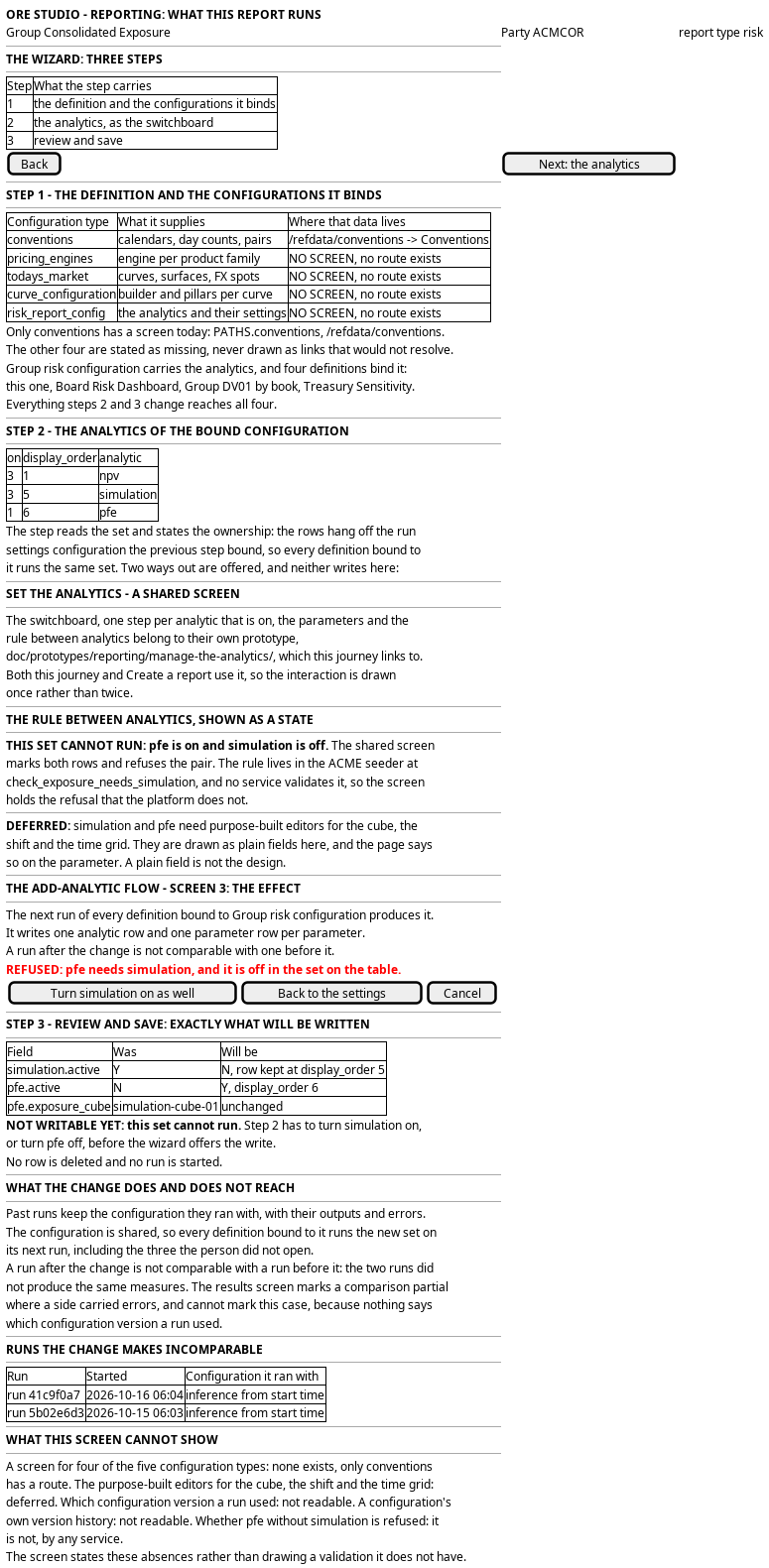
Figure 1: What this report runs: the wizard's three panels with the analytics of the bound configuration summarised and the pfe and simulation pair marked, and the shared screen the panel hands the work to.
5. Prototype
The manage the analytics
prototype owns this journey, and
its design note says
what it argues, which states it can reach and what is fake. It belongs at
doc/prototypes/reporting/manage-the-analytics/.
It is one screen on the standard steps UI, and it draws the whole analytic
interaction: the switchboard with every analytic type as one row, the on/off
control, the display_order and a one-line summary; a rail step for each
analytic that is on in display_order, titled with its name, carrying what the
analytic is, how it is calculated, and every parameter with a control chosen for
its shape and a note on its meaning and its normal value; and a final step that
reads the set back and offers the way to the report. It must show the pfe
incompatibility as a visible state — the rule strip, both rows marked, the toggle
refused and the last step refusing to read the set back — and it must name the
rule and the seeder it lives in. It must state that an analytic is turned off by
setting active false and never by deleting the row, and no control on it may
remove a row. It must say that the complex editors for simulation and pfe are
deferred, and label each as it draws it. It carries ?variant=A|B|C as three
readings of the per-analytic step, because that layout is the open question. Every
value on the page is a fixture, and the page says so.
The change what a
report runs prototype is the same journey's wizard, and
its design
note says what it argues. It belongs at
doc/prototypes/reporting/change-what-a-report-runs/. It must draw step 1 with
the definition's five bindings, each with what it supplies and a link that is real
for conventions and stated missing for the other four; step 2 as the read-only
summary of the bound configuration's analytics, with the active flag shown, the
display order, the incompatibility as a visible state, and the link to the shared
prototype; and step 3 with what a change reaches and the runs it makes
incomparable, placed by start time against the definition's version history and
marked an inference. It must state the server's silence beside the rule, say that
past runs keep their configuration, that the configuration is shared, and that a
new run is not comparable with an older one. It draws no analytic control, because
the shared prototype owns them.
6. Entities composed
| Entity | What it contributes | Model |
|---|---|---|
report_definition |
The definition whose analytics change: name, report_type, party_id, and the version history an edit writes |
ores.reporting.report_definition |
report_configuration |
The slot a configuration fills: configuration_type_code and configuration_id, five of them per definition |
ores.reporting.report_configuration |
configuration |
The configurations step 1 names, and the one the analytics belong to, which several definitions can bind | ores.reporting.configuration |
configuration_analytic |
One measure the configuration asks for: analytic_type_code, display_order and active |
ores.reporting.configuration_analytic |
configuration_analytic_parameter |
One setting of one measure: parameter_name and value |
ores.reporting.configuration_analytic_parameter |
analytic_type |
The vocabulary the analytic_type_code comes from: the fourteen types, their names, and what the switchboard offers |
ores.reporting.analytic_type |
report_instance |
The runs, which keep the configuration they ran with, and whose start times are what the screen places against the version history | ores.reporting.report_instance |
party |
The owner of the definition and the configuration | ores.refdata.party |
The rows this journey edits are configuration_analytic and
configuration_analytic_parameter, and neither belongs to the definition. The
definition reaches them through report_configuration, one row per configuration
type, and the configuration in the fifth type, risk_report_config, is the one
that carries the analytics. The definition's own fields are shown to the person
but not written here:
schedule_expression, concurrency_policy, pre_processing,
prepared_input_key, post_processing and is_official all stay as they are.
The definition is bitemporal. An edit writes a new version, older versions stay readable, and a run keeps the configuration it ran with. That is what makes the change safe to make and hard to read afterwards: nothing is destroyed, and nothing names the version a run used.
Every entity above carries party_id and is party-scoped by row-level security.
The analytic and its parameters carry the tenant as well, because a
configuration's analytics are written by the session that writes the
configuration.
7. Operations and messages
| Step | Operation | Subject | Status |
|---|---|---|---|
| Step 1, read the definition | Read the definition | reporting.v1.report_definitions.get |
exists |
| Step 1, read the definition | List the party's definitions | reporting.v1.report_definitions.list |
exists |
| Step 1, read the bindings | Read the configurations the definition binds | reporting.v1.report_configurations.list |
exists |
| Step 1, read the bindings | Read the configurations themselves | reporting.v1.configurations.list |
exists |
| Step 1, read the bindings | Read the configurations of one type | reporting.v1.configurations.list_by_configuration_type_code |
exists |
| Step 2, read the set | Read the analytics of one configuration | reporting.v1.configuration_analytics.list_by_configuration_id |
exists |
| Step 2, read the set | Read the analytic type vocabulary | reporting.v1.analytic_types.list |
exists |
| The shared screen, read one analytic's settings | Read one analytic's parameters | reporting.v1.configuration_analytic_parameters.list_by_configuration_analytic_id |
exists |
| The shared screen, turn one off | Write one analytic's active and order |
reporting.v1.configuration_analytics.put |
exists |
| The shared screen, turn one on | Write the new analytic and its parameters | reporting.v1.configuration_analytics.put and reporting.v1.configuration_analytic_parameters.put |
exists |
| The shared screen, the set | Write the whole set in one call | reporting.v1.configuration_analytics.put_many |
exists |
| The shared screen, one setting | Write one parameter's value | reporting.v1.configuration_analytic_parameters.put |
exists |
| The shared screen, read back | Read the stored analytics again | reporting.v1.configuration_analytics.list_by_configuration_id |
exists |
| Step 3, review what the change does not reach | Read the configuration's market roles, which this journey leaves alone | reporting.v1.configuration_market_bindings.list_by_configuration_id |
exists |
| Step 3, the version history | List the definition's versions | reporting.v1.report_definitions_versions.list |
exists |
| Step 3, the version history | Read one version | reporting.v1.report_definitions_versions.get |
exists |
| Not sent here | Write a definition's binding to a configuration | reporting.v1.report_configurations.put |
exists |
| Not sent here | Write a configuration row | reporting.v1.configurations.put |
exists |
| Not sent here | Write a configuration's market roles | reporting.v1.configuration_market_bindings.put |
exists |
| Not sent here | Write the definition itself | reporting.v1.report_definitions.put |
exists |
| Which runs ran with which configuration | Name the configuration version behind a run | (no operation returns it) | missing |
| The screen itself | Read and change analytics from the browser | (no BFF route) | missing |
Two operations are this journey's writes, and configuration_analytics.put_many
carries the set. A person toggles rows, adds one with the switch, and the shared
screen sends the whole set at once, so added, turned-off and reordered analytics
land together and a half-written configuration is not left behind.
configuration_analytic_parameters.put writes one parameter at a time, because
a parameter is one row with one value and the set of parameters a person edits is
not a unit. Both belong to the shared screen; the wizard sends neither.
report_configurations.put, configurations.put and report_definitions.put
exist, and this journey sends none. Reaching into another configuration,
rebinding the definition to a different one, or editing the definition's own
fields is a different change: it would move every analytic at once and leave the
old configuration running for whoever else binds it. A person who wants that has
not asked to change what a report runs; they have asked to change which
configuration it uses, or what the definition says.
No BFF route serves reporting. The shared screen adds one, for example
GET /api/reporting/configurations/<configuration-id>/analytics for the read and
PUT /api/reporting/configurations/<configuration-id>/analytics for the write,
which calls configuration_analytics.put_many and the parameter write behind it.
8. What is missing
- A route and a screen for reporting. No BFF route serves reporting, and nothing in the web application shows a report today. The wizard, the summary, the shared analytics screen and the read-back are new.
- No screen exists for four of the five configuration types. Step 1 names the
five configurations the definition binds, says what each supplies, and links
each to the screen that holds its data. Only conventions has a screen
today:
PATHS.conventionsis/refdata/conventions, a real route inprojects/ores.web/packages/web/src/shell/paths.ts. The other four,pricing_engines,todays_market,curve_configurationandrisk_report_config, have no screen and no route, so step 1 states the link as missing rather than drawing one that would not resolve. A person who wants to change the engines, the market data or the curves behind a run has nowhere to go, and the wizard says so instead of hiding it. - The complex editors for simulation and pfe are deferred.
simulationandpfeeach need a purpose-built editor: one for the cube, one for the shift, one for the time grid. Manage the analytics draws those settings as plain fields,time_gridas a select andexposure_cubeas a text field, and it says on the parameter that the purpose-built editor is a later task. A plain field is not the design, and the page never pretends it is. - Nothing validates the
pferule.pfereads a cube thatsimulationwrites, sopfeon withoutsimulationcannot work. That rule lives in the ACME seeder, ingenerate_risk_config_data.py, functioncheck_exposure_needs_simulation, and nowhere else. The reporting service does not check it when a configuration is written, soreporting.v1.configuration_analytics.put_manyaccepts the set and the failure arrives in the run. A screen cannot rely on a refusal it does not get, so the summary marks the pair, the shared screen refuses the toggle and its last step refuses to read the set back, and all three name the rule. That is a screen defending itself against a server that does not, and it is the second-best answer; a validation on the write is the first. - No operation says which runs used which configuration. A run keeps the configuration it ran with, and nothing reads that configuration back with the run. The screen can place a run against the definition's version history by the run's own start time, and that is an inference: the analytics live on the configuration, and the definition's version history says what the definition changed, not what the configuration held. A person who needs "this run predates my change" has an inference and no fact, which is why the panel marks it.
- No read of a configuration's version history. A configuration carries a version, and no operation in this journey's set returns the versions of one configuration or the version a definition bound at a time. The definition's history is the only history the screen can read, and it is a history of a different row.
- The comparison is marked partial for errors and not for a changed set of analytics. The results screen compares a run with a previous run of the same definition and marks the comparison partial where either side carried errors. It cannot mark it invalid because the analytics changed, because nothing tells it that they did. A person reading a comparison across the change is reading two different sets of measures side by side, and the screen shows the change as a change in the figures.
- The allowed values of a parameter are not readable here. A parameter's kind comes from the definition behind it, and the operations in this journey's set read the configuration's parameter rows and the analytic types. No operation in the set returns the value domain of a parameter, so the shared screen draws a select only where the fixture knows the enumeration, and a text field where it does not, and cannot tell the person whether a value is one the analytic accepts. A run is where a wrong value shows up.
9. Related journeys
- See the reports a party runs — the front door this journey starts from, and the row whose next run carries the change
- Run a report and watch it finish — the run that produces the new measures, and the manual way to see them
- Read what a run produced — the results screen whose comparison this change invalidates
- Look back over a report's history — the sequence of runs the person reads to see what the change did
- Find out why a run went wrong — where a person goes when
pfewas turned on withoutsimulationand the run failed - Choose when a report runs — the schedule of the definition, which this journey does not touch
10. Related knowledge
- Reporting journeys — the group this journey belongs to
- Report definition and schedule — the definition, its job held outside it, and its version history
- Report execution pipeline — the run the changed configuration feeds
- Report execution — the workflow a run starts
- ores.reporting.report_definition — the definition this journey reads and does not edit
- ores.reporting.configuration_analytic — the row a toggle writes
- ores.reporting.configuration_analytic_parameter — the row a parameter change writes
- ores.reporting.analytic_type — the fourteen types
- Investigation: The analytics of a configuration and their parameters — why the analytics and their parameters hang off the configuration
- ores.reporting — the component
- Journey execution — how the screen composes its reads
- User Journeys — the index
11. See also
- User Journey Extraction Standard — the checklist this journey is written against
- Task: Extract the ores.reporting user journeys — the work that owns it
- UX — the standard the screen follows