User Journey: Choose when a report runs
Table of Contents
This page documents a user journey: A tenant administrator gives a report definition a schedule so it runs every morning, changes that schedule, runs the report now, pauses the schedule, or takes it away, and reads what each action does and does not reach.
A user journey describes what one person is trying to do, before anything is built. It is a design document that outlives any sprint, so it names the screens, the entity fields each screen shows, and the operations and messages each step needs.
1. Goal
"Make this report run every morning." The person owns a report definition for a party and wants it produced without anybody pressing a button: at the close, at the start of the trading day, or at whatever time the desk reads it. They also want four separate answers as the routine changes. They want one run now, without waiting for the schedule. They want the schedule to stop firing for a while and to keep it. They want the same recurrence to fire again afterwards. They want the schedule gone when the report is no longer read each morning. The journey is done when the definition carries the schedule the person meant, or no schedule at all, and the person has read what the change does and does not reach.
2. Actor and trigger
The tenant administrator runs this journey. Choosing when a report runs is a tenant-level decision: it changes what the tenant's parties produce every day, and it is not a desk's choice for the afternoon. The administrator acts inside their tenant, and the definitions they can schedule are the tenant's own, party by party. A trading desk asks for the schedule; the administrator sets it.
The trigger is a decision about routine. A report that has been run by hand every morning is wanted on a schedule. A schedule that fires too early or too late is wanted at another time. A report wanted today and not at 06:00 tomorrow is wanted run now. A schedule that fires into a quiet week is wanted paused, and back on the same recurrence afterwards. A report that is no longer read each morning is wanted off the schedule. The person opens the definition from See the reports a party runs, and the journey ends when the definition's row reads the way they meant it to.
This journey writes three ways. Scheduling and unscheduling change the definition and the scheduler job that carries the recurrence. Running the report now creates a run and changes no schedule. Pausing and resuming would change neither the expression nor the job, only whether the job fires, and no operation does it today. No action here touches a run that has already happened.
3. Steps
- Open the definition and read its schedule. The person opens one definition
and reads its schedule panel. The panel states the definition's
schedule_expression, the cron expression that drives the report's recurrence, and whether the definition is scheduled at all. A definition with ascheduler_job_idis scheduled and names the job that holds its recurrence; one without it is on-demand. The panel states which of the two the person is looking at before offering to change it, because "every morning" is already true for some definitions and a person should not schedule one twice. The panel cannot state that a schedule is paused. The scheduler job carries anis_activeflag and no read in this journey returns it, so a paused schedule and a live one read the same here, and What is missing records that. - Write the expression. The person states the recurrence as a cron expression. The screen accepts the expression and shows it back, and it does not pretend to evaluate it: the next firing is the scheduler's to compute, and the personal reading of a cron expression is not a fact the definition stores. A person who wants "every morning" states the expression the installation's scheduler understands; the screen offers no natural-language promise it cannot keep.
- Press Schedule. The system asks the person to confirm, restating the
definition, its party and the expression. On confirmation the screen sends
reporting.v1.ops.schedule_report_definitionsfor the definition. The reporting service validates the expression and asks the scheduler to hold the definition's job; the definition records the job inscheduler_job_id. The service answers, and the screen reads the definition again so the panel shows the stored expression and the job, not the value the person typed. - Read what the schedule now covers. The panel states that the definition is scheduled, with its expression and its scheduler job. The front door's row for this definition now reads scheduled, and the next firing creates a run there. The screen says plainly what it cannot say: it cannot show the job's next due time, the last time the schedule fired, or the scheduler's own state, because no read in this journey's set returns them. A person who wants "every morning, starting tomorrow" has to trust the expression and the scheduler, and What is missing records that.
- Change the time. The person edits the expression and presses Schedule again. The same operation is sent with the new expression and the service reconciles the definition's schedule. The screen does not simulate the change: it sends it, reads the definition back, and states the result.
- Run now. A person who wants one run without waiting for the next firing
presses Run now. The system asks the person to confirm, and the confirmation
states what the action reaches: it starts one run at once, and it does not
change the schedule, the expression or the scheduler job. On confirmation the
screen sends
reporting.v1.ops.trigger_report_instancefor the definition. The reporting service applies the definition's concurrency policy, creates areport_instance, and dispatches the execution workflow. The screen does not wait for the run: it states that the run started and hands the person to Run a report and watch it finish. Run now serves an on-demand definition as well as a scheduled one, because running when a person asks is what an on-demand definition is for. The scheduler sends the same operation when a job fires, so a build that offers it to a person must name the permission that gates a person's call. - Pause. A person who wants the schedule to stop firing, and to keep it,
presses Pause. The system asks the person to confirm, and the confirmation
states what the action does and does not reach: the recurrence stays on the
definition, the scheduler job stays, and nothing fires until the person
resumes; the next fire time is unknown while the schedule is paused, and the
screen says so instead of drawing one. No operation does this today. The
scheduler job carries
is_activeinores_scheduler_job_definitions_tbl, so the data can express a paused schedule, and nothing exposes it to a reporting screen. This journey names the action because a person asks for it, and records the operation as missing rather than inventing a subject for it. - Play. A person whose schedule is paused presses Play. The system asks the
person to confirm, and the confirmation states that firing starts again on
the same schedule: same expression, same job, and the next time the
expression names. Nothing is re-entered and no run is created by the action
itself. No operation does this today, for the same reason: the state would
live in the job's
is_activeand nothing writes it from a reporting screen. - Unschedule. A report that is no longer wanted on a schedule is unscheduled
with
reporting.v1.ops.unschedule_report_definitions. The system confirms, because taking a schedule away changes what the tenant produces every day. On confirmation the service removes the definition's schedule, and the definition no longer names a scheduler job. The definition stays, and it becomes on-demand: a person who wants the report can still run it now. Unscheduling is not pausing. It removes the expression and the job with it, so there is no recurrence left to resume. - Read what these actions do not do. The runs already produced stay, with their outputs and their errors. No action here deletes history, and none stops a run that is in flight: there is no operation in this journey that cancels a run. Run now does not change the schedule, and pausing does not remove a run. The screen says all of it, so a person who expected "unschedule" to mean "stop everything" is not left believing it did.
- Leave, or go on. The person returns to the front door and checks the row, or opens the definition's latest run to see what the schedule last produced. The run the schedule produces is See the reports a party runs's row and Run a report and watch it finish's page; this journey changes when that happens and nothing else.
4. Screens and wireframes
One screen. The definition header, the schedule panel, the expression editor and the actions are panels of the same screen, because the person reads them as one answer. Each action carries its own confirmation, a dialog that restates the definition, the party and the expression, because the change outlives the person's session. The confirmation also says what the action does not reach, so Run now, Pause and Unschedule cannot be read as one another.
The screen writes three ways at most: it schedules, it unschedules, and it
starts one run. Every other message on it is a read. The panel distinguishes
"scheduled" from "on-demand" by the presence of the definition's scheduler job.
It cannot distinguish a paused schedule from a live one, because the job's
is_active is unread here. It says what it cannot show rather than drawing a
next-run time it did not read.
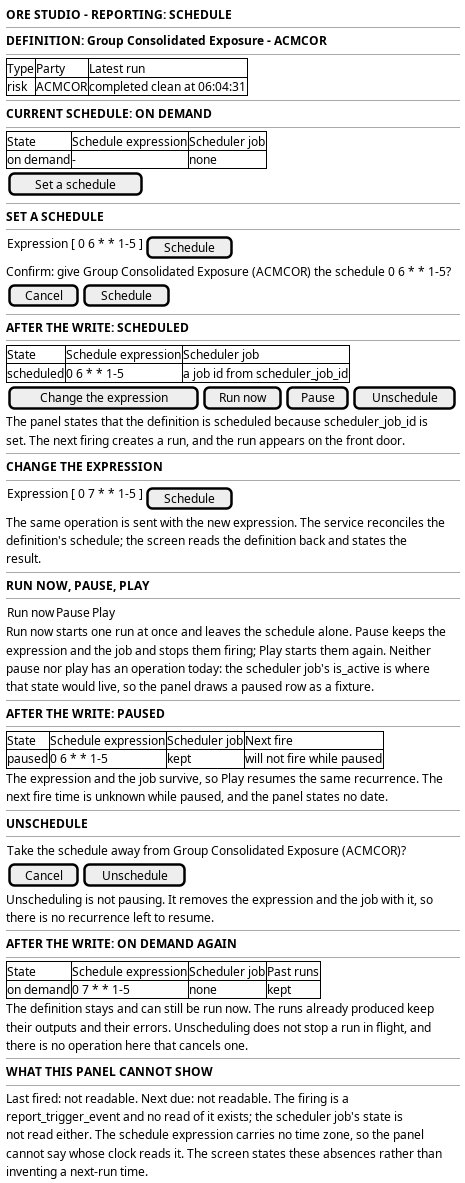
Figure 1: Choose when a report runs: the definition, its current expression, the schedule editor, and what the schedule does and does not cover.
5. Prototype
The prototype argues this journey in three interpretations, and its design note says what each argues and what is fake. This journey is the design intent for the schedule panel, and its
prototype belongs at
doc/prototypes/reporting/choose-when-a-report-runs/. The prototype must draw a
definition that is on-demand with no scheduler job; the confirmation that sets a
schedule; the same definition scheduled, with its expression and its job; the
change of an expression; the confirmation that runs the definition now; the
confirmation that pauses a schedule, and the same definition resumed; the
confirmation that unschedules; and the definition back on-demand with its past
runs still listed. It must draw Run now, Pause or Play, and Unschedule as three
separate actions, and it must show a paused definition as paused while its
expression stays readable. Pause and Play have no operation, so the prototype
draws them as a fixture and says so. It must also draw the panel's honest
statement that the next firing and the last firing are not readable, so the
prototype does not imply a next-run time.
6. Entities composed
| Entity | What it contributes | Model |
|---|---|---|
report_definition |
The definition whose recurrence changes: schedule_expression, scheduler_job_id, concurrency_policy and the party that owns it |
ores.reporting.report_definition |
report_instance |
The runs the schedule has already produced, which unscheduling leaves in place | ores.reporting.report_instance |
party |
The owner of the definition whose routine changes | ores.refdata.party |
The definition is the row this journey edits, and scheduler_job_id is how the
screen knows the definition has a schedule. The runs are the definition's
history, and they are not part of the schedule: unscheduling does not remove
them. The firing a schedule produces is a report_trigger_event, immutable and
written once; it is named here because it is what the screen would read to
answer "did the schedule fire", and no read serves it.
The paused state does not live on the definition. It lives in the scheduler job:
ores_scheduler_job_definitions_tbl carries is_active, and a paused schedule
would be a job whose is_active is false. The definition stores only the job's
identifier, so a screen that reads the definition alone reads a paused schedule
and a live one the same. The table is named here because it is where the state
belongs, and no operation in this journey reads or writes that column.
Every entity above carries party_id and is party-scoped by row-level security.
The definition and the run are bitemporal, so a schedule change is a new version
of the definition and the earlier version stays readable. The trigger event is
an immutable event.
7. Operations and messages
| Step | Operation | Subject | Status |
|---|---|---|---|
| Open the definition | Read the definition and its expression | reporting.v1.report_definitions.get |
exists |
| Open the definition | List the party's definitions | reporting.v1.report_definitions.list |
exists |
| Schedule | Give the definition a schedule | reporting.v1.ops.schedule_report_definitions |
exists |
| Schedule | Read the definition back after the write | reporting.v1.report_definitions.get |
exists |
| Change the time | Give the definition a new schedule | reporting.v1.ops.schedule_report_definitions |
exists |
| Run now | Start one run immediately, without touching the schedule | reporting.v1.ops.trigger_report_instance |
exists |
| Run now | Follow the run the trigger created | reporting.v1.report_instances.list |
exists |
| Pause | Stop the schedule firing and keep it | (no pause operation; the state would be the job's is_active) |
missing |
| Play | Start firing again on the same schedule | (no play operation; the state would be the job's is_active) |
missing |
| Unschedule | Take the schedule away | reporting.v1.ops.unschedule_report_definitions |
exists |
| Unschedule | Read the definition back after the write | reporting.v1.report_definitions.get |
exists |
| Read the past runs | List the runs the schedule already produced | reporting.v1.report_instances.list |
exists |
| Read the firing | Read when the schedule last fired, and what it triggered | (no read of report_trigger_event over NATS) |
missing |
| Read the scheduler job | Read the job's state or its next due time | (no scheduler read is named in this set) | missing |
| The screen itself | Read and change a schedule from the browser | (no BFF route) | missing |
Three operations are this journey's writes, and run now is one of them. The two
schedule operations are served by the reporting service, which asks the
scheduler to hold one job per definition. trigger_report_instance is served by
the same service: it applies the definition's concurrency policy, creates a
report_instance, and dispatches the execution workflow. The scheduler sends
that same operation when a job fires, so its caller is normally a service and
not a person. The definition read returns schedule_expression and
scheduler_job_id, so the screen can state whether a definition is scheduled
and what expression it carries. It cannot state the job's own state or its next
due time, because those belong to the scheduler and no operation here reads
them.
The permission that gates these operations is not uniform. The scheduling handler
checks a permission before it schedules or unschedules, so those two writes are
gated. The run-now handler checks none. It serves
reporting.v1.ops.trigger_report_instance and contains no permission test
anywhere, while its own documentation states that the caller's permission check
is what decides whether it may act in a tenant. Any authenticated caller can
therefore trigger a run today. The definition read is gated by
reporting::report_definitions:read. The tenant administrator holds
* and reaches all three. A role below the administrator has no stated code to
be granted for the schedule writes, and needs none at all for run now, which
What is missing records.
No BFF route serves this screen. The prototype adds one, for example
GET /api/reporting/reports/<definition-id>/schedule for the read,
PUT /api/reporting/reports/<definition-id>/schedule for the schedule and
unschedule writes, and POST /api/reporting/reports/<definition-id>/runs for
run now, which calls trigger_report_instance. The handler authenticates the
caller's token and checks the definition read and run write codes.
8. What is missing
- A route and a screen. No BFF route serves reporting, and nothing in the web application shows a report today. The schedule panel, its editor and its confirmations are new.
- The firing is stored and unreadable.
report_trigger_eventrecords every firing with its definition, its trigger type, its scheduler job and its time. There is no read of it over NATS. The screen can say a definition is scheduled, and it cannot say when the schedule last fired, whether it fired at all, or which run a firing produced. That is the central gap for a person who has set a schedule and is waiting for the first result. - No read of the scheduler job. The definition stores
scheduler_job_id, and no operation in this set reads the job behind it. The screen cannot show the job's state, its next due time or the scheduler's own view of the expression, so "every morning" is a promise the screen can only repeat, not verify. - No time zone.
report_definitionstates a cron expression and no time zone. A tenant whose morning is not the installation's morning cannot state which morning it means, and the screen cannot say whose clock the expression is read on. A time zone on the definition, or a stated installation default, is the missing field. - The write permission is not named, and run now is not gated at all. The two
schedule operations have no permission code in this journey's set.
TenantAdminandSuperAdminhold*and can call them; no role below the administrator can be granted the capability because there is no code to grant. A write code for the definition is the missing piece. Run now is worse than unnamed: its handler performs no permission test, so any authenticated caller can start a run. The handler's own documentation claims the caller's permission check decides, and no such check exists. - No pause and no play. The scheduler's job row carries
is_activeinores_scheduler_job_definitions_tbl, so the data can express a paused schedule, and nothing exposes it to a reporting screen.reporting.v1.ops.schedule_report_definitionsandreporting.v1.ops.unschedule_report_definitionsare the only two schedule operations, and neither setsis_active. A pause operation and a play operation are the missing pair, and a read of the flag is the missing read: without it the screen cannot tell a paused schedule from a live one, and Pause cannot be offered honestly. No subject is invented for them here. - Unscheduling is not pausing, and neither stops a run. Unschedule removes the expression and the scheduler job, so the definition has no recurrence left. Pause would keep both and stop only the firing. Neither action cancels a run in flight, and neither removes past runs or their archives. The screen states all of it. A person who needs a running report stopped has no action in this journey.
- No preview and no validation on the screen. The expression is validated by the service when the write arrives, and the screen does not evaluate it. A bad expression is refused by the service, and the screen shows the refusal. A next-firing preview would need the scheduler's own evaluation, which no read here provides.
9. Related journeys
- See the reports a party runs — the row that reads scheduled or on-demand, and the front door this journey starts from
- Run a report and watch it finish — the run a firing produces, and the manual alternative to a schedule
- Read what a run produced — the output the first scheduled run will leave
- Find out why a run went wrong — where a person goes when the schedule keeps producing a run carrying errors
10. Related knowledge
- Reporting journeys — the group this journey belongs to
- Report definition and schedule — the definition, the job held outside it, and the firing that becomes a run
- Report execution pipeline — what a firing then runs
- Report execution — the workflow a firing starts
- ores.reporting.report_definition — the row this journey changes
- ores.reporting.report_trigger_event — the firing the screen cannot read
- ores.reporting.report_trigger_type — scheduled and on-demand
- ores.reporting — the component
- Journey execution — how the screen composes its reads
- User Journeys — the index
11. See also
- User Journey Extraction Standard — the checklist this journey is written against
- Task: Extract the ores.reporting user journeys — the work that owns it
- The scheduler and reporting have no journeys — the capture this group answers
- UX — the standard the screen follows