User Journey: Find out why a run went wrong
Table of Contents
+#+updated: 2026-10-17 +#+startup: inlineimages
This page documents a user journey: A person opens one run's errors and places every one of them by scope and subject, down to the trade, the analytic or the curve the engine named.
A user journey describes what one person is trying to do, before anything is built. It is a design document that outlives any sprint, so it names the screens, the entity fields each screen shows, and the operations and messages each step needs.
1. Goal
"The numbers are wrong, or the run failed. Tell me which trade, which analytic and which curve." The person has a run whose answer they do not trust, and they want the run's own account of what went wrong. They want every error the run recorded, each one placed on the thing it names, and they want to see when two errors are about the same trade for two different reasons. The journey is done when the person can point at a trade, an analytic or a curve and say what the engine said about it.
This is the journey that carries the error model. Every row it shows is an event the run wrote, and the screen's job is to place the row, not to explain it.
2. Actor and trigger
Three actors read this screen. The engineer reads it to place a failure in the engine: which analytic, which curve, which trade. The market risk reader reads it because a number they must sign off is suspect, and needs to know whether the run's answer is complete. The tenant administrator reads it because a report they own has failed, and needs to know whether the cause is the report or the data behind it. All three read the same rows; the permissions decide who can.
The trigger is doubt. A run completed while carrying errors, a run failed, or a number does not look right and somebody follows the number back to the run. The person arrives from a health row on See the reports a party runs, from a terminal panel on Run a report and watch it finish, or from the output screen of Read what a run produced. The journey ends when every error row has a home, or when the person knows that some rows name nothing below the run.
This is a read-only journey. Errors are immutable, written once and never changed, and the screen creates nothing. A run's errors are read as a group, because one error rarely tells the story on its own.
3. Steps
- Open the run's errors. The person opens the errors from the run. The header
states the run, its definition, its state when it finished, when it completed
and when the errors were collected. An error carries
event_time, the instant the errors were collected from the run's output, and no actor: the run already names who asked for it. The screen shows the collection time once, in the header, and the rows share it. - Read the shape of the run before reading a row. The summary counts the
errors by severity and by scope. Severities are exactly
errorandwarning. Scopes are exactlyTrade,Analytics,Curve,ConfigurationandReport. The counts are the first diagnosis, because the same report produced two shapes. A clean run of it recorded eleven rows: eightAnalyticserrors and threeConfigurationwarnings. The run whose market data was removed recorded twenty: oneCurveerror, sixteenTradeerrors across eight trades and two analytics, twoAnalyticserrors and oneAnalyticswarning. The summary tells the person which shape they are looking at, and so which question to ask. - Read a row. Every row states a
severity, ascope_code, amessageand asubjectwith asubject_id. The message is the engine's own words, unaltered; the screen shows it as it is and does not translate it. The scope is the engine's own group name, and it says what kind of thing the error is about. The subject is the particular thing, and it names that thing in full or names none. A row never names half a subject: a subject without an id, or an id without a subject, is not a row the model admits. - Place the row by its subject. The subject is a discriminator and a value
because the ids are of different kinds. A trade's id is a UUID. A curve's id
is a free-text name, for example
[IndexCurve(GBP-SONIA,Yield/GBP/GBP1D)]. The pair is not a database foreign key: the engine names its own trades and curves, and neither is a key any table holds. The screen therefore treats the subject as a label and a value to copy and filter by, not as a link that always resolves. A person can ask for every error about one trade id, or one curve name, and the screen answers with the rows that carry it. - See one trade fail twice. This is the step the screen exists for. A trade
that will not build can fail in more than one analytic, and each failure is
its own row. Two rows then have the same scope,
Trade, the same subject andsubject_id, the same trade UUID, and the same message,Cannot build all required curves! Building failed for: ([IndexCurve(GBP-SONIA,Yield/GBP/GBP1D)]). Onlydetailtells them apart: one carries{"exceptionType": "Error building trade for context 'analytic/PRICING'"}, the other{"exceptionType": "Error building trade for context 'analytic/SA_CCR'"}. The screen must show the detail beside the message and must never de-duplicate rows by message, scope and subject. A list that collapsed them would report one error where the run recorded two, and it would hide the second analytic — which is the fact the engineer needs. - Follow the curve. The curve error is the root the trade errors point at. It
carries scope
Curve, severityerror, subjectcurve, the subject id[IndexCurve(GBP-SONIA,Yield/GBP/GBP1D)], and the messageyield curve building failed for curve(s) Yield/GBP/GBP1D on date 2026-10-15 while processing Yield/GBP/GBP1D. A person who filters by that curve name sees the curve row and the trade rows that name the same curve in their messages. The screen does not claim the trades caused the curve failure or the reverse; it shows that the engine said both. - Read the analytic row. An analytic error names the analytic as its subject,
for example
PRICING, with the messagePortfolio does not contain any built trades, context is 'analytic/PRICING'. A warning can name the application rather than a portfolio object, for example subject_idOREApp::run()with the messageError in ORE analytics: Failed to run analytics PRICING,SA_CCR. The two are both scopeAnalyticsand they are not the same kind of statement: one is about the analytic's portfolio, the other is the application's summary of the run. The subject and the severity separate them. - Read the configuration warning. A
Configurationwarning names an input that belongs to no one trade, for example subjectconfiguration, subject_idCounterparty, messageInput configuration was not provided. The default values will be used for all netting sets in the portfolio. It is a warning: the run continued with defaults, and a reader who signs the numbers off needs to know the defaults were used. The screen does not present it as a trade error because it names no trade. - Read the Report scope. Some failures happen before the engine sees the run.
The model states a scope of
Reportfor exactly that, because a run can fail for a reason no engine saw. AReportrow names no subject: the row names the run itself. The screen shows it at the top of the list, stated as an error about the run, and never as a row about an unnamed trade. - Understand what the rows can and cannot say. The rows place a failure; they do not explain it. The curve row says the curve would not build on a date, and it cannot say that the market data for that date was removed. The screen stops at what the engine said. A person who needs the cause follows the curve name to the market data that should have built it, or follows the run's step failure to the workflow, and both are outside this screen.
- Leave, or go on. The person opens the run's output to see what the archive does contain, or returns to the front door to see whether the next run cleared the errors. A failure that needs a reproduction continues in the compute journeys, where the job behind the run is followed.
4. Screens and wireframes
One screen. The run header, the summary by severity and scope, the subject filter, the row index and the expanded rows are panels of the same screen, because the person reads them as one answer. The screen is read-only: it creates nothing, changes nothing and destroys nothing.
The row index is deliberately redundant with the expanded rows: the index is how a person sees that two rows are identical except for their detail, and the expanded rows are how they read the detail. The wireframe draws the two Trade rows one after the other, with the same scope, subject, subject id and message, and different detail. That is the design rule this screen must not lose.
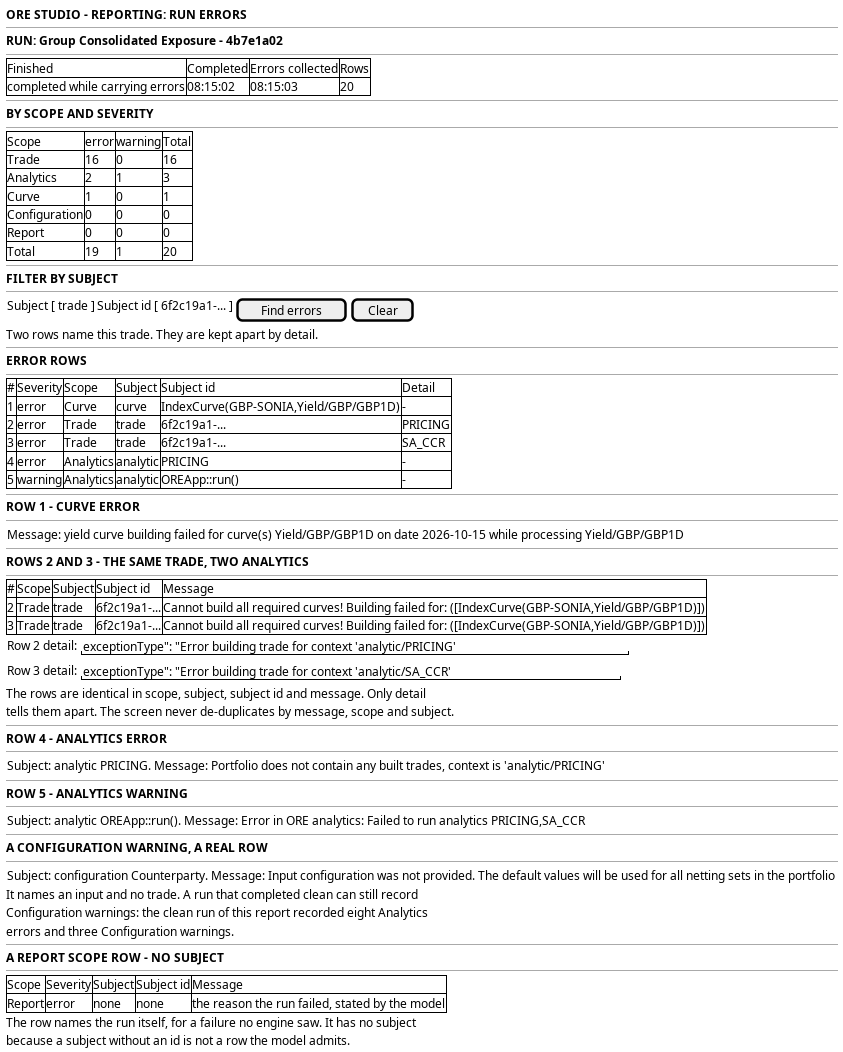
Figure 1: Find out why a run went wrong: the summary by scope, the row index, and two Trade rows that only detail tells apart.
5. Prototype
The prototype argues this journey in three interpretations, and its design note says what each argues and what is fake. This journey is the design intent for the run's error screen, and its
prototype belongs at
doc/prototypes/reporting/find-out-why-a-run-went-wrong/. The prototype must
draw a run whose market data was removed, with its twenty rows: one Curve
error, sixteen Trade errors across eight trades and two analytics, two
Analytics errors and one Analytics warning. It must draw the two Trade rows
with the same trade UUID and the same message and different detail, and make
the difference visible without opening a row. It must also draw a clean run that
still records eleven rows — eight Analytics errors and three Configuration
warnings — so that "carrying errors" is not mistaken for "failed", and a run
whose only rows are Report scope rows with no subject.
6. Entities composed
| Entity | What it contributes | Model |
|---|---|---|
report_error_event |
One error: severity, scope_code, message, subject, subject_id, detail, event_time and the run it belongs to |
ores.reporting.report_error_event |
report_error_scope |
The scope vocabulary the row's scope_code comes from, with the engine's own code for each |
ores.reporting.report_error_scope |
report_instance |
The run the errors belong to: its name, its state, its completed_at and its definition |
ores.reporting.report_instance |
report_definition |
The report whose run produced the errors, so a reader knows what was being computed | ores.reporting.report_definition |
party |
The owner of the run and its errors | ores.refdata.party |
The error is the row. Its report_instance_id is the run, and a run's errors
are the rows that name it: they are read as a group, never one error as the
answer. The scope is a lookup on scope_code, so the screen reads the scope
vocabulary once and labels every row from it. The subject is not a lookup and
not a foreign key: it is a discriminator and a value, and the screen keeps the
pair together.
Every entity above carries party_id and is party-scoped by row-level security.
The error event and the trigger event are immutable events; the error is written
once when the run's output is read, and it is never edited afterwards. The run
and the definition are bitemporal, so the definition the run used is the run's
own record even after the definition changes.
7. Operations and messages
| Step | Operation | Subject | Status |
|---|---|---|---|
| Open the errors | Read the run | reporting.v1.report_instances.get |
exists |
| Open the errors | List the run's errors as a group | reporting.v1.report_error_events.list_by_report_instance_id |
exists |
| Open the errors | List the errors the party holds | reporting.v1.report_error_events.list |
exists |
| Read a row | Read one error | reporting.v1.report_error_events.get |
exists |
| Read a row | Read many errors at once | reporting.v1.report_error_events.get_many |
exists |
| Read the scopes | List the scope vocabulary | reporting.v1.report_error_scopes.list |
exists |
| Read the scopes | Read one scope | reporting.v1.report_error_scopes.get |
exists |
| Read the scopes | Read many scopes at once | reporting.v1.report_error_scopes.get_many |
exists |
| Read the definition | Read the report behind the run | reporting.v1.report_definitions.get |
exists |
| Watch the errors | Learn that a run gained errors | reporting.v1.events.report_instances.updated |
exists |
| Watch the errors | Learn that an error row was written | (no event for report_error_event) |
missing |
| The failed step | Read why a run failed before the engine saw it | (no reporting read; the steps live in ores.workflow) |
missing |
| The screen itself | Read a run's errors from the browser | (no BFF route) | missing |
The error reads are generated from report_error_event, and the list by report
instance is the one this journey uses. The scopes are a simple lookup. Every read
is gated: reporting::report_error_events:read for the rows and
reporting::report_error_scopes:read for the vocabulary, with
reporting::report_instances:read for the run. The two error codes are held by
no role below TenantAdmin and SuperAdmin, which hold *.
The error model's own consequence is visible in the table. There is no read of
report_trigger_event, so the screen cannot say who triggered the run; the
run's trigger_id names the trigger event, and nothing resolves it. There is no
event for an error row, so a screen showing a finished run finds new errors only
by re-reading the list. And there is no read that says which workflow step
failed, so a Report row says the run failed and not where.
No BFF route serves this screen. The prototype adds one, for example
GET /api/reporting/runs/<run-id>/errors, which returns the rows with their
scope labels and the summary by severity and scope. The handler authenticates
the caller's token and checks the error read codes.
8. What is missing
- A route and a screen. No BFF route serves reporting, and nothing in the web application shows a report today. The errors screen, its summary and its subject filter are new.
- The error permissions sit too high.
reporting::report_error_events:readandreporting::report_error_scopes:readare held by no role belowTenantAdminandSuperAdmin, which hold*. The trading desk and the market risk reader can run a report and cannot read its errors, so this journey is closed to two of its three actors until a role below the tenant administrator is granted the read. This is the group's most important permission gap. - No aggregate read. The summary by severity and scope is computed from the rows. A run with twenty rows is fine; a screen that summarises errors across runs has no grouped read and would page every row to count it.
- No event for an error row. The model writes errors once, and there is no
report_error_eventchange event. A screen open on a running run cannot be told that errors arrived; it waits for the run's update and re-reads. That is acceptable for a run that writes its errors before finalisation, and it is not a general answer. - A trade id does not resolve to a trade. The error names a trade UUID, and the pair is deliberately not a database foreign key: the engine names its own trades, and no table here holds that key. The screen can copy and filter the id, and it cannot link to the trade. A resolver from the engine's trade id to the platform's trade is the missing piece, and it is not in this model.
- A curve id is free text.
[IndexCurve(GBP-SONIA,Yield/GBP/GBP1D)]is a name the engine writes, not a row this platform owns. The screen can filter by the exact string and cannot follow it to the market data curve that should have built it. The market data journey is where that link belongs. - No actor on the error, and no read of the actor on the run. The model is
right that an error carries no actor, because the run names who asked for it.
The run reaches that person through
trigger_id, and no read ofreport_trigger_eventexists. The screen therefore cannot show who triggered the failing run, which is the first question an operator asks. - A
Reportrow does not name the step. The model statesReportfor a failure no engine saw, and it names no subject. It does not say which workflow step failed. The steps live inores.workflowand no reporting read serves them, so the row says the run failed and not where. - The errors have no diagnosis. The engine's message is the engine's own words, and the platform holds no explanation of them. The screen must not invent a cause; the engineer reads the message and the detail, and follows the subject out of the screen.
9. Related journeys
- See the reports a party runs — the health row that says a run is carrying errors
- Run a report and watch it finish — the terminal panel that links here, and the run that may be rerun
- Read what a run produced — the archive that sits beside these errors
- Follow a job — the compute job behind a run that failed, followed from submission to output
- Choose when a report runs — the next scheduled run, which may clear the errors
10. Related knowledge
- Reporting journeys — the group this journey belongs to
- ores.reporting.report_error_event — the error row, its fields and why the subject is not a key
- ores.reporting.report_error_scope — the five scope codes and where each one places an error
- Report definition and schedule — the run the errors belong to
- Report execution pipeline — the phases a run walks before its errors are read
- Report execution orchestration — the workflow whose step failure a
Reportrow cannot name - Risk Reporting — the analytics the engine was asked to run
- ores.reporting — the component
- Market data — the curves a Curve error points at, and the journeys that read them
- Journey execution — how the screen composes its reads
- User Journeys — the index
11. See also
- User Journey Extraction Standard — the checklist this journey is written against
- Task: Extract the ores.reporting user journeys — the work that owns it
- Sample bundle smoke test — the report an engineer runs to isolate the machinery from the analytics
- UX — the standard the screen follows