User Journey: Read what a run produced
Table of Contents
+#+updated: 2026-10-17
This page documents a user journey: A person opens one finished run and reads what it produced: the system's output message, the engine's output archive, the exported ORE package, and the errors that came with it.
A user journey describes what one person is trying to do, before anything is built. It is a design document that outlives any sprint, so it names the screens, the entity fields each screen shows, and the operations and messages each step needs.
1. Goal
"What did this run actually produce?" The person has a run in front of them, usually the latest one of a report they care about, and wants the file or the package that came out of it. They want to know where the engine's output landed, what the system said when the run ended, and what else the run left behind. The journey is done when they can take the output away, or say why there is no output to take.
The person is not asking what the numbers mean. Reading the CSV artefacts is reading a report; this journey is about the run's own products: the archive, the package the engine read, and the record of what the run said.
2. Actor and trigger
The trading desk and the market risk function read this journey. The desk takes the output of a Headline Position run to a meeting, and the market risk function takes the same output for sign-off and for the file it keeps. Both act inside their party, and they arrive from a run's row on See the reports a party runs or from the run page of Run a report and watch it finish.
The trigger is a run that has finished, or a person asking whether it has produced anything yet. The journey starts when the person opens the run's outputs and ends when they have the archive, or the package, or the reason neither exists.
This is a read-only journey. It downloads what the run already wrote; it does not run, rerun or edit anything.
3. Steps
- Open the run. The person opens the run from its row, or the screen opens it after a run completes. The header states the run's name, the definition it came from, its kind, its state, and when it started and completed. A person who has just finished Run a report and watch it finish arrives with the run already in front of them.
- Read what the system said. The run carries an
output_message, the system's own sentence about the run. A completed run states exactlyReport execution completed.The screen shows that sentence as it is, and it does not paraphrase it into a friendlier one. The message is the run's whole account of itself when nothing went wrong, and it is the first thing a person reads when they ask what happened. - Read where the output is. A completed run carries an
output_storage_key, the storage key of its output archive, of the formreporting/runs/<instance-id>/output.tar.gz. The screen shows the key and offers the archive. The key is the answer to "where did it land": it names the run's own directory in storage, so a person can quote it, find it with a storage tool, or hand it to another reader. The screen does not pretend to list the files inside the archive, because nothing lists them — see What is missing. - Drill down from the run's figures to one trade. The run's figures are an
aggregate: one NPV for the run, or one per book. Beneath them the screen
shows the per-trade table, one row per trade, because the run produced that
detail: the engine writes
npv.csvinto the run's archive, and its columns areTradeId,TradeType,Maturity,MaturityTime,NPV,NpvCurrency,NPV(Base),BaseCurrency,Notional,NotionalCurrency,Notional(Base),NettingSetandCounterParty. Each row states that trade's NPV, its base-currency NPV, its notional and its counterparty. Opening a row shows that trade's result, and, where the run recorded an error against the trade, that error. A trade in the result is the trading trade with that id, so a row leads to the trade itself:trading.v1.trades.getis what resolves the id to the trade. Nothing parses the archive yet, so no screen can serve these rows as data — see What is missing. - Read the results by book. A run's results have a third reading beside the
aggregate figures and the one-row-per-trade table: the book tree. The tree has
four levels. A portfolio is the top level. A portfolio nests under another
portfolio, so a sub-portfolio is a level of its own. A book hangs off a
portfolio. A trade is booked to a book, so the trade is the bottom level.
The person opens the tree of the run's portfolios and books, sees each node's
name, its trade count and its aggregate NPV, and expands a level to read the
books inside it. Each node aggregates what sits below it: a book's figure is
the sum of its trades, and a portfolio's figure is the sum of its books.
Selecting a node filters the per-trade table to that subtree, so a person
drills from the group portfolio to a book and then to one row. A trade that is
booked to no book is a real state, and the tree shows it. That trade has no
book_idonores_trading_trade_bookings_tbl, so it cannot sit under a book, and the screen draws it as an unbooked node rather than dropping it. The hierarchy is the schema's.ores_refdata_portfolios_tblcarriesparent_portfolio_id, so portfolios nest.ores_refdata_books_tblcarriesparent_portfolio_id, so a book hangs off a portfolio.ores_trading_trade_bookings_tblcarriestrade_idandbook_id, so a trade is booked to a book. The tree on the prototype is a fixture, for two reasons the journey states in What is missing: the archive carries no book column, and no operation returns the run's results grouped by book. The screen also plots these numbers, and the plot is chosen to fit the analytic that produced them: NPV by book is horizontal bars, sorted and drawn from a zero rule; Delta and Gamma by book are that same bar form in two charts, because a Greek is a different unit from an NPV; the change against a previous run is a signed bar chart of its own; and the run's NPV across the runs of the same definition is a line, with the current run and the baseline marked, which is what makes the comparison legible. The screen has a plot vocabulary wider than bars and lines — a donut for one whole in few parts, stacked bars for several wholes each split the same way, grouped bars for two series over the same categories, and a scatter for two measures against each other — and it states the rule that chooses between them, so a later screen applies the same rule rather than guessing: each book's share of the run and the run's problems by scope are donuts, Delta against Gamma is grouped bars, and a book's Gamma against its Delta is a scatter. Selecting a node of the book tree narrows the bars to that subtree exactly as it narrows the table. Every plot states its title, its unit, a text alternative and a one-line reason for its form, and keeps its exact numbers in the table beside it. A figure that is not a magnitude to compare — positions priced, books, counterparties — is a table answer, and the screen draws no plot of it. - Read the errors that came with the output. Output and errors are not alternatives. A run that completed while carrying errors produced its archive and recorded its errors, and a reader who takes the archive must know what the run said was wrong. The outputs screen therefore carries the error summary: the count, the severities and the scopes. A reader who wants the detail follows Find out why a run went wrong. The archive is still the answer to "what did this run produce", and the errors are the answer to "what is missing from it".
Read a partial result. A run can complete, write its archive, and still not hold the whole answer. The engine may fail to build some trades, so
npv.csvcarries no row for them and every total read from that file leaves them out. A configured analytic may skip positions it could price, so those positions carry an NPV and no Delta. Both facts are rows of the run, read byreporting.v1.report_error_events.list_by_report_instance_id, and both are already recorded before the person opens the screen. The screen must say so before the numbers are trusted, and not in a panel a person may close.- A banner above the results states that the results are partial and why: how many trades the engine could not build, how many positions carry an NPV and no Delta, and that the totals below exclude them. The banner names the count of error rows and offers the way to see them, the same way the summary of a completed run that carries errors does.
- The aggregate figures keep their number and carry a marker and a footnote. The figure is not hidden and not replaced: a person who needs the total gets it, and a person who would take it for the whole answer is told otherwise on the figure itself.
- A plot of a partial result is marked too. A bar or a point drawn from a
figure the errors left incomplete carries the same
partialmarker the figure carries, is drawn dashed or hollow, and its caption names what the figure excludes. A plot never presents a floor as the whole answer. - A book whose trades include a failed one is marked, and it states that its figure excludes the failed trades. A portfolio above it states that it inherits the exclusion, because its figure is the sum of its books and it must not include a book that lost trades in silence.
- The per-trade table draws each failed trade as a row with its
TradeId, itsTradeType, itsNotionaland itsCounterParty, withNPVandNPV(Base)empty, and with anerrortag. Opening the row shows the error the run recorded. A trade the engine could not build writes no row intonpv.csv, so its price cells are empty by nature and not by omission, and the screen says so.
A completed run whose totals are incomplete is the ordinary case this step exists for. The message
Report execution completed.is true and says nothing about it.- Read the exported ORE package. Pre-processing produces the engine's input,
and the step that prepares it is
ore.v1.ops.prepare_ore_package. The package is the engine's input, and it is what a person would run locally to reproduce the output. The screen states the package the run produced and offers it where the run has one. A run whose definition substitutes pre-processing resolves a prepared input instead, and the package it resubmits is named by the definition'sprepared_input_key. The two are different objects, and the screen says which one this run used. - A run still in flight. Output does not exist until retrieval. The run's
output_storage_keyis set only once the run's results have been retrieved, so a running run states that no output is available yet and that the panel will fill when the run completes. It does not draw an empty archive, which would read as a run that produced nothing. - A run that failed. A failed run has no archive and no package to hand over. The screen says there is nothing to take, states that the run failed, and sends the reader to the run's errors. The empty answer is explained, not dressed as an empty folder.
- Compare the run with a previous run. A run's figures answer what the
books were worth; they do not answer what changed. The person chooses a
previous completed run of the same definition on the result panel, or turns
the comparison off. The panel names the baseline by its run instance id and
its start time, and never by a report number. Each aggregate figure, each
book row, each tree node and the total row then carries its change and its
percentage against that run. Both sides are the actual figures of two runs and
the change is subtraction: no figure is multiplied by a constant to stand in
for another run, because a per-metric multiplier moves every book by the same
percentage and the change is then fiction. A stress scenario is not a run of
this report, and yesterday's official close belongs to a different run, so
neither is offered as a baseline. When either run in the comparison carried
errors, the change is partial: a total over the trades that survived cannot be
compared as if it were the whole answer. The badge carries a
partialmarker and the screen says so once in words, with what the current run's errors leave out. The book tree's selected node drives both sides, so selecting a book compares that book across the two runs. Reading an earlier run's figures needs the same parsed result the current run needs, so the comparison waits on the same missing read twice;reporting.v1.report_instances.listis the existing read that finds the earlier runs of the definition. - Take it away, or leave. The person copies the storage key, downloads the archive through the route the screen provides, or follows the error screen. The run remains the record: its outputs do not expire with the screen, and a person who comes back later reads the same key.
4. Screens and wireframes
One screen. The run header, the output panel, the errors summary and the ORE package panel are panels of that screen, because they are one answer: what this run produced and what it said about it. The screen is read-only: it creates nothing, changes nothing and destroys nothing.
The outputs panel is deliberately thin. It names the archive, offers it, and says that its contents are not listed, because no operation lists them. The wireframe shows the three states a person meets: a completed run with an archive, a run in flight with no output yet, and a failed run with nothing to take.
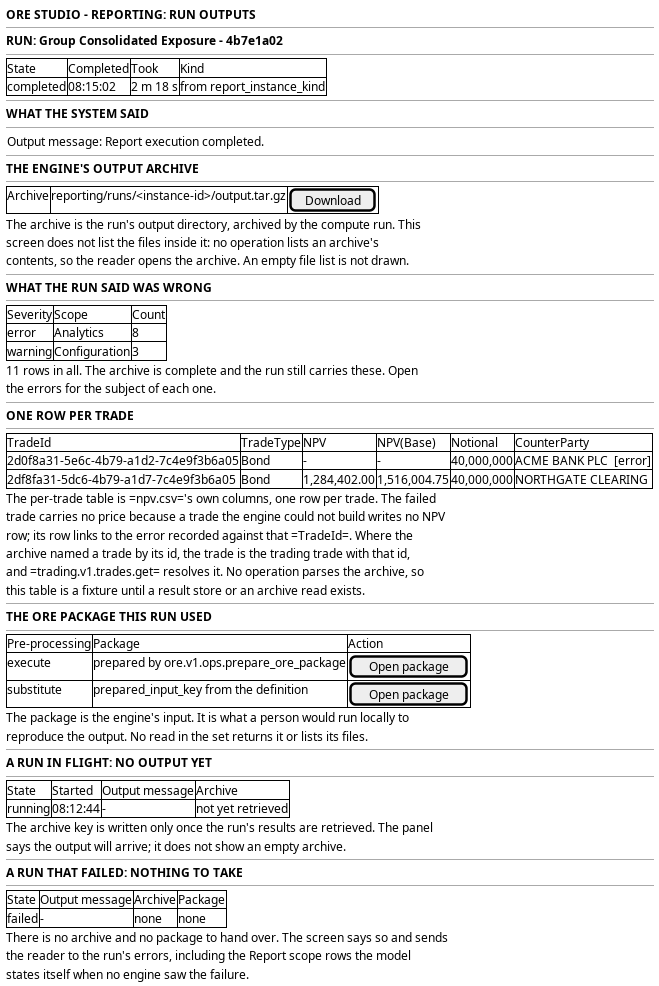
Figure 1: Read what a run produced: the output message, the archive's storage key, the exported ORE package, and the states where there is nothing to take.
The book tree sits with the figures and the per-trade rows, because it is a third reading of the same result. It draws the run's portfolios and books with a trade count and an aggregate NPV at each node, an unbooked node for the trades that have no booking, and a selected node that filters the per-trade rows to its subtree.
The result panel also carries the comparison: the control that chooses a previous
run of the definition, the change badge under each figure, the change columns on
the book tree and the by-book table, and the total row. The plots sit under the
book tree and above the by-book table they take their numbers from: bars for NPV,
for Delta and for Gamma across the books in view, a signed bar chart of the change
when the comparison is on, and a line of NPV across the runs of the definition
with the current run and the baseline marked. A plot whose figure the errors left
partial carries the same partial marking the figure carries, with its caption
naming what the figure excludes, because a bar of a floor must not read as a bar
of the whole answer. When either side of the
comparison carried errors the badge and the panel mark every change as partial,
because a change between one incomplete figure and one complete figure is not the
change the two runs would show.
5. Prototype
The prototype argues this journey in three interpretations, and its design note says what each argues and what is fake. This journey is the design intent for the run's outputs screen, and
its prototype belongs at doc/prototypes/reporting/read-what-a-run-produced/.
The prototype must draw a completed run with an archive and a package; a
completed run carrying errors, where the archive and the error summary sit
together; a run in flight with no output yet; and a failed run with nothing to
take. It must also draw the archive panel without a file list, and say in the
panel why the list is absent. It must draw the drill-down too: the run's figures
as an aggregate with the per-trade table under them, one row per trade, and the
error a row carries where the run recorded one against that trade. Because no
operation parses the archive, the prototype labels the rows a fixture on the
panel that draws them. It must draw the book tree in all three interpretations,
in each one's own shape: the run's portfolios and books with a trade count and an
aggregate NPV at each node, an unbooked node for the trades with no booking, and
a selected node that filters the per-trade rows. Because the archive carries no
book column and no operation returns a result grouped by book, the prototype
labels the tree a fixture and says on the panel how a built screen would join it.
It must draw the partial case too, in all three interpretations: a completed run
whose results carry errors, with the banner above the figures, the marker and the
footnote on the figures, the marked books and portfolios, and the row of every
trade the engine could not build. Because a person must be able to find that case
on purpose, the prototype selects it by a fixture chip and by ?scenario on the
URL. It must draw the comparison too, on the result panel: a control that chooses
a previous completed run of the same definition or no comparison, every aggregate
figure, book row, tree node and the total row carrying its change and percentage
against that run, the baseline named by its instance id and start time, and the
partial marking on the change when either side carried errors. The page opens
with the previous run chosen and ?baseline=none turns the comparison off.
Because an earlier run's
figures need the same parsed result the current run needs, the changes are a
fixture like the figures, and the panel says so.
6. Entities composed
| Entity | What it contributes | Model |
|---|---|---|
report_instance |
The run: state, completed_at, output_message and output_storage_key |
ores.reporting.report_instance |
report_definition |
The definition behind the run: its name, its schedule, and the prepared_input_key a substituting run resolves |
ores.reporting.report_definition |
report_instance_kind |
The kind of run, so a reader knows what this run set out to do | ores.reporting.report_instance_kind |
report_error_event |
The errors the run recorded beside its output: severity, scope and message | ores.reporting.report_error_event |
report_error_scope |
The vocabulary that names what each error is about | ores.reporting.report_error_scope |
party |
The owner of the run and the archive | ores.refdata.party |
The run is the row and the archive is its output_storage_key. The package is
not a column: it is the object the pre-processing step prepared, and the screen
reaches it through the definition's prepared_input_key when the run
substituted pre-processing. The errors are rows of the run, read as a group,
and the summary counts them by severity and by scope.
Every entity above carries party_id and is party-scoped by row-level security.
The run and the definition are bitemporal, so the name and the definition the
run started with are the run's own; editing the definition today does not rename
the output of a run from last week.
7. Operations and messages
| Step | Operation | Subject | Status |
|---|---|---|---|
| Open the run | Read the run | reporting.v1.report_instances.get |
exists |
| Open the run | Read the run's definition | reporting.v1.report_definitions.get |
exists |
| Open the run | Read the kind of run | reporting.v1.report_instance_kinds.get |
exists |
| Read the output location | Read the archive key the run recorded | carried by reporting.v1.report_instances.get |
exists |
| Drill down to one trade | Read a run's per-trade results | (no operation parses the archive) | missing |
| Drill down to one trade | Read the trade a result row names | trading.v1.trades.get |
exists |
| Read the results by book | List the run's portfolios | refdata.v1.portfolios.list |
exists |
| Read the results by book | Read one portfolio, and its parent_portfolio_id |
refdata.v1.portfolios.get |
exists |
| Read the results by book | Read many portfolios | refdata.v1.portfolios.get_many |
exists |
| Read the results by book | List the books under a portfolio | refdata.v1.books.list_by_parent_portfolio_id |
exists |
| Read the results by book | List the books | refdata.v1.books.list |
exists |
| Read the results by book | Read one book, and its parent_portfolio_id |
refdata.v1.books.get |
exists |
| Read the results by book | Read many books | refdata.v1.books.get_many |
exists |
| Read the results by book | List the trades' bookings, and so each trade's book_id |
trading.v1.trade_bookings.list |
exists |
| Read the results by book | Read one booking | trading.v1.trade_bookings.get |
exists |
| Read the results by book | Read many bookings | trading.v1.trade_bookings.get_many |
exists |
| Read the results by book | List the trades that were booked | trading.v1.trades.list |
exists |
| Read the results by book | List the runs of a definition, to reach the run | reporting.v1.report_instances.list |
exists |
| Read the results by book | Read a run's results already grouped by book | (no operation returns results grouped by book) | missing |
| Read the results by book | List the portfolios under a portfolio in one read | (no refdata.v1.portfolios.list_by_parent_portfolio_id; the tree is assembled from portfolios.list) |
missing |
| Read the errors | List the run's errors | reporting.v1.report_error_events.list_by_report_instance_id |
exists |
| Read a partial result | Read the errors that make a completed run's results partial | reporting.v1.report_error_events.list_by_report_instance_id |
exists |
| Read a partial result | Read the per-trade rows, to draw the trades that carry no price | (no operation parses the archive) | missing |
| Compare with a previous run | List the earlier completed runs of the same definition | reporting.v1.report_instances.list |
exists |
| Compare with a previous run | Read the baseline run's figures, book rows and total | (no operation parses the archive) | missing |
| Read the errors | Read one error | reporting.v1.report_error_events.get |
exists |
| Read the errors | Read the scope vocabulary | reporting.v1.report_error_scopes.list |
exists |
| Read the package | Prepare the ORE package the engine reads | ore.v1.ops.prepare_ore_package |
exists |
| Watch for output | Learn that the run completed and its output landed | reporting.v1.events.report_instances.updated |
exists |
| Take the archive | List the files inside the run's archive | (no operation lists an archive's contents) | missing |
| Take the archive | Read or stream the archive's bytes | (no reporting operation serves the archive) | missing |
| Take the package | Read the exported ORE package, or list its files | (no operation in the set returns it) | missing |
| The screen itself | Read a run's outputs from the browser | (no BFF route) | missing |
The output message and the storage key are fields of the run, so the read that
opens the run already answers "where did it land". A per-trade result names a
TradeId, and the trade with that id is trading's trade, so
trading.v1.trades.get resolves the row to the trade itself. The per-trade read
is the one that is missing: ores_compute_results_tbl carries the archive's
output_uri, its outcome and its error_message, and it carries no parsed
rows. No operation parses the archive. The errors are a list by
report instance. The package is an operation of the ORE component, and no
reporting read returns it. The archive's own bytes are behind storage, not
reporting: the run names the key and the screen needs a route that can fetch the
object it names.
The book tree is assembled from reads that exist: refdata.v1.portfolios.list
for the portfolios and their parent_portfolio_id,
refdata.v1.books.list_by_parent_portfolio_id for the books under a portfolio,
and trading.v1.trade_bookings.list for each trade's book_id. The two that do
not exist are the read of a result grouped by book and
portfolios.list_by_parent_portfolio_id, and both are in What is missing.
The comparison adds one existing read and no new one: report_instances.list
returns the runs of a definition, and the baseline is the earlier completed one
among them. Reading the baseline's figures needs the parsed result this journey
already needs, so a comparison is one read the platform has and two parsed
results it does not.
The reads are gated by reporting::report_instances:read and
reporting::report_definitions:read, and the errors by
reporting::report_error_events:read and reporting::report_error_scopes:read.
The error codes are held by no role below TenantAdmin and SuperAdmin.
No BFF route serves this screen. The prototype adds one, for example
GET /api/reporting/runs/<run-id>/outputs, which returns the run's output
message, its storage key, the package it used and the error summary, and a
second route that streams the archive by its key. The handler authenticates the
caller's token and checks the read codes above.
8. What is missing
- A route and a screen. No BFF route serves reporting, and nothing in the web application shows a report today. The run's outputs screen is new.
- No file list for the archive. The run names one archive,
reporting/runs/<instance-id>/output.tar.gz, and no operation lists the files inside it. A person who wants one CSV must download the archive and open it. A read of the archive's entries is the missing piece, and the screen states the absence rather than showing an empty list. - No read of the archive itself. Reporting states the key; no reporting operation returns the bytes. The download is a BFF and storage concern, and it is not designed here. The screen can quote the key today and cannot hand the object over without that route.
- No read of the exported ORE package.
ore.v1.ops.prepare_ore_packageis the step that prepares the package, and no operation in the set returns it or lists its contents. A person who wants to reproduce the run locally has the same problem as with the output archive: they need the object, and the journey can only name where it came from. - No operation parses the archive. Per-trade results are real: the engine
writes
npv.csvinto the run's archive, one row per trade with its NPV, its base-currency NPV, its notional and its counterparty. What is missing is the read.ores_compute_results_tblholds the run'soutput_uri, itsoutcomeand itserror_message: it points at the archive and carries no parsed rows. No operation parsesreporting/runs/<instance-id>/output.tar.gz, and none serves the rows inside it, so trade-level results need a result store or an archive read before a screen can serve them. The result store that would ingest the archive is designed on Report post-processing and is not built, so there are no report rows to query and "what did this run produce" is still answered by an archive rather than by a table. The prototype draws the per-trade table as a stated fixture for that reason. - No read returns a result grouped by book. The run's archive carries no book
column.
npv.csv's columns are exactlyTradeId,TradeType,Maturity,MaturityTime,NPV,NpvCurrency,NPV(Base),BaseCurrency,Notional,NotionalCurrency,Notional(Base),NettingSetandCounterParty, so a row of the file names a trade and never a book. Attributing a result to a book needs the join fromTradeIdtotrade_bookings.book_id, throughtrading.v1.trade_bookings.list, and no operation returns results already grouped by book. The booking is real and stored; the grouped read is the missing piece. The book tree therefore needs the per-trade read above and this join before a screen can serve it, and the prototype draws every node's trade count and NPV as a fixture. - No
portfolios.list_by_parent_portfolio_id. Portfolios nest throughparent_portfolio_idonores_refdata_portfolios_tbl, and there is no read that returns the portfolios under a portfolio. A client assembles the portfolio tree fromrefdata.v1.portfolios.list, which carriesparent_portfolio_id, and pays for it with a full list of the party's portfolios per level.refdata.v1.books.list_by_parent_portfolio_idexists for books, so the book level needs no such workaround; the portfolio level does. - The run does not name the job that produced the archive.
report_instancecarries no batch or workunit id, so the screen cannot link this output to the compute job whoseoutput_uriit came from. The key is on the run; the lineage to the grid is not. - The error permissions sit too high.
reporting::report_error_events:readandreporting::report_error_scopes:readare held by no role belowTenantAdminandSuperAdmin, which hold*. A trading desk can open the archive and cannot read the errors that say what is missing from it, which is the one warning the outputs screen exists to give. - The package a substituting run used is named on the definition, not the
run. A run that resolves a prepared input leaves the definition to state
prepared_input_key, and a later edit to the definition changes what the screen reports for an earlier run. The definition keeps its history, and the run does not name the version of the definition it used, so the screen has no key to the prepared input the run actually read. - No artefacts page, and no icon to open it with. The screen offers an
Artefactslink beside each package, the input package and the output archive, because the package is a container of files and a reader who wants to look inside it expects to leave the screen for somewhere that lists them. Two things are missing behind that link. There is no artefacts page and no route serves one, so the link is the requirement on the platform rather than a working destination. And the icon set carries no box, package or archive glyph: the sixty-eight Fluent icons in the application have a folder and nothing nearer, so the prototype draws a folder and the catalogue needs a package icon before the real screen can use a fitting one.
9. Related journeys
- See the reports a party runs — the front door that leads to a run's row
- Run a report and watch it finish — the run that produced this output, and the terminal panel it lands on
- Find out why a run went wrong — the errors that sit beside the archive when a run completed carrying them
- Choose when a report runs — the schedule that will produce the next run's output
10. Related knowledge
- Reporting journeys — the group this journey belongs to
- Report execution pipeline — retrieval and post-processing, the phases that produce and record the output
- Report post-processing — what reading the archive will become
- ORE output formats — what each file of the output holds, column by column
- Report pre-processing — the phase that produces the input package
- Report compute handoff — the result the archive arrives through
- Report execution substitution — why a run may resolve a prepared input instead of preparing one
- Report pages — what each report's output is meant to be
- Sample bundle smoke test — a report whose output is the engine's archive and nothing more
- ores.reporting — the component
- Journey execution — how the screen composes its reads
- User Journeys — the index
11. See also
- User Journey Extraction Standard — the checklist this journey is written against
- Task: Extract the ores.reporting user journeys — the work that owns it
- Headline Position — the report whose output a desk takes away
- UX — the standard the screen follows