User Journey: See the reports a party runs
Table of Contents
This page documents a user journey: A person opens reporting and reads every report definition their party owns, with the health of each one's latest run, and can tell a clean run from one carrying errors without opening it.
A user journey describes what one person is trying to do, before anything is built. It is a design document that outlives any sprint, so it names the screens, the entity fields each screen shows, and the operations and messages each step needs.
1. Goal
"Which reports does my party run, and how did each one last go?" The person opens one screen and gets one row per report definition their party owns. Each row answers four questions: what the report is called, when it runs, how its latest run ended, and, when that run carries errors, how many. The journey is done when every row has a health word the person can act on, including the row of a report that has never run at all.
The question is the front door of the group. A person arrives without an identifier, so the screen must answer it from the party alone. Every other journey in this group starts from a row this screen draws.
2. Actor and trigger
Three actors read the same screen: the trading desk, the market risk function and the tenant administrator. They read the same activity over different visible sets, and the sets are the permissions and the row-level policy, not three screens. A trading desk reads the definitions of the party it works in, a market risk reader reads the same rows for sign-off, and a tenant administrator reads every party of their tenant because the administrator holds the tenant's permissions in full. For a party user the session supplies the party and every row is party-scoped by row-level security; a tenant administrator's rows span the tenant's parties, so the table adds a party column and the filter can narrow to one.
The trigger is a routine question with a deadline. A trading desk opens it at the start of the day, before the first number is quoted. A market risk reader opens it for sign-off, after the overnight runs should have finished. A tenant administrator opens it when a person reports that a report did not run, or when the same report fails twice. The journey begins when the person opens the reporting area and ends when they have read the health of every row they came for.
This is a read-only monitoring journey. It creates nothing, changes nothing and destroys nothing. It reads the definitions, the runs, the runs' errors and the error scopes, and it subscribes to the run events so a row that finishes while the screen is open updates itself.
3. Steps
- Open the reporting area. The person opens reporting. The system shows one screen: a header that names the party, a summary that counts the definitions by health, and a table with one row per definition the party owns. The header states the party code, for example ACMCOR, so a reader who works in more than one party knows which one they are reading; a tenant administrator's header names the tenant, and the rows carry their party. A party that owns no definition is stated as such, not shown as an empty table with no explanation.
- Read the rows. Each row states the definition's name, its report type, the
schedule expression it carries, when its latest run started, and its health.
Every seeded definition is of type
risk, and one type is registered:risk, the full ORE risk analytics run. The names are the seed's thirty-one: Group Consolidated Exposure, Large Exposures, Liquidity Coverage, Headline Position, SA-CCR Exposure, Intraday Risk Monitor and the rest. A definition with a schedule expression is scheduled; one the party runs by hand is on-demand. The row states which, because the two answer different expectations: a scheduled report that has not run by now is late, and an on-demand report that has not run is waiting for a person. - Read the health of the latest run. The health column is one of five words.
The screen derives it from the definition's latest run, never from the
definition's own state, because a definition can be perfectly healthy while
its last run failed.
- Never run: the definition has no run. The row says so, and it does not read as clean, because nothing ran and nothing was checked.
- Running: a run exists, it has started, and it has not completed. The row prefers running over any earlier attempt's result: a person asking how the report last went means the run in flight, not the last one that finished.
- Completed clean: the latest run completed and recorded no error.
- Completed while carrying errors: the latest run completed and recorded at least one error. This is normal and expected: the engine finished, wrote its report, and said in its own log that a trade would not build. The report still succeeded, and the health word says so rather than turning the row red as a failure.
- Failed: the latest run failed and has no output to read.
- Tell a run carrying errors from a clean one without opening it. The health
word alone is not enough: completed while carrying errors is long, and two
completed rows must separate at a glance. The errors cell therefore carries
the count and the worst severity, for example 20 errors, and the row is
drawn in the warning tone while a clean completed row is drawn in the normal
tone. Severities are
errorandwarning, and a run can carry both. The count comes from the run's error rows, and the row states it without the person opening the run. - Compare the latest runs. A completed row states when the run started and when it completed, so a reader can see that the overnight run took longer than yesterday's, or that the run the desk asked for at 08:10 has already finished. A failed row states when it failed. A never run row states nothing in the time columns, and that absence is the answer: the report has not run, so there is no time to show.
- Order the list by the question. The list orders by name by default, which is how a person looks a known report up. The health filter puts the rows a reader came for at the top: Failed, then Completed while carrying errors, then Running, then Never run, then Completed clean. A reader who asks "what is broken" reads four rows instead of forty, and a reader who asks "what is clean" reads the same list the other way round.
- Watch the screen while runs finish. Runs are happening while the person
reads. The screen subscribes to the run events,
createdandupdated, so a run that starts or finishes changes its row's health and times in place. The person does not refresh to see the overnight run land. A row whose definition is unknown to the subscription is not silently dropped; the screen reads the definitions it owns and applies the events to the rows it holds. - A row that finished while carrying errors. The person opens the run to read why. The health word is a door, not a verdict: the row carries the run's errors, and the error screen gives the scope, the subject and the engine's message. That is Find out why a run went wrong, and it is the journey a row with errors leads to.
- Leave, or go on. The person runs a report, reads what a run produced, or changes when one runs next. The three writing and reading journeys are the rows' own actions: Run a report and watch it finish, Read what a run produced and Choose when a report runs. A person with no permission to write sees the read-only rows and no action that would be refused after they press it.
4. Screens and wireframes
One screen. The party header, the summary counts, the health filter and the definition table are panels of that screen, because the person reads them as one answer. The screen is read-only: it creates nothing, changes nothing and destroys nothing. The table is the whole answer, and a row carries its health word, its error count and its times so that no row needs opening to be understood.
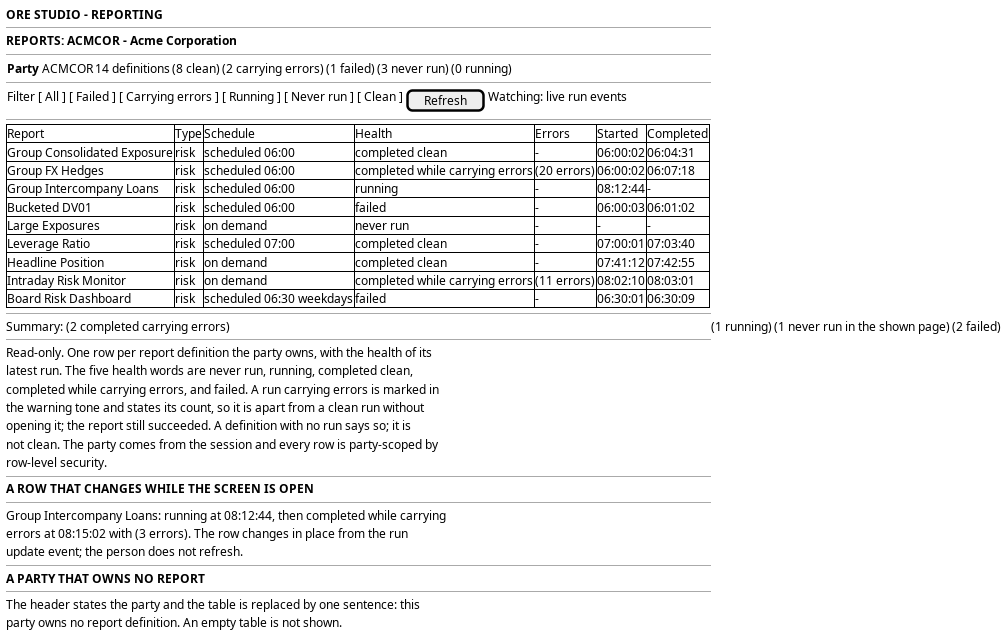
Figure 1: See the reports a party runs: every definition the party owns, the health of its latest run, and a run carrying errors marked apart from a clean one.
5. Prototype
The prototype argues this journey in three interpretations, and its design note says what each argues and what is fake. This journey is the design intent for the reporting front door, and
its prototype belongs at doc/prototypes/reporting/see-the-reports-a-party-runs/.
The prototype must draw five states, one per health word, in one table so the
five can be compared side by side: a definition that has never run, one whose
run is in flight, one completed with no errors, one completed carrying errors
with the count and the warning tone, and one failed. It must also draw the
empty party, the health filter with the rows ordered by health, and a row that
changes from running to completed while carrying errors while the page is
open.
6. Entities composed
| Entity | What it contributes | Model |
|---|---|---|
report_definition |
The row: name, report type, schedule expression, scheduler job, and the run configuration the definition carries | ores.reporting.report_definition |
report_instance |
The latest run of the definition: state, output_message, output_storage_key, started_at and completed_at |
ores.reporting.report_instance |
report_error_event |
The errors the latest run recorded: severity, scope, message and subject | ores.reporting.report_error_event |
report_error_scope |
The scope vocabulary that names what an error is about | ores.reporting.report_error_scope |
report_instance_kind |
The kind of run the latest run is, so a person knows it is a full run rather than one that stopped early | ores.reporting.report_instance_kind |
party |
The owner of every row: the party code and name in the header, and the party each definition and run carries | ores.refdata.party |
The definition is the row and the run is the health. The latest run is the run
with the greatest started_at among the runs whose definition_id is the
definition's id; a definition with no such run is never run. The error count
is the number of report_error_event rows whose report_instance_id is that
run's id. Neither is a stored field: the screen derives both, and What is
missing states the read that would spare it the join.
party_id is on every one of these entities and every read is party-scoped by
row-level security. The screen does not filter by party in the browser: the
policy serves the rows, a party user sees their own party, and a tenant
administrator sees the tenant's parties named in the party column. The
definition and the run are
bitemporal, so a definition edited today still states the name the earlier run
carried; the row shows the current definition and the run's own name, and the
two can differ.
7. Operations and messages
| Step | Operation | Subject | Status |
|---|---|---|---|
| Open the screen | List the report definitions of the party | reporting.v1.report_definitions.list |
exists |
| Open the screen | Read one definition | reporting.v1.report_definitions.get |
exists |
| Read the health | List the runs of the party | reporting.v1.report_instances.list |
exists |
| Read the health | Read one run | reporting.v1.report_instances.get |
exists |
| Read the health | Read many runs at once by their ids | reporting.v1.report_instances.get_many |
exists |
| Read the error count | List the errors of a run | reporting.v1.report_error_events.list_by_report_instance_id |
exists |
| Read the error count | Read one error | reporting.v1.report_error_events.get |
exists |
| Read the error count | Read the scope vocabulary | reporting.v1.report_error_scopes.list |
exists |
| Read the run's kind | Read the kinds a run can carry | reporting.v1.report_instance_kinds.list |
exists |
| Watch the screen | Learn that a run was created | reporting.v1.events.report_instances.created |
exists |
| Watch the screen | Learn that a run changed | reporting.v1.events.report_instances.updated |
exists |
| Read the schedule firing | Learn when a schedule last fired | (no read of report_trigger_event over NATS) |
missing |
| The screen itself | Read the definitions and their latest runs in one answer | (no BFF route) | missing |
The reads are the reporting service's generated operations, and each is gated
by a permission. The definition read checks
reporting::report_definitions:read, the run read checks
reporting::report_instances:read, and the error read checks
reporting::report_error_events:read. The error reads are held by no role
below TenantAdmin and SuperAdmin, so a trading desk that can see a row
carrying errors cannot read the errors behind it until a role below those two is
granted the read. That is a permission gap, not a screen design.
The run events are the canonical change events for report_instance, and they
carry the subject and the key. The screen uses them to refresh a row; it does
not poll. No event exists for report_error_event, so a run that gains errors
without changing state is caught by the run's own update or by the next read.
No BFF route serves this screen. The prototype adds one, for example
GET /api/reporting/reports, which reads the definitions, the latest run of
each and the error counts, and returns the five health words already derived.
The handler authenticates the caller's token and checks the read codes above,
and the row-level policy narrows every read to the session's party.
8. What is missing
- A route and a screen. No BFF route serves reporting, and nothing in the web application shows a report today. The screen, its summary and its health filter are all new.
- No read returns a definition with its latest run. The definitions and the runs are two lists, and the latest run of each definition is a join the screen performs. A read of definitions with their latest run, and the count of that run's errors, would make the front door one answer instead of three.
- No read counts errors for a set of runs. The screen reads one run's errors at a time. A definition list of forty rows is forty error reads after the run list, and a run carrying twenty errors is twenty rows. A count per run, or a grouped count by scope, is the missing read.
- The schedule's firing is stored and unreadable.
report_trigger_eventrecords a firing with its trigger type, its scheduler job and its time, and there is no read of it over NATS. The screen can say a definition is scheduled, and it cannot say when the schedule last fired or whether it fired at all. A read of the trigger events would close that, and What is missing on Choose when a report runs states the same gap from the scheduling end. - The error permissions sit too high.
reporting::report_error_events:readandreporting::report_error_scopes:readare held by no role belowTenantAdminandSuperAdmin, which hold*. A trading desk or a market risk reader can run a report and cannot read why it failed. Either the screen hides the error count from them, which defeats the point of the health words, or a role below the tenant administrator is granted the read. - A run that did not execute has no health word. The five words cover a run that is in flight, one that completed, and one that failed. A run that was recorded and then did not execute fits none of them, and the screen must not call it failed when nothing failed or clean when nothing ran. The mapping is undecided, and the definition's state machine is the authority the screen needs.
- The definition carries no cycle and no audience. A definition states its
report type and its schedule expression. The cycle a report serves is
intradayoreod, and its audience is one oftrading-desk,market-risk,engineerorrelease check, and both of those live on the report page. The list cannot filter by either, so a reader who wants the day'seodreports narrows the list by hand. - The latest run is a convention, not a read. "The latest run" is the run
with the greatest
started_at, and the screen derives it. A run with nostarted_at, or two runs that started in the same second, has no stored tie-break. The definition's run list needs an order the screen can rely on, or the read needs to state the latest run itself.
9. Related journeys
- Run a report and watch it finish — the action on a row: trigger one definition now and follow the run
- Read what a run produced — what the latest run left behind, opened from the run's row
- Find out why a run went wrong — a row carrying errors, read down to the trade, the analytic or the curve
- Choose when a report runs — the schedule expression the row shows, changed by an administrator
10. Related knowledge
- Reporting journeys — the group this journey opens
- Report definition and schedule — the definition, the instance and the states between them
- Report execution pipeline — the phases a run walks
- Report pages — the cycle, audience and frequency of each report
- Risk Reporting — the catalogue the seeded names come from
- ores.reporting.report_error_event — the error row the count is taken from
- ores.reporting.report_error_scope — the scope vocabulary
- ores.reporting — the component
- Journey execution — how a screen of this group composes its reads
- User Journeys — the index
11. See also
- User Journey Extraction Standard — the checklist this journey is written against
- Task: Extract the ores.reporting user journeys — the work that owns it
- Headline Position — the report a trading desk and the market risk function read first
- Sample bundle smoke test — the report an engineer reads to prove the machinery
- UX — the standard the screen follows