Tenant provisioning
Table of Contents
Tenant provisioning creates a tenant from a starting point and brings it to a working state. The caller chooses the starting point, describes the tenant and its administrator, and confirms; the request creates the tenant and its administrator at once and opens a workflow instance for the work that follows. When the workflow instance finishes, the tenant holds its administrator, its reference data and its parties, and the workflow instance rests in a terminal state. A step that fails stops the workflow instance and keeps every completed step, so a person retries from the failed step or discards the tenant.
1. Purpose
Tenant provisioning turns a chosen starting point into a live tenant. The request creates the tenant and its administrator before it answers, and the workflow instance performs the operations the starting point orders: it publishes a bundle, imports the legal-entity hierarchy, provisions every party the tenant holds, and completes the tenant. When the workflow instance reaches its terminal state, the tenant is ready with its administrator, its reference data and its parties, and a client can hand the tenant over to that administrator. The workflow instance is the platform's record of the work, so any client observes the outcome without the caller keeping state of its own.
2. Participants
The caller chooses the starting point, describes the tenant and its administrator, and confirms. The process manager owns the workflow instance: it builds the step list from the definition, dispatches one step at a time, records each outcome, and moves the workflow instance to its terminal state. The definition declares the workflow type, the ordered steps, and the failure policy the workflow follows. The component owning the operations performs the work each step names and reports the step's outcome. The store holds the workflow instance, its steps, and their results and errors, so any reader follows it. The client follows the workflow instance through the progress read and renders one line per operation.
| Participant | Kind | Responsibility |
|---|---|---|
| Caller | role | Chooses the starting point, describes the tenant and its administrator, and confirms |
| Process manager | component | Builds the step list, dispatches each step, records each outcome, and completes the workflow instance |
| Definition | declaration | Declares the workflow type, the ordered steps, and the failure policy |
| Component owning the operations | component | Performs the work each step names and reports the step's outcome |
| Store | store | Holds the workflow instance, its steps, their results and errors |
| Client | component | Follows the workflow instance through the progress read and renders one line per operation |
3. Messages
The workflow exchanges the messages below, in the order it exchanges them. Each message carries a subject and an objective; the fields a message carries are drawn beside this page rather than listed here.
| Message | Subject | Objective |
|---|---|---|
| Provision request | iam.v1.ops.provision_tenant |
Creates the tenant and its administrator, validates the starting point and its parameters, and opens the workflow instance |
| Provision answer | the reply to the request | Reports the tenant, its administrator, and the workflow instance the caller follows |
| Start message | workflow.v1.ops.start_workflow |
Opens the workflow instance with the workflow type, the tenant, the request payload, the correlation identifier and the instance identifier |
| Step command | iam.v1.ops.provision_tenant_step |
Dispatches one operation to the component that performs it |
| Step completion | workflow.v1.ops.step_completed |
Reports the step's outcome: success with a result, success with warnings, or failure |
| Progress read | workflow.v1.ops.get_workflow_steps |
Returns the workflow instance's status and one summary per step |
| Retry action | workflow.v1.ops.retry_workflow_instance |
Resumes a stopped workflow instance from its failed step |
| Discard action | iam.v1.ops.reset_tenant |
Discards the tenant and stops the workflow instance the tenant owns |
The fields of the provision request and its answer:
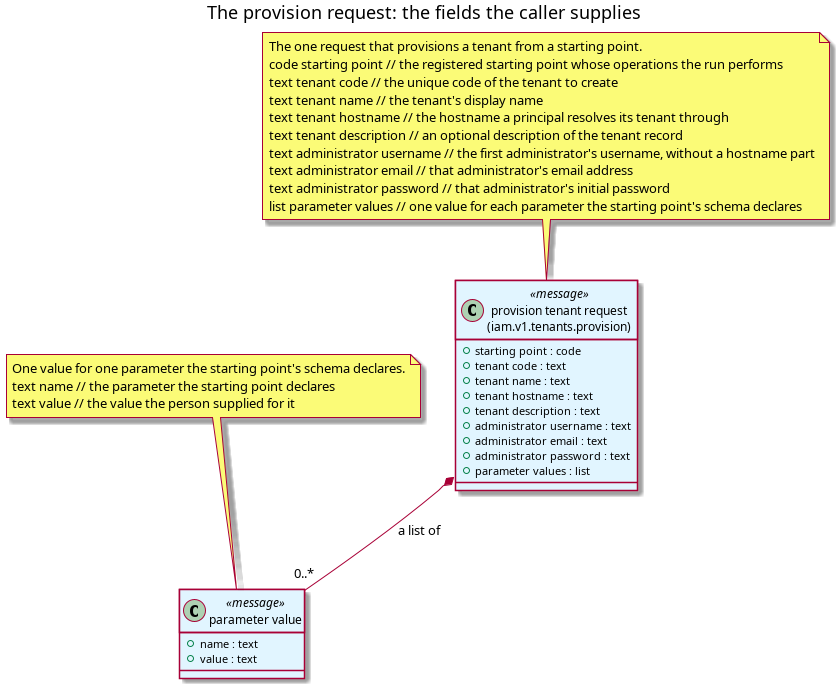
Figure 1: The fields a provision request carries: the starting point that fixes the operations the workflow instance performs and the parameter schema its form is built from, the tenant's own details, the administrator's details, and one value for each parameter the schema declares.
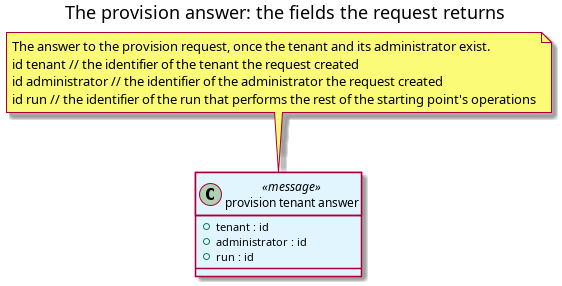
Figure 2: The fields a provision answer returns: the identifier of the tenant the request created, the identifier of the administrator it created, and the identifier of the workflow instance that performs the rest of the starting point's operations.
The fields of the start message:
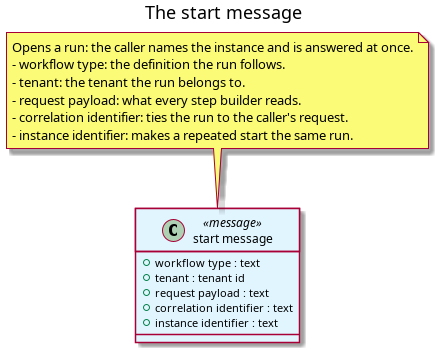
Figure 3: The fields a start message carries: the workflow type, the tenant, the request payload, the correlation identifier and the instance identifier.
The fields of the step command and of the completion a handler reports:
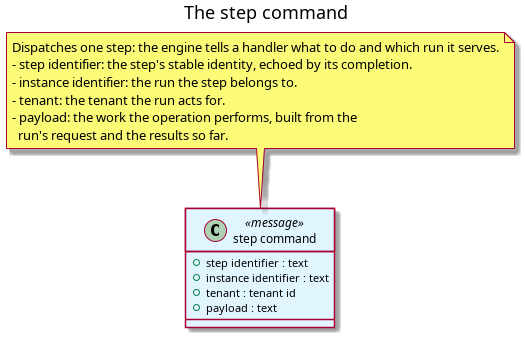
Figure 4: The fields a step command carries: the step identifier, the instance identifier, the tenant, and the payload the operation performs.
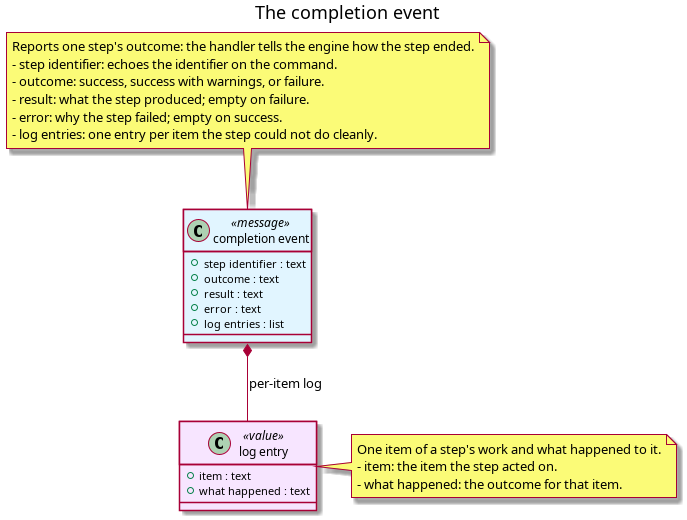
Figure 5: The fields a step completion carries: the step identifier it echoes, the outcome, the result, the error, and one log entry per item the step could not do cleanly.
The fields of the progress read and of the retry action:
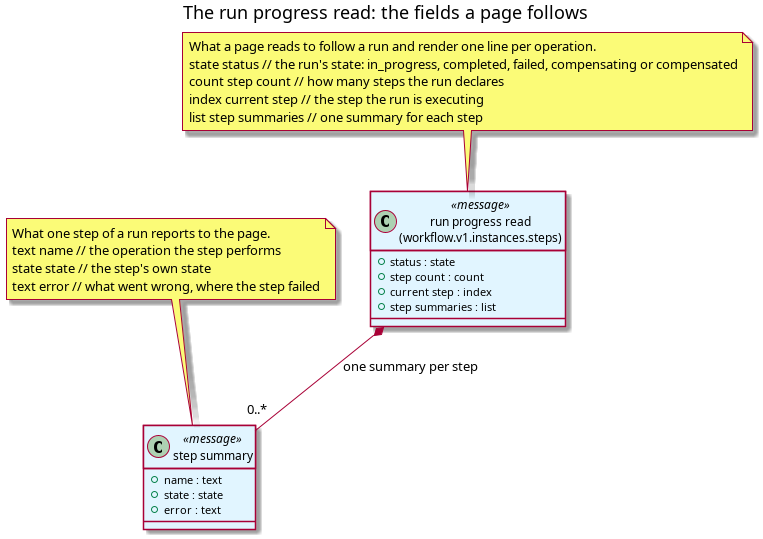
Figure 6: The fields a progress read returns: the workflow instance's status, the number of steps it declares, the step it is executing, and one summary per step naming the operation, the step's state and its error.
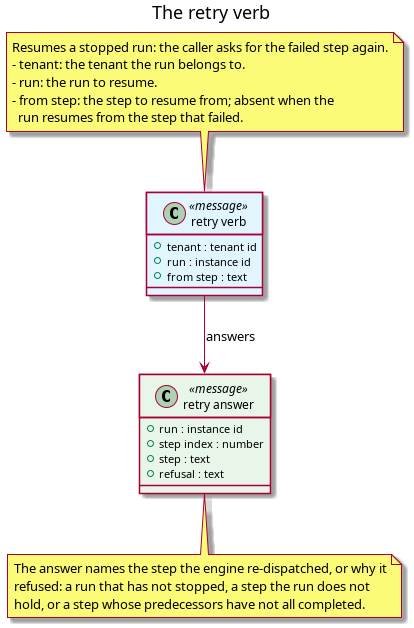
Figure 7: The fields a retry action carries: the tenant, the workflow instance to resume, and the step to resume from.
4. Steps
The workflow runs the step kinds a starting point orders, in the order that starting point states, and it appends the completing operation last. Every step kind shares one failure rule: a failure stops the workflow instance on that step, keeps every completed step and its result, and waits for a retry.
| Operation | Produces | On failure |
|---|---|---|
| Publishing a bundle | The reference data the bundle gathers, published into the tenant | Stops the workflow instance; every completed step is kept; a retry resumes from this step |
| Importing a legal-entity hierarchy | The legal entities a root LEI anchors, with their relationships | Stops the workflow instance; every completed step is kept; a retry resumes from this step |
| Provisioning a party | One party, with the reference data its bundle holds, once per party the tenant has | Stops the workflow instance; every completed step is kept; a retry resumes from this step |
| Loading staff | The tenant's staff accounts and their parties | Stops the workflow instance; every completed step is kept; a retry resumes from this step |
| Attaching images | The images the tenant's records display | Stops the workflow instance; every completed step is kept; a retry resumes from this step |
| Starting market feeds | The tenant's market data feeds | Stops the workflow instance; every completed step is kept; a retry resumes from this step |
| Completing the tenant | The tenant in its ready state, and the workflow instance's final step | Stops the workflow instance; the tenant stays unready until a retry completes the step |
5. Interaction
The diagram below draws the whole workflow: the caller confirming the provision request, the request creating the tenant and its administrator and opening the workflow instance, the process manager dispatching each operation the starting point orders, the client following the workflow instance through the progress read, and the two terminal actions, retry and discard.
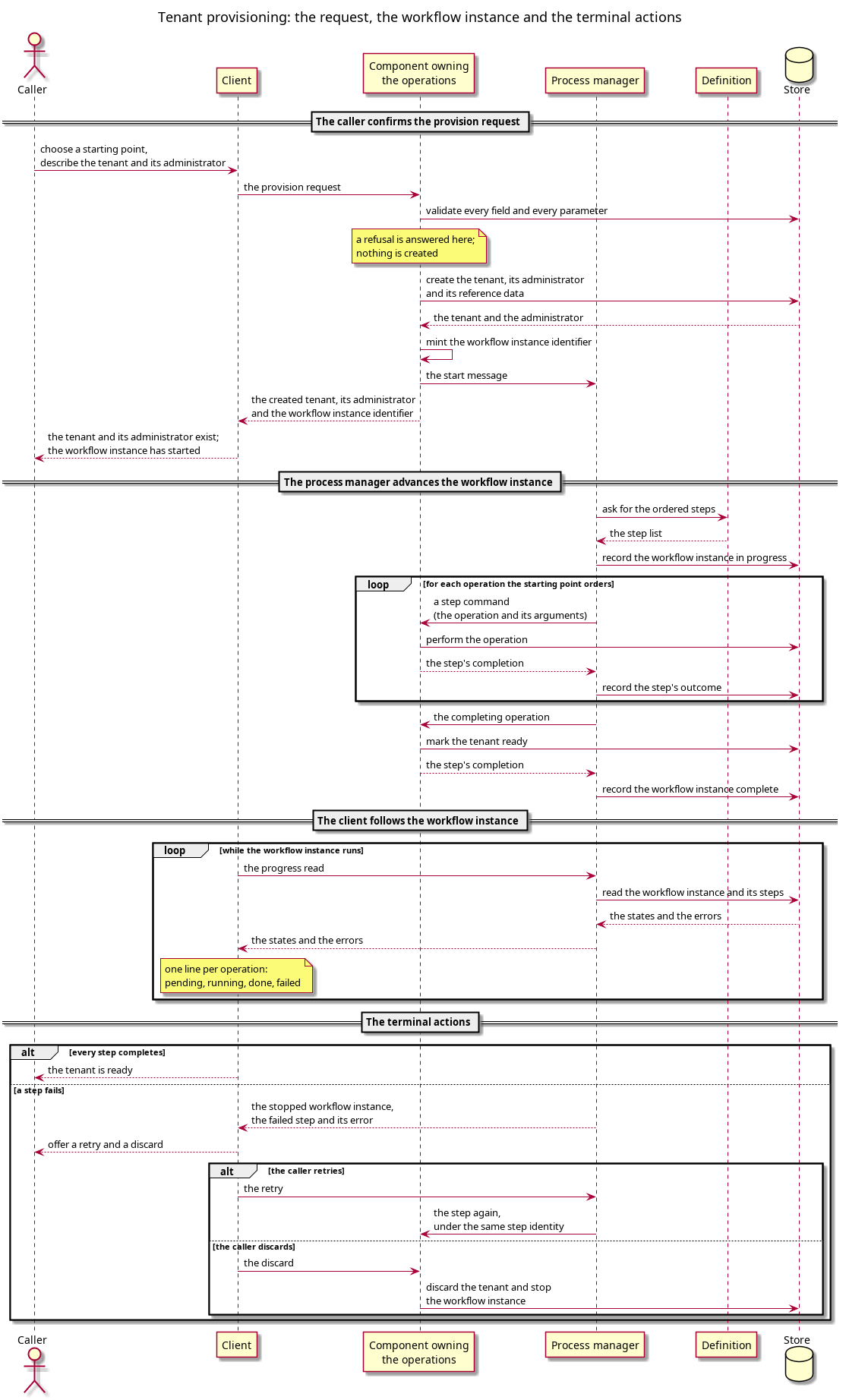
Figure 8: Tenant provisioning: the caller confirms the provision request, the request creates the tenant and its administrator and opens the workflow instance, the process manager dispatches each operation the starting point orders, the client follows the workflow instance through the progress read, and the workflow instance ends on a retry or a discard.
Source: tenant_provisioning_interaction.puml. Regenerate with
plantuml -tpng doc/knowledge/workflows/tenant_provisioning_interaction.puml.
6. Failure and recovery
Tenant provisioning declares the stop-and-retry failure policy. Its completed steps are published reference data and parties that a person expects to keep, and every step is idempotent, so a retry is cheaper and safer than a rollback of work that already succeeded.
A retry resumes from the failed step. The retry re-dispatches that step under its stable identity and clears the workflow instance's error, so the work that succeeded is not repeated. The retry reads the workflow instance's persisted record: every completed step keeps its result, and the failed step keeps its position and its error. A caller may name the step to resume from, and a workflow instance that has stopped resumes from the step that failed when the caller names none.
Discarding a tenant is a separate action from a retry. Discard removes the tenant and stops the workflow instance the tenant owns, so no workflow instance keeps running behind a discarded tenant.
7. Progress
A client follows the workflow instance through a read that returns the workflow instance's status, the number of steps it declares, the step it is executing, and one summary per step naming the operation, the step's state and its error. The read exposes the workflow instance states pending, in progress, completed and failed, and the step states pending, running, done and failed. The client renders one line per operation, so the rail shows every step as the workflow instance advances. A failed step carries its error until a retry resumes it, and a completed workflow instance shows every step done.
8. Patterns used
- Saga is not used: provisioning declares stop-and-retry rather than compensation, because its completed steps are published data.
- Process Manager — the engine runs the provisioning plan's steps.
- Idempotent Receiver — every step is idempotent, so a retry is safe.
9. Related
- The workflow definition — how a definition declares these steps, how it is registered, and what a change to it does to a run in progress.
- Provisioning operations and the plan — the starting point as registered data, and the step kinds this workflow orders.
- The tenant provisioning journey — the same path as an interaction diagram, from the setup screen to the terminal actions.
- The step protocol — what a step command carries and what a handler reports to complete a step.
- The workflow instance and step states — the states this workflow's workflow instance and steps occupy.
- Failure, compensation and retry — the failure policy contract, and why provisioning declares stop-and-retry.
- Waiting, deadlines and cancellation — how an operation that takes minutes waits, and where its budget belongs.
- Workflows — the structure note for the workflow cluster this page belongs to.
- Workflow pages — the inventory of the platform's workflows.
- New tenant — the journey a system administrator takes to provision a tenant.
- First run — the journey that provisions the first tenant.
- Document type: workflow — the contract this page follows.
- Story: Implement the setup journeys in ores.web — the story that commissioned this workflow.
- Task: Add the generic provision request — the task that added the request this workflow answers.
- Task: Define the tenant provisioning workflow — the task that defines this workflow.
- Investigation: The provisioning architecture — the investigation that decided the shape this workflow follows.
10. See also
- PlantUML sequence diagrams — the notation the interaction diagram uses.
- NATS core publish/subscribe — the transport the workflow's messages travel on.
- NATS JetStream — the durable subscription a step completion arrives under.