Business Centres
Table of Contents
This chapter examines the business centre as a
reference-data entity in ORE Studio. Business centres are identified by
the FpML businessCenterScheme code list; the chapter sets out that
standard, the role a business centre plays in identifying a holiday
calendar, and the complete lifecycle of managing business centre
records — viewing, editing, deleting, and auditing them — through the
Qt interface.
1. Overview
The chapter advances the argument that managing a business centre well means first understanding what it identifies, then the interface that governs its lifecycle. It begins by establishing the identity of a business centre in The FpML business centre scheme, which sets out the 4-character codes that name a business centre and the coding-scheme scoping that governs their uniqueness; this is the premise the rest of the chapter builds on. From there it surveys the body of records in The Business Centres window, explaining the list view, paging, and reloading, before narrowing to a single record in Business Centre Details and its General and Provenance tabs. It then turns to changing a record under audit — Editing, Deleting, and Business centre history — culminating in reverting to an earlier version, the point at which the bitemporal audit trail does its work. Finally the Conclusion draws these steps together and names what is deliberately still missing.
2. The FpML business centre scheme
A business centre is a 4-character code drawn from the FpML
businessCenterScheme coding scheme1:
either the real geographical location whose calendar governs a bad
business day (USNY for New York, GBLO for London), or an
FpML-format rate-publication calendar code used for fixing-day
offsets. The scheme's own description is precise about the
distinction: the geographical codes are "implicitly locatable and
used for identifying a bad business day for the purpose of payment
and rate calculation day adjustments", while the rate-publication
codes "are used in the context of the fixing day offsets" — two
different jobs sharing the same 4-character code shape.
3. The Business Centres window
Open the Business Centres window from the Reference Data menu. It lists all business centres defined in the tenant, one row per centre, each row carrying the code, source, description, city, coding scheme, country (with its flag), version, last modifier, and when the record was last recorded.
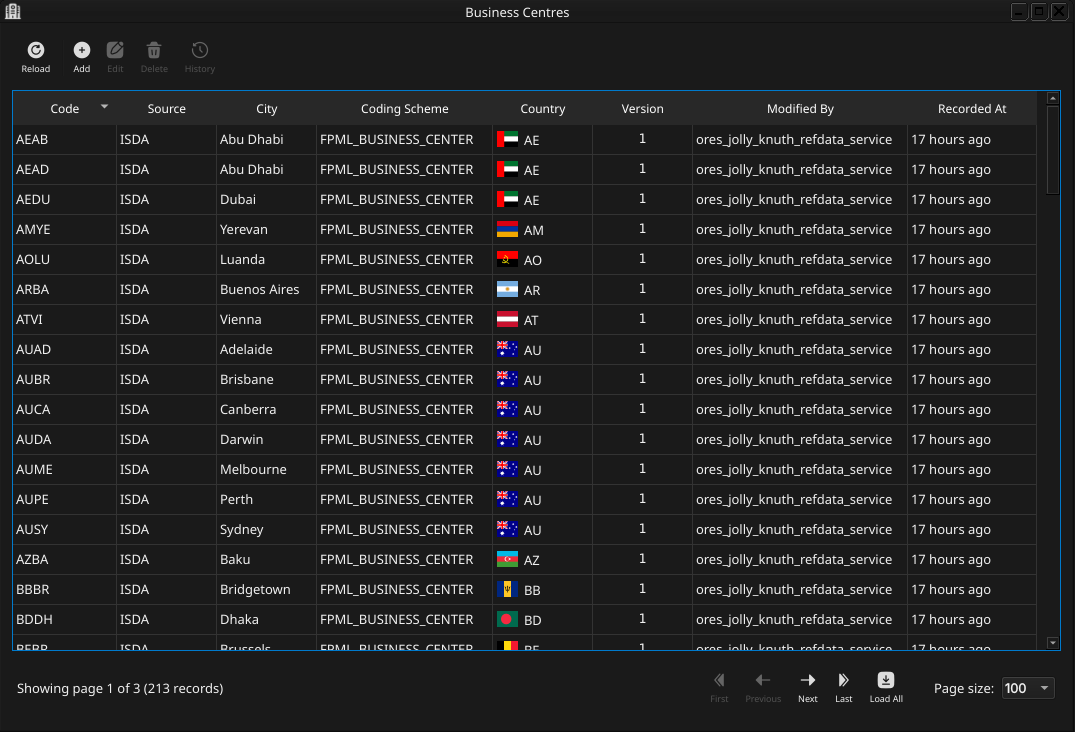
Figure 1: The Business Centres window, showing a page of business centres imported from the FpML reference data. Each row shows the code, source, city, coding scheme, country flag, version, last modifier, and when the record was last recorded; the status bar shows the current page and total record count.
The list is paginated; use the page controls at the bottom right to navigate the full set of business centres. The toolbar buttons reload the list and open the add, edit, delete, and history actions.
Double-clicking a row opens the Business Centre Details dialog.
4. Business Centre Details
The Business Centre Details dialog has two tabs — General and Provenance. The three action buttons at the bottom — Delete, Close, and Save — apply to the business centre as a whole.
4.1. General
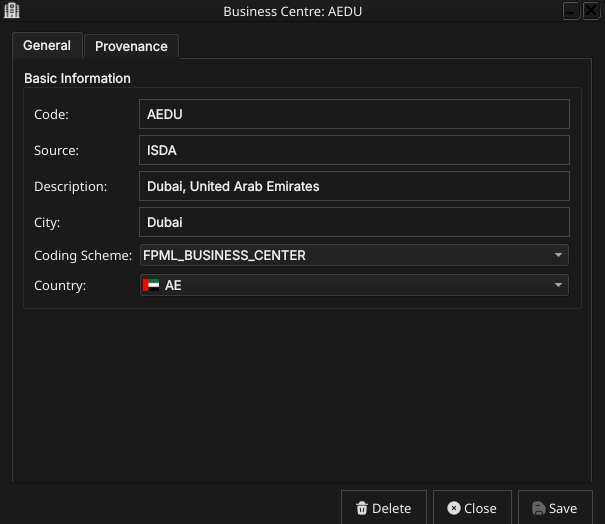
Figure 2: The General tab for business centre AEDU (Dubai), showing its code, source, description, city, the populated Coding Scheme combo, and the flagged Country combo.
The General tab carries the core identity of the business centre:
- Code — the FpML business centre code (e.g.
USNY). This is the primary key and cannot be changed after creation. - Source — the data source identifier (e.g. FpML, ISDA, Internal for platform-seeded centres).
- Description — a short human-readable description of the centre.
- City — the city name, derived from the description for centres imported from the FpML reference data.
- Coding Scheme — the coding scheme this centre's code belongs to,
chosen from a combo populated with every coding scheme known to the
system (e.g.
FPML_BUSINESS_CENTER,NONE). A value is required — the server rejects a save with no coding scheme selected. - Country — an optional link to a country, chosen from a flagged combo. Selecting a country renders its flag both in this combo and in the Country column of the list window.
4.2. Provenance
The Provenance tab is read-only and shows the audit metadata for the current version. See the Reference Data — Provenance section for a full description of the provenance fields common to all reference data entities.
5. Editing a business centre
To edit a business centre, open it in the Business Centre Details dialog, make your changes, and click Save. Before the record is written, ORE Studio prompts for a change reason — the same Change Reason Required dialog shown in the Currencies chapter, and not repeated here. Select a Reason from the drop-down and add optional Commentary, then confirm. Every save creates a new version; the previous version is never overwritten.
6. Deleting a business centre
To delete a business centre, open it and click Delete. ORE Studio asks for confirmation before the record is closed off.
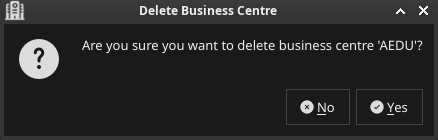
Figure 3: The confirmation prompt shown before business centre AEDU is deleted.
Deletion is a soft close — the record's history is preserved and remains visible in the History dialog.
7. Business centre history
To view the full change history, open the details dialog and click the history icon in the title bar, or right-click the row and choose History.
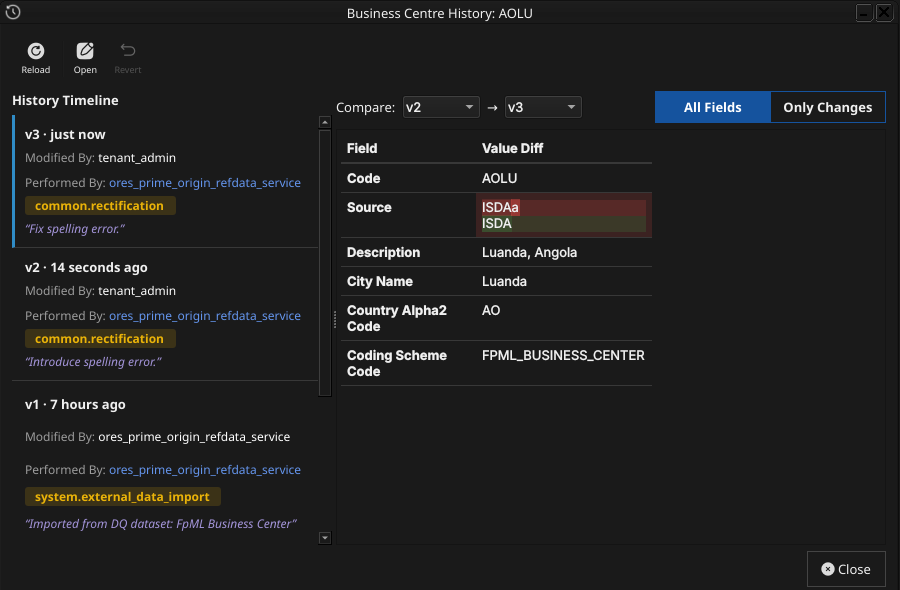
Figure 4: The History dialog for business centre AOLU (Luanda), comparing version 2 against version 3. The Only Changes toggle narrows the field list to what actually differs — here, a spelling correction to the Source field.
Pick the two versions to compare from the Compare drop-downs. The All Fields / Only Changes toggle switches between showing every field and showing only the fields that differ between the two selected versions. The Revert button reinstates any historical version as a new version, preserving the full audit chain — the old version is never rewritten. Reverting a business centre follows exactly the same confirm-then-save-with-a-reason flow described for Countries; it is not repeated here.
8. Conclusion
The chapter set out to show that managing a business centre well
follows from understanding what it identifies before turning to its
interface, and it has traced exactly that path. The FpML
businessCenterScheme supplies the identity — a 4-character code
naming either a real geographical calendar location or a
rate-publication calendar, scoped to a coding scheme but unique per
tenant regardless of which scheme it came from — while ORE Studio's
own country link adds a purely cosmetic flag icon on top. Building on
that, the Qt interface took the record from the list view down to a
single detail dialog and through the editing, deletion, and history
workflows, where reverting to an earlier version demonstrated the
same bitemporal audit trail already familiar from the Currencies and
Countries chapters. Business centre does not yet have shell or
command-line equivalents, nor Wt web UI or HTTP REST API support;
those gaps are tracked as backlog work rather than glossed over here.
9. See also
- Business Centre — the domain-knowledge hub this chapter draws on.
- Currencies — the template chapter this one mirrors.
- Countries — the country a business centre may optionally link to for its flag icon.
- Books — a book's rates centre is a business centre, referenced by code.
Footnotes:
http://www.fpml.org/coding-scheme/business-center.
A business centre's defining role in ORE Studio is exactly the one
the FpML description names: it identifies which holiday calendar a
business day-adjustment is performed against. The business centre
itself is only the identifier — resolving a code to its actual set of
holiday dates is a downstream concern the pricing/analytics layer
carries out, not something the business centre record stores. Every
code belongs to a coding scheme — FPML_BUSINESS_CENTER for the
standard FpML set, or NONE for platform-internal centres such as
the system's own WRLD ("World") centre, used for entities not tied
to a specific geographic location. Unlike some coding-scheme-scoped
reference data, a business centre's code is unique per tenant
regardless of which scheme it came from: two schemes cannot both
register the same code for one tenant.
ORE Studio layers one further, optional extension on top of the FpML
fields: a link to a country, used purely to render a flag icon next
to the centre in the Qt UI. This link plays no role in calendar
resolution — a centre with no natural country mapping, such as a
rate-publication-calendar code or the system's WRLD centre, simply
has no flag.
Two other entities reference a business centre by its code rather than embedding calendar logic of their own: a book's rates centre, which determines which set of end-of-day revaluation market data the book uses, and a business unit, which may itself carry a business centre assignment (see Business Unit in the domain knowledge base; a dedicated manual chapter for business units does not exist yet). This chapter documents only the business centre record itself.
With the underlying identity and scoping rules in place, the rest of the chapter turns from what a business centre record contains to where you go to work with one.