User Journey: Give a report its cut
Table of Contents
This page documents a user journey: A market-risk owner gives a report its cut on create or update, reads what the selection would resolve to now, runs the report, and follows the run that resolved the selection to one body and recorded it, with the badge and the run's card stating what the report prices from.
A user journey describes what one person is trying to do, before anything is built. It is a design document that outlives any sprint, so it names the screens, the entity fields each screen shows, and the operations and messages each step needs.
The decision behind it is The cut is the body a run prices from: a report carries a cut selection, the run resolves it to a concrete cut, and the cut is the body the run prices from. The journey replaces an earlier one that imagined a pricing screen choosing a cut: there is no two-way pricing in the product, reporting is the only surface, and a cut is selected where a report is defined rather than where a price is looked at. It also replaces the market bindings the earlier binding decision put on the run settings, which that decision now records as superseded in part.
1. Goal
"Reports in this list all look the same, and I cannot tell which of them prices from yesterday's close and which from the moment I press Run. I want to say what a report prices from, once, where the report is defined; to see on the report that I have; to be told before I run it when the cut it wants does not exist or is not signed; and to have the run's own record name the body it priced from, so that the number in the report and the cut on the cuts screen are one object and not two."
The journey is done when the report's badge states its selection, the run has resolved that selection to one cut and recorded it, and the run's card names the body, its timepoint and what the selection resolved from.
2. Actor and trigger
A market-risk owner runs this journey, or a tenant administrator acting for the party. Both act inside their own tenant, on a report definition their party owns.
Three permissions decide what the person sees. Reading the cuts a selection may
name needs reporting::cuts:read. Setting the selection needs
reporting::report_definitions:write, because the selection is a property of the
definition and changes with it. Running the report is
reporting::report_instances:write, through
reporting.v1.ops.trigger_report_instance, and that same permission is what lets a
LIVE selection mint a cut. An action the person may not take is not drawn, as the
Record screen standard requires.
The trigger is a result nobody can account for, or a report whose numbers are not the ones the desk means. A run completed and the question is which body it priced from; the answer available today is a valuation date, and the store answers that date differently a week later. The person opens the reports list, sees a badge that says nothing about the body, opens the report, and the journey ends on the run's page with the cut named.
This journey does not take a cut by hand: that is Take a cut. It does not approve a published curve, and it does not read what a run produced, which is Read what a run produced.
3. Steps
3.1. Step 1: read what the reports price from
Open Reports. The reports list is See the reports a party runs's, with one addition: a Cut column carrying the selection's badge.
Column What it holds Report The definition's name, and its type under it Cut The selection's kind as a badge, and under it the fact that qualifies it: no cut selected, pinned for a specific cut, indicative for a kind whose values are Cycle eodorintraday, as the report's page statesLatest run The health word the list already draws Last run The instant, relative - Read the badge. A person who reads thirty-one reports sees which of them price from the close, which from the open and which from the run itself, without opening one. The badge is a classification of the report and not a status, so it borrows no green, amber or red; the health of the last run stands where it already stands.
- Open the report and read the selection beside the runs. The report's record carries the Definition tab with its selection, and the Market tab with the selection beside the cut the last run resolved. The two are different facts and the tab says so: the selection is what the report will resolve next time, and the resolved cut is what the last run used.
3.2. Step 2: give the report its cut
- Set the selection on create. The create flow's step that names the report gains one field: the cut selection, with the kinds the party may select and the cuts already taken. The default is the end of day kind, because most reports cover a day, and a report created without a choice says no cut selected on its badge and is refused at its first run with the sentence that names what it lacks.
- Set the selection on update. The Definition tab's Edit opens the record dialog with the selection among the definition's own fields. It is written with the rest of the definition, in one version, with a change reason and a commentary; a change to the selection is a material change, because it moves what the report prices from.
- Read what each kind resolves to. The field offers the kinds the party's cut type list holds, each with the sentence that says what it resolves against: End of day — the close of the date this report covers, Month end — the close of the date's month's last business day, Year end — the close of the year's last business day, Start of day — the open of that date, Independent verification — the signed verification cut of that date, Live — the instant you press Run, and the body it fixes is indicative. The kinds are read from the type list rather than named here, so a firm that adds a kind adds it once. A kind the party has taken no cut for is still offered, because the party may take one; the preview says what it would need.
6a. Read the family's fallback. A report that selects the ordinary close prices from the body fixed on the date, whether that body was taken as an ordinary close, a month end or a year end, because the family fixes the same four inputs at the same centre's close. A report that selects the month end is stricter: it needs the month end cut, because the longer retention is the reason the occasion exists and a plain close of that day was not kept as one.
3.3. Step 3: read the preview, which is the resolution
- Read the preview. Beside the field, the dialog draws what the current choice would resolve to now, computed by the run's own operation: the cut's label, its kind, its timepoint, its state, its authoriser and the counts of its body, or the sentence that would refuse the run. EOD would resolve to EOD.ACME-LONDON.2026-10-06, authorised by a.reyes, 1,284 deals and 3,912 values is the common reading; EOD would resolve to nothing: no end of day cut of 06 October exists for these books is the other.
Read the preview's refusals. The preview refuses what the run would refuse, in the run's words, and each names what would make the selection usable.
What the preview finds What it says No cut of the kind and date exists That no cut of that kind covers the date, for these books and this centre, and that somebody must take one. For a month end or year end selection it names the last business day it looked at A cut that is taken and unsigned That the cut is waiting on its kind's authorisation, and the request and account it waits on A cut whose body is incomplete That its body has gaps, and where they are read A cut that was refused That its authorisation was refused, and that the remedy is a new take A pinned cut that has been superseded That a later cut replaced it, and that a rerun may still name it on purpose A scope spanning two centres That no one cut values books that read two centres, and that the report's scope must be narrowed or split - Select a specific cut where the kind is not enough. A person who means one body — to reproduce an earlier result, or to pin a report to the body a client was shown — selects the cut itself from the list of the party's cuts, filtered by kind and date. The badge then reads the kind with pinned under it, and the selection resolves to that cut whatever the date, which is the one way a report can price from a body that is not of its own date.
3.4. Step 4: run the report, and follow the resolution
- Run the report. Run now is Run a report and watch it finish's press. The dialog names the cut the selection resolves to before the press, in the same words the preview used, so the person is not asked to trust a tab they read an hour ago.
- Let the run resolve and gather. The run resolves the selection first, records the cut and its timepoint, and then gathers: the deals from the cut's population and the market data from the cut's fixed snapshot, in one body and not two halves at two instants. A resolution that yields nothing refuses the run before the engine is reached, and the run's output message carries the same sentence.
- Read the run's record. The run's page carries the card that names the body: the cut's label, kind, timepoint and scope, the counts of its parts, its basis — the authoriser where the kind requires one, and that the kind requires none where it does not — and the selection it resolved from, which may have moved since. The run's `priced_at` is the cut's timepoint, so the date the report states and the body it used are one fact.
3.5. Step 5: the LIVE report, which has no cut until it runs
- Select Live and read what it promises. The preview cannot name a cut, and says so instead: LIVE will fix a body at the instant you press Run, and every result it prices is marked indicative. The badge reads LIVE with no body until a run under it.
- Run it. The run resolves the selection to a cut it mints at its own instant: the four inputs at that instant, the taking identity being the run acting for the account that pressed it, and no authorisation, because the run mints and consumes the body in one act. The cut appears in the cuts list with its instant in its label, in the In use state, marked indicative.
- Read why it is different. The run's card states that the cut was minted by this run, that its values are indicative, and that the result is reproducible only by naming that cut. A rerun of the same LIVE report tomorrow is a new body: the comparison verdict says cannot be compared for the retake reason, which is the same verdict a retaken daily cut draws.
3.6. The audit of the selection**
- Read the definition's history. The selection is a field of the definition, so its changes merge into the report's History tab: the selection before and after, the account, the instant and the reason. A run already produced keeps the cut it recorded, so the history explains the difference between two runs rather than relabelling them.
- Read the cut's consumers. The cut's Runs tab lists the runs that priced from it, and the Market tab of each report names the selection that resolved to it. That is the question a person asks before a cut is superseded — what still rests on this body? — and it is the same fact read from each side.
4. Screens and wireframes
Three surfaces, all of them reporting's. The reports list gains a Cut column. The report's record gains the selection on its Definition tab and the resolved cut on its Market tab. The run's page keeps the binding decision's card, read through the cut, and gains the sentence that names the selection it resolved from.
No surface selects a cut while pricing, because there is no pricing surface: a cut is selected where a report is defined, and a price is read where a run is recorded.
The judgement, per step, against the standards.
| Step | Shape on the screen | Judgement |
|---|---|---|
| 1 to 2, the list | The standard's list with one column of the design's own | RS-LIST-09 to RS-LIST-15, and the badge is a cell drawn by the cell rules |
| 3, the record | The report page's tabs, each stating what it decides | The entity screen specification's tabs |
| 4 to 5, the selection | A field on the create flow and on the definition's dialog | RS-WRITE-01 to RS-WRITE-16; the field is a record kind and so a picker |
| 6 to 9, the preview | A panel beside the field, computed by the run's operation | No rule draws a resolution preview; the prototype defines it and What is missing records the gap |
| 10 to 12, the run | The run's page, its card and its refusal | The binding decision's card and the run journey's page |
| 13 to 15, LIVE | The same field and the same card, with the indicative sentence | A kind's own words on the screens that already exist |
| 16 to 17, the audit | The report's timeline, and the cut's Runs tab | RS-HIST-01 and RS-RELATED-04 |
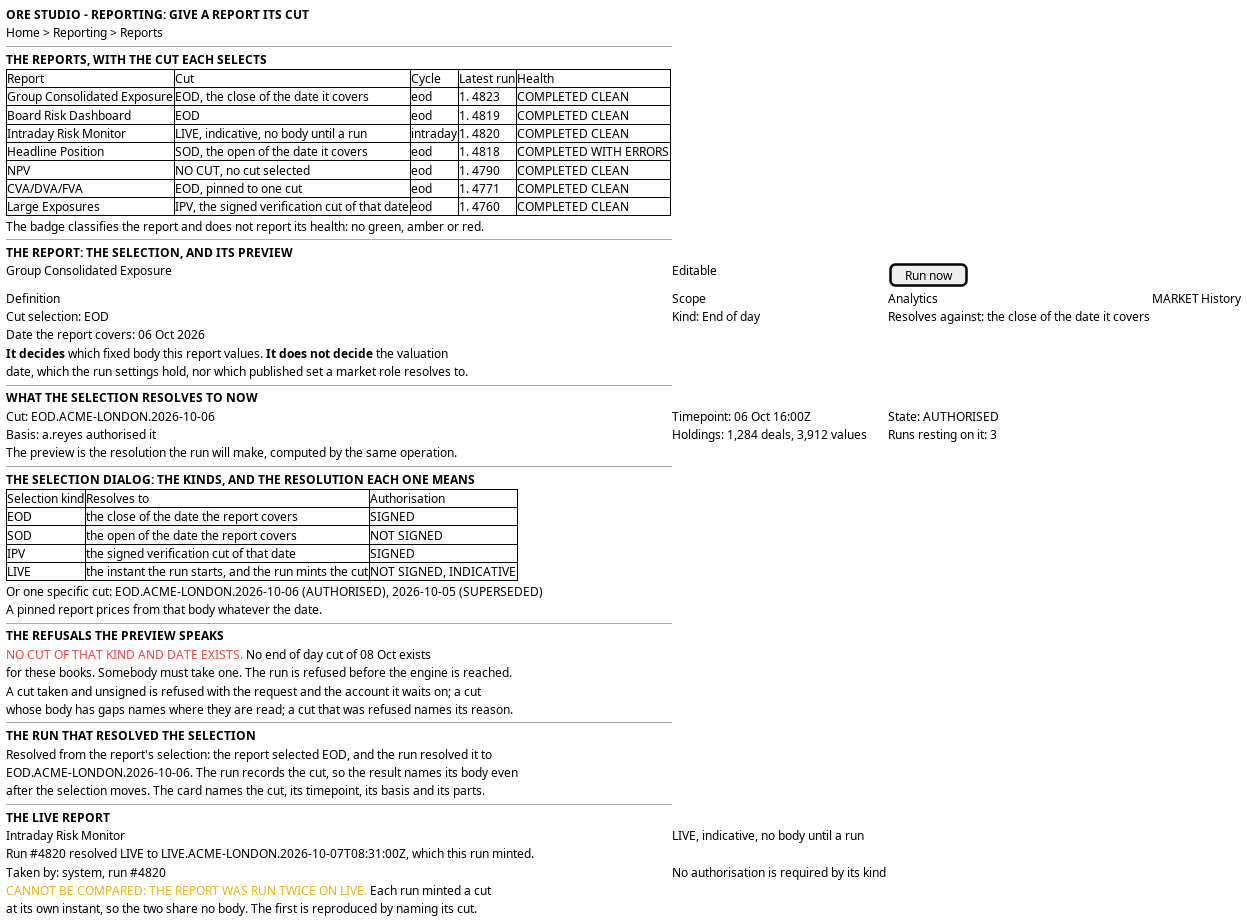
Figure 1: The report's cut: the reports list with the badge, the selection with its preview, the run that resolved it, and the LIVE report whose body exists only after the run.
5. Prototype
The the cut prototype draws this journey on four of its surfaces: the reports list with the badge, the report's record, the selection dialog with the preview, and the run that resolved. Its design note records the states and what is fake.
It must draw a report with no selection, one that selects the end of day kind, one that selects the start of day kind, one that selects LIVE, one whose selection resolves to nothing, one pinned to a specific cut, one whose cut is taken and unsigned, a run that resolved and recorded its cut, and a LIVE run whose resolved cut exists only because the run minted it. Every value is a fixture.
6. Entities composed
| Entity | What it contributes | Model |
|---|---|---|
report_definition |
The report, which gains the cut selection: the kind code, and the cut where the selection names one | ores.reporting.report_definition |
| the cut kind | The type a selection names: its family, whether it is signed, whether its values are indicative, the rule that resolves it and its retention | The cut is the body a run prices from |
| the cut | The body the selection resolves to, its state, its parts and its acts | The cut is the body a run prices from |
report_instance |
The run, which gains the cut it resolved, the cut's timepoint, and the selection it resolved from | ores.reporting.report_instance |
configuration |
The run settings, which keep the valuation date the resolution reads and lose the market bindings | ores.reporting.configuration |
report_configuration |
The slot that ties the definition to its configurations, which is where the covered date is read | ores.reporting.report_configuration |
configuration_market_binding |
The row this journey retires: a report's market role and the published set it named | ores.reporting.configuration_market_binding |
curve_publish |
The publish record the cut's market data half holds, which is what the retired row used to name | ores.marketdata.curve_publish |
The row this journey writes is the definition's selection, one version at a time, and the run writes the cut it resolved. The definition does not hold the resolved cut — a run does — because a selection is a rule and a resolution is an event.
7. Operations and messages
| Step | Operation | Subject | Status |
|---|---|---|---|
| Step 1, the list | List a party's definitions with the cut selection and the latest run's health | reporting.v1.report_definitions.list |
exists; the selection is missing from the row |
| Step 2, the record | Read one definition and its selection | reporting.v1.report_definitions.get |
exists; the selection is missing |
| Steps 4 to 5, the write | Write the selection with the definition | reporting.v1.report_definitions.put |
exists; the fields are missing |
| Step 6, the kinds | Read the kinds the party may select, with the sentence each resolves against | reporting.v1.cut_selection_kinds.list |
missing |
| Step 9, the cuts offered | List the party's cuts, filtered by kind and date, with their state | reporting.v1.cuts.list |
missing |
| Steps 7 to 8 and 13, the preview | Resolve a selection to a cut now, with its state and the sentence that would refuse it | reporting.v1.ops.resolve_cut |
missing |
| Step 10, the run | Trigger a run of one definition | reporting.v1.ops.trigger_report_instance |
exists |
| Step 11, the resolution | Resolve the selection at the run, and mint a LIVE cut where the kind is LIVE | reporting.v1.ops.resolve_cut, and reporting.v1.ops.take_cut for the LIVE case |
missing |
| Step 11, the body | Read the cut's deal population and its fixed snapshot | reporting.v1.ops.gather_trades and gather_market_data read the store by date |
partial, shape changes |
| Step 12, the run's record | Record the cut, its timepoint and the selection | reporting.v1.ops.record_run_pricing records the date and the note |
exists; the cut is missing |
| Step 16, the history | Read the versions of a definition | reporting.v1.report_definitions_versions.list |
exists |
| Step 17, the consumers | List the runs that priced from a cut | reporting.v1.cuts.get would carry them |
missing |
| The screen itself | Read and choose a cut from the browser | (no BFF route serves reporting, and none serves cuts) | missing |
The resolution is one call and it is the same call for a preview and for a run. That is the point of it: a preview computed by a second code path is a preview of that path and not of the run, which is how a person comes to trust a screen that lies.
8. What is missing
- No cut exists to select. Everything this journey draws waits on the entity the decision note describes. Until it exists the preview has nothing to resolve and the card has nothing to name.
- The definition has no selection.
report_definitioncarries no field for a cut kind or a cut, so the list cannot draw a badge and the dialog cannot set one. - The run records a date and not a body.
record_run_pricingcarriespriced_atandprice_note. A cut is the answer that survives a correction to the store, and the run needs the field and the timepoint. - No resolution exists. Nothing reads a selection and answers a cut. The rule is stated here and on the decision note; the operation, its refusals and its one sentence are missing.
- The gathering steps re-read the store. Neither step reads a fixed body, so a run of a resolved cut would price from whatever the store holds when the step runs. The Trade cut page states the defect in the population and the Market data cut page states it in the market data.
- The preview is a new part. No rule draws a resolution preview, and the shape it needs — a panel that states what a choice resolves to and what would refuse it — is the prototype's one addition to the standards.
- The picker over cuts is not a standard part.
RecordPickerreads its whole kind once and draws no state, and a cut is filtered on the server and carries a derived state. The screen needs its own picker or the shared one needs a filtered form. - No market card that reads through the cut. The binding decision's card reads the publish records the run recorded. Read through a cut it reads the cut's market data half, and the two must not disagree: the run records the cut, and the card reads the sets from it.
- The retired row still exists.
configuration_market_binding, its tab and its picker are in the schema and in the signed-off screens, and nothing yet says in the schema that a run ignores them. The decision to retire them is recorded; the removal is work. - No route and no screen for reporting. The reports list, the report page and its tabs do not exist in the web application, so this journey's surfaces are new with the reporting group's.
9. Related journeys
- Take a cut — where the cut this journey selects comes from, and the gaps that stop one.
- Rerun and audit a cut — the reproduction this journey's card states, drawn as a journey of its own, and where a LIVE result is reproduced.
- See the reports a party runs — the list this journey adds a column to.
- Create a report — the flow this journey adds a step to.
- Run a report and watch it finish — the press this journey resolves a cut for.
- Read what a run produced — the numbers whose provenance the card makes answerable.
- Find out why a run went wrong — where a person goes when the run was refused because its selection resolved to nothing.
- Change what a report runs — the other change to a definition, and the one that moves the numbers rather than the body.
- Look back over a report's history — the runs of one report, each now naming the cut it resolved.
10. Related knowledge
- The cut is the body a run prices from — the decision this journey draws: the selection, the resolution and the LIVE kind.
- Kinds of cut — the five occasions a selection may name, and the LIVE kind whose instant the run supplies.
- Cuts — the definition and the body.
- A report binds to a published curve, not to a name — the decision this journey's row retires, and the argument it keeps.
- Market data cut — the values the run reads from the resolved cut.
- Trade cut — the population the run values from the resolved cut.
- Book groups and rates centres — why a report whose books span two centres has no single cut.
- Configuration screen standard — the definition's fields, its reach and its history.
11. See also
- Cuts journeys — the group this journey belongs to.
- User Journey Extraction Standard — the checklist this journey is written against.
- Record screen standard — the picker, the states, the writes and the refusals.
- Menu structure — the area and the trail.
- Reporting journeys — the group whose list, report and run this journey extends.