User Journey: Check the versions and the database
Table of Contents
This page documents a user journey: A signed-in person reads what the browser, the deployment and the database are: the client build, the server build, and the database fingerprint.
A user journey describes what one person is trying to do, before anything is built. It is a design document that outlives any sprint, so it names the screens, the entity fields each screen shows, and the operations and messages each step needs.
1. Goal
"What am I talking to?" The person reads three builds in one place: the browser's own, the deployment's, and the database under it. The journey is done when all three are stated and compared, or when the screen says which of them it cannot read and why.
2. Actor and trigger
Any signed-in person. This is the one journey in the group that is not the system administrator's: a member reporting a fault, an administrator checking a rollout, and a support engineer on a call all ask the same question, and the answer is not sensitive. The answer is built into every screen already — the footer states the client and the server — and this journey adds the screen that states all three together. Because the answer belongs to every session, the shell offers the versions screen in every mode, so a tenant administrator and a regular user open it as well as the system administrator does; the four installation screens stay out of their reach, behind the Operations area that only system administration carries.
The trigger is doubt about a build: a screen behaves like yesterday's, a release note asks for the deployment's version, or a support request asks which database the deployment stores into. The journey ends when the three values are read, and the person can say whether the build they are testing is the build they think they have.
This journey writes nothing.
3. Steps
- Read the footer. Every screen carries a footer with two lines: the build the browser is running and the build the deployment is running. Two versions that disagree mean the browser holds a stale bundle, and the refresh that fixes it is not a guess. The server's version is absent until the deployment answers, and the footer says so rather than inventing one.
- Open the versions screen. When the question needs more than the two lines — the platform, the commit, the database — the person opens the versions screen. The system shows one screen with three panels: the client, the server and the database.
- Read the client panel. The system states the build the browser runs. The bundle carries it from the moment it was built and never changes afterwards: the release, the short commit the bundle was cut from, and whether the checkout had uncommitted changes at that moment. A person can match those three against the release they meant to test.
- Read the server panel. The system states the build the deployment runs, in full: the release, the platform triplet and the build information, in the same composition the login answer stated — the answer that opened the session names the build it was opened against. The panel adds the address the browser is talking to, so a person testing two deployments keeps them apart.
- Read the database panel. The system states the fingerprint of the database the deployment stores into: the fingerprint of the schema it was built from, the build environment, the commit and its date, and when the database was created. The four values arrive with the login answer — the same answer that states the server build — so the panel reads them without a second request. The answer carries the row today; a database whose row could not be read is stated as unknown (The login answer does not carry the database).
- Compare the three. Together the values answer what no single one can: a browser older than the deployment (a stale bundle), a deployment whose build does not match the schema the database records — which every service checks at its own startup, so the deployment would not be running — or a database built from a checkout nobody claims. The client and the server strings do not share a shape, so the screen shows them side by side for a person to compare; it cannot compare them mechanically.
- Leave, or go on. The versions raise the next question: which instances of each service run which build, which the services screen answers per instance, and what a stale build did, which the logs answer.
4. Screens and wireframes
Two surfaces, one answer. The footer is built and rides on every screen; the versions screen is the one this journey adds, with its three panels. The screen is read-only: it creates nothing, changes nothing and destroys nothing.
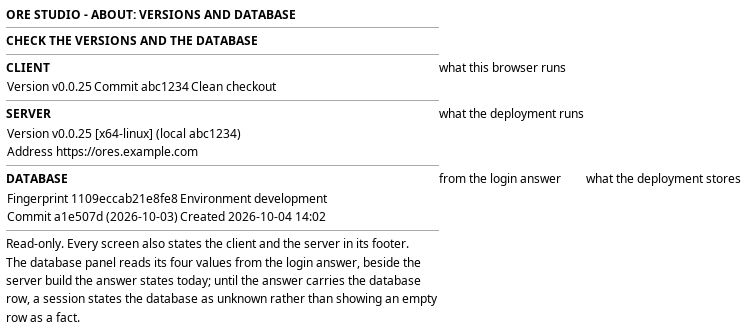
Figure 1: Check the versions and the database: the client, server and database panels, with the footer.
5. Prototype
Accepted by the user on 2026-10-04. The prototype is merged into main and
kept there as the record; the accepted commit names the state.
- Accepted commit
285519db99, the tip ofprototype/operations-journeys, merged intomain- Source
doc/prototypes/operations/versions-and-database/index.html- Open
/OreStudio/doc/prototypes/operations/versions-and-database/once the site is built, or the file directly- Design record
- Task: Prototype the operations journeys
The prototype settled where the database row comes from. The panel needs no read of its own: the login answer that already states the server build states the database row beside it, and the session keeps both. A session whose answer carried no row states the database as unknown, which the prototype shows beside the settled one. The panel's shape is settled too: fingerprint, environment, commit and created, in that order, which is the question "which checkout built this database".
6. Entities composed
| Entity | What it contributes | Model |
|---|---|---|
login answer |
The build the answering service runs, in full, and the database row, stated when the session opens | ores.iam.login_messages |
bootstrap answer |
The same build, stated before anyone can sign in | ores.iam.bootstrap_messages |
service_sample |
Each instance's own version, for the step that follows this journey | ores.telemetry.service_samples |
ores_database_info_tbl |
The fingerprint, build environment, commit and date of the database | no model: the table is deliberately not a codegen entity |
The client's build is not a model at all: the bundler stamps it into the
browser code at build time, and it cannot change while the tab is open. That
is the point of stating it — a client that matches the server proves the
bundle is current, and a client that does not says the tab is stale. The
database table is the other extreme: it is declared by hand in
projects/ores.sql/create/database/database_database_info_create.sql, and it
owes nothing to the code generators, because it records the checkout that
built the database before any service runs.
The login answer's job grows by one row. It states the deployment's build, and
it states the database beside it — fingerprint, environment, commit and
created — read once per login from ores_database_info_tbl. The row's only
reader was each service's startup check; the login answer is its second, and
no subject of its own is needed — see What is missing.
7. Operations and messages
| Step | Operation | Subject | Status |
|---|---|---|---|
| Read the client version, on every screen | (no operation: the build stamps the bundle) | — | exists |
| Read the server version, before sign-in | The bootstrap answer states the build the service runs | iam.v1.ops.bootstrap_status |
exists |
| Read the server version, at sign-in | The login answer states the same build in full | iam.v1.ops.login |
exists |
| Read the server version, on every screen | The session carries the build it was opened against | carried by the BFF route GET /api/session |
exists |
| Read the database fingerprint | The login answer states the database row | iam.v1.ops.login |
exists |
| Read the per-instance versions | List the latest sample of every running instance | telemetry.v1.services.list |
exists |
The server version is composed by ores.utility::version::full_version_string()
as the release, the platform triplet and the build information, and the login
answer carries it in full. The BFF keeps it on the session record, so the
footer states it from the first read onwards without asking the service again.
The database row is written when the database is created or recreated, and exactly one row exists. Each service reads it at its own startup and compares the fingerprint with the one compiled into the code, refusing to start when they differ — so a person reading the fingerprint tells which checkout built the database, and the deployment's own startup check is the reason the values agree until somebody recreates the database under a running service. The accepted design gives the row a second reader: the login answer carries it to the session.
The versions screen needs no route of its own. The session already carries the
build the login answer stated, and the database row beside it, so the screen
reads the session and asks for nothing. The hand-written BFF route pattern
belongs to the services screen instead, which reads the roster through
GET /api/operations/services on the
journey runtime — see
See the running services. A
session whose answer carried no row states the database as unknown.
8. What is missing
- The login answer carries the database row. Closed by Carry the database on the login answer: the row is read once per login and travels on the answer and the session, with no subject, permission or route of its own. The versions screen still reads it from the session rather than a read of its own, which the screens task builds. A row that could not be read is stated as unknown.
- The database row's audience rides the login answer. The fingerprint names the commit and build environment the database was made from — build forensics, not customer data. Riding the login answer settles the audience with the server build's: everyone who may open a session may read it. The decision to record is that the two travel together, so a future change to one audience changes both.
- The client and the server strings cannot be compared mechanically. The client states the release and the commit; the server adds the platform and the build information in a different composition. One shared shape would let the screen mark a mismatch instead of leaving it to the eye.
- The services screen cannot compare builds either. Each service reports its release string only, so the per-instance versions this journey points to cannot tell two builds of one release apart. The gap is recorded on See the running services.
9. Related journeys
- See the running services — the same question per instance: which build each running service reports
- Read the telemetry logs — what a stale build did, in the lines it wrote
- Watch the compute grid — the work the deployment was doing while the build was in question
- Audit sign-ins — the sessions each build opened; every session records the version it was opened against