User Journey: Browse the grid's jobs
Table of Contents
This page documents a user journey: A signed-in person browses the batches, workunits and results of the compute grid that they may see, finds one, reads its details and takes its input or output away.
A user journey describes what one person is trying to do, before anything is built. It is a design document that outlives any sprint, so it names the screens, the entity fields each screen shows, and the operations and messages each step needs.
1. Goal
"Show me the work the grid ran for me. Let me open a batch, see its jobs and their runs, read why one failed, and take its input or output away." The person has finished when they have found the record they came for, read its details, and downloaded what they needed.
2. Actor and trigger
Three actors use this screen, and the session decides what each sees.
- The operator is a system administrator in the system party. They see every tenant's batches, workunits and results, and the node each run used.
- The tenant administrator sees every batch of their tenant, across parties.
- The party member sees only the batches of their own party.
The trigger is a question from the Usage tab or the Overview tab: "1268 results failed. Which ones?" or "What did my party run today?" The journey starts on the Jobs tab of the compute grid screen. It ends on a record page or on a saved file. The screen is read-only.
3. Steps
- The person opens the Jobs tab. The system reads the first page of batches
that the session may see, newest first, and shows each with its
external_refand itsstatus. - The person narrows the list. They type a batch reference or id, choose a
status, or (as operator or tenant administrator) choose a party. Each change returns to page one. - The person opens a batch. The system reads one page of its workunits and
shows them under the batch, each with its
priorityandtarget_redundancy. The person may open several batches. - The person opens a workunit. The system reads its results and shows them as
leaves of the tree, each with its
server_stateandoutcome. - The person selects any row. The details panel shows that record's own fields under the model's headers. For a result it shows the outcome, the error message, the host and the time received.
- The person follows the Input URI link of a workunit or the Output URI link of a result. Each link is the stored file's own address and the system serves the file as a download. A result has no input of its own: the person reaches it through the result's Workunit ID link. The file is large, so the download streams.
- The person follows a reference in the details: the batch of a workunit, the workunit of a result, the canonical result of a workunit, or, as operator, the host of a result. The workunit's page continues in Follow a job.
No step needs the server to finish work later, so the journey carries no state beyond the address: the filters, the open rows and the pages live in the URL.
4. Screens and wireframes
One screen. The finder bar, the tree and the details panel are panels of the Jobs tab. The tree is the relationship view the Record screen standard names: it shows how a batch holds workunits and a workunit holds results. The pager is the request. Each level pages on the server with First, Previous, Next, Last, a page size and Load all, and Load all appears only when the total is 1000 or less. Opening a node never reads more than one page of its children.
State is a badge, as the UX
Language sets it. A batch's status is blue for open, sky for processing and
assimilating, and green for closed. A result's server_state is gray for
Inactive, blue for Unsent, sky for InProgress and green for Done. Its outcome
is green for Success, red for ClientError and amber for NoReply. Gray means
inactive only.
The screen shows only fields the entity models hold, under the models' own
headers. It computes no count and no state: a closed batch and a failed result
are read from status and outcome as stored. The references in the
details (the node, the job, the party) are links, not text.
The screen shows four states in words: loading ("Reading the batches…"), empty ("No jobs match. Clear the filters."), error (the server's reason and a Retry action) and refused ("Your role cannot read jobs.").
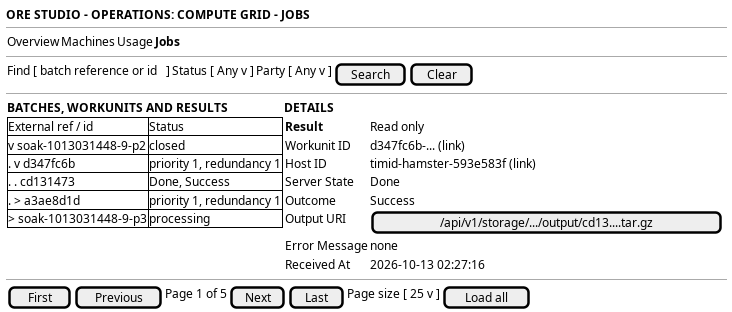
Figure 1: Browse the grid's jobs: the finder bar, the tree of batches, workunits and results, and the details panel.
5. Prototype
A static prototype argues the layout: the tree beside the details, the three roles, and the four states.
- Source
doc/prototypes/compute/browse-the-grids-jobs/- Open
index.html, with?role=operator|tenant|memberand?state=loaded|loading|empty|error|refused
The finder also filters by outcome, and a workunit or a result links to
Follow a job. The address holds the
filters, the open rows, the page and the selection.
6. Entities composed
| Entity | What it contributes | Model |
|---|---|---|
batch |
The tree's roots: external_ref, status and party_id |
ores.compute.batch |
workunit |
The second level: batch_id, app_version_id, input_uri, config_uri, priority, target_redundancy and canonical_result_id |
ores.compute.workunit |
result |
The leaves: workunit_id, host_id, server_state, outcome, output_uri, error_message and received_at |
ores.compute.result |
host |
The display_name that the host_id link shows, for the operator |
ores.compute.host |
7. Operations and messages
| Step | Operation | Subject | Status |
|---|---|---|---|
| 1, 2 | Read a page of batches | compute.v1.batches.list |
partial |
| 2 | Filter batches by status, party or reference | (the list takes an offset and a limit only) | missing |
| 4 | Find the results whose outcome is not Success |
(read_by_state filters on server_state only) |
missing |
| 3 | Read a page of a batch's workunits | compute.v1.workunits.list_by_batch_id |
exists |
| 4 | Read the results of a workunit | compute.v1.results.list_by_workunit_id |
exists |
| 5 | Read one record | compute.v1.batches.get, compute.v1.workunits.get, compute.v1.results.get |
exists |
| 5 | Read the node of a result | compute.v1.hosts.get |
exists |
| 5 | Read a run's times, sizes and peak memory, and their aggregates per workunit and batch | (no field on the result; the submit message does not carry them) | missing |
| 6 | Download an input or an output | (no route serves the stored file) | missing |
| 1 to 5 | Reach the reads from the browser | (no BFF route for jobs) | missing |
Each read checks its entity's read code (compute::batches:read,
compute::workunits:read, compute::results:read) and serves the session's
tenant. The row-level policy narrows a party member to their own party. The
Member role holds the batch, workunit and result read codes in the seed, so a
party member opens a batch of their own party and reads its workunits and
results. The TenantAdmin role holds every code, and the ReportRun service role
holds the three reads.
The batch list reads newest first. The batch model declares recorded_at
sortable and orders by it, descending, and the workunit and result lists accept
the same field. The time is that of the current version of the row, so a batch
whose status changes is recorded again and moves to the top of the list.
8. What is missing
- Filters on the batch list are partial. The list narrows by status, by party and by a part of the reference, on the server. A filter by date is still missing.
- Finding the failed runs is flat. A read by
outcomelists the runs that ended with a code, newest first, and each run leads to its job page, which names its batch. The Jobs tab draws it as a flat list. It does not prune the tree to the batches that hold such a run, because the models hold no count of failures per batch. The batch and the outcome filters do not combine. - No run statistics on the result. The result holds no start time, no end
time, no input or output size and no memory figure. The wrapper measures the
run's duration and the bytes it fetched and uploaded, but it only sums them
into
node_sampleper node and interval, so a node's mean is stored and a job's own value is not. The engine reports its peak memory use in its own log (peakMemoryUsage (bytes) | memoryUsage (bytes)), which the wrapper publishes as a log line keyed by the result id and the platform does not parse into a field. The host row holds its totalram_mbonly. Per-run fields, written by the wrapper in the submit message, are the missing piece:started_at,finished_at,input_bytes,output_bytesandpeak_memory_bytes. A workunit and a batch show the aggregate of the results below them: the earliest start, the latest finish, the sums of the bytes and the largest peak memory. The aggregate is a grouped read, not a stored field. The prototype draws all three levels in a dashed block labelled "proposed, not stored yet". - Downloads reach the operator and the tenant administrator.
input_uriandoutput_uriname stored objects. Two BFF routes stream them after they read the owning record, so a caller who may not read the record gets no byte. The storage service then checksstorage::objects:readon the person's own token, and that code is bucket-wide. The Member role lacks it, so a party member sees the address as text. The task Let a party member download its own files closes the gap. - The BFF routes exist. Six routes under
/api/operations/grid/jobs/serve the paged tree, and the batch route takesstatus,partyandfind. - Node names for tenants. A result names its host. The node belongs to the installation, so only the operator sees its name. A tenant administrator and a party member see "hidden for your role" where the node would be. The reads and the screens follow this rule, and a test pins each role.
- A run in flight has no node. As in Follow a job, the node is bound when the run ends. The details say "not yet known".
- A report run has a page. A batch names its report run in its
external_ref. When the reference is an id, the job page links to the page of that run. The BFF reads the run with the person's own session, so a person who may not see the run's party gets the answer for a run that does not exist, and so does the operator, who works outside the tenant. A batch the shell dispatched holds an operator string, and the page says no report is behind it.
9. Related journeys
- Follow a job: one job end to end, from the details' job link.
- Diagnose and reproduce a failure: the failed run found here, and how to run it again.
- Watch the grid: the load that produced these jobs.
- Watch the compute grid: the node a run used, for the operator.
10. Related knowledge
11. See also
- User Journey Extraction Standard: the checklist this journey follows.