User Journey: Onboard a counterparty
Table of Contents
This page documents a user journey: A tenant administrator brings a new trading counterparty on board: its legal identity, its identifiers, its contacts, and the netting agreements and collateral terms the tenant trades under.
A user journey describes what one person is trying to do, before anything is built. It is a design document that outlives any sprint, so it names the screens, the entity fields each screen shows, and the operations and messages each step needs.
1. Goal
"I want to bring a new counterparty on board once — the legal entity, the names we recognise it by, the people we contact, and the agreements and collateral terms we trade under — so that the desk can trade with it and every screen resolves it to the same entity." The journey is done when the counterparty reads in the list, resolves by an authoritative identifier, and its agreements, netting sets and collateral terms read back.
2. Actor and trigger
The actor is the person who maintains the tenant's reference data: an account
holding the Operations role, or a tenant administrator, acting inside their own
tenant. The trigger is a new trading relationship, a
legal name or group change, or an ORE document that names a counterparty the
tenant does not hold. The journey starts at Counterparties, or at the
Onboard a counterparty button there, and ends at Outcome, at History, or
at Refused.
A counterparty is a tenant-wide record. The party-counterparty junction decides which of the tenant's parties can see it, and a party sees only the counterparties its junction rows name.
3. Steps
- See the counterparties. The person opens Counterparties. The system lists the tenant's counterparties: short code, full name, party type, status, business centre, identifiers, contact count, version, and last modifier. The person searches by code, name or identifier value, and filters by Active, Closed or All. The person chooses Onboard a counterparty.
- Identity. The person enters the short code, the full name, the transliterated name when the registered name is not Latin, the party type, the status, the business centre, and the parent counterparty. The system offers the party types, the party statuses, the business centres, and the counterparties already stored. The short code is the natural key and is unique in the tenant. The full name need not be unique: branches share a name under distinct short codes. The parent is optional.
- Identifiers. The person adds each identifier the tenant recognises this counterparty by: a scheme and a value. The system shows the list, marks the identifier the tenant resolves the counterparty by, and refuses a duplicate. The system takes the LEI first, then the BIC, as the authoritative identifier. An ORE alias is unique across the tenant. The system also shows which parties may trade with the counterparty.
- Contacts. The person adds a contact for each purpose the tenant uses: Legal, Operations, Settlement and Billing. A contact carries the street address, the city, the state, the country, the postal code, the phone, the email and the web page. The natural key is the counterparty and the contact type, so the system keeps one row per type.
- Legal agreements. The person records each netting agreement with the counterparty: the agreement number, the type, the governing law and a description. Under an agreement the person records its netting sets, and under a set its identifiers, its collateral terms (the CSA), and the currencies the CSA accepts as collateral. The two parties of an agreement are fixed and never change across its versions. A set with no agreement holds trades that do not net.
- Review. The system shows one summary of everything the person entered and the operations the confirm will send. Nothing is written yet.
- Confirm. The person chooses Confirm and write. The system writes the counterparty, its identifiers, its contacts, its agreements, its netting sets, its netting set identifiers, its collateral terms, its eligible currencies, and the visibility rows. It then shows the outcome: the short code, the identifiers, the contacts, the agreements, and the version written, with links to trade with the counterparty, to see who can see it, and to onboard another.
- Check the history. The person opens the history. The system lists every version with who changed it, when, and why, and shows the field-level difference from the version before. The person can read the counterparty, its identifiers and its contacts as they stood in a version, and can revert to an older version, which the system writes as a new version.
- Handle a refusal. When the server refuses a write, the system keeps what the person typed and states what was refused, from which step, and that the record did not change. The person corrects the value, or keeps the value already stored, and continues.
No step waits on the server after its reply, and the journey keeps no state.
4. Four-eyes controls
A change that touches data other functions rely on needs a second person, and the person who asks cannot decide. Book types and the controls on each records the rule for each act of this journey:
- A new counterparty, a change to its identity, parent, status or business centre, an identifier, and a link to a party that may see it: Operations decides.
- A netting agreement, a netting set or a collateral term: Market Risk decides, because these set the exposure to the counterparty.
- A contact: not gated. It is written directly.
Review marks each change as needing a named function or no approval. When any
change is gated, the confirm becomes Raise request: the system raises one
approval request (inbox.v1.ops.raise_approval), shows it waiting, and leaves the
record as it was. A decider from the named function opens the request with
inbox.v1.ops.get_approval, reads what would change and the check, and approves or
declines with a comment (inbox.v1.ops.decide_approval). The request applies only when
every named function has approved, and one decline ends it. The prototype draws the
waiting, decide and declined states (?state=waiting, ?state=decide, ?state=declined); the check it draws is that the counterparty has one authoritative identifier, which ?check=identifier makes fail.
The approval operations exist. No request kind is seeded for these acts, a request holds no pending change, and nothing applies the change when the last decider approves, so a screen cannot yet raise or apply a gated change. The deferred four-eyes authorisation framework is that missing piece. The deciders are Operations, Finance and Market Risk, and the Acme dataset holds no Finance account; the task Add the missing book-control actors to Acme adds it.
5. Screens and wireframes
One list screen and one journey screen. Counterparties is the list, with its search and its tabs. Onboard a counterparty is one screen: a flat step rail on the left, and the current step on the right. The steps are Identity, Identifiers, Contacts, Legal agreements, Review, Outcome and History. Nothing is written until the person confirms on Review, so Review is the last step that reads and Outcome is the first that reports a write.
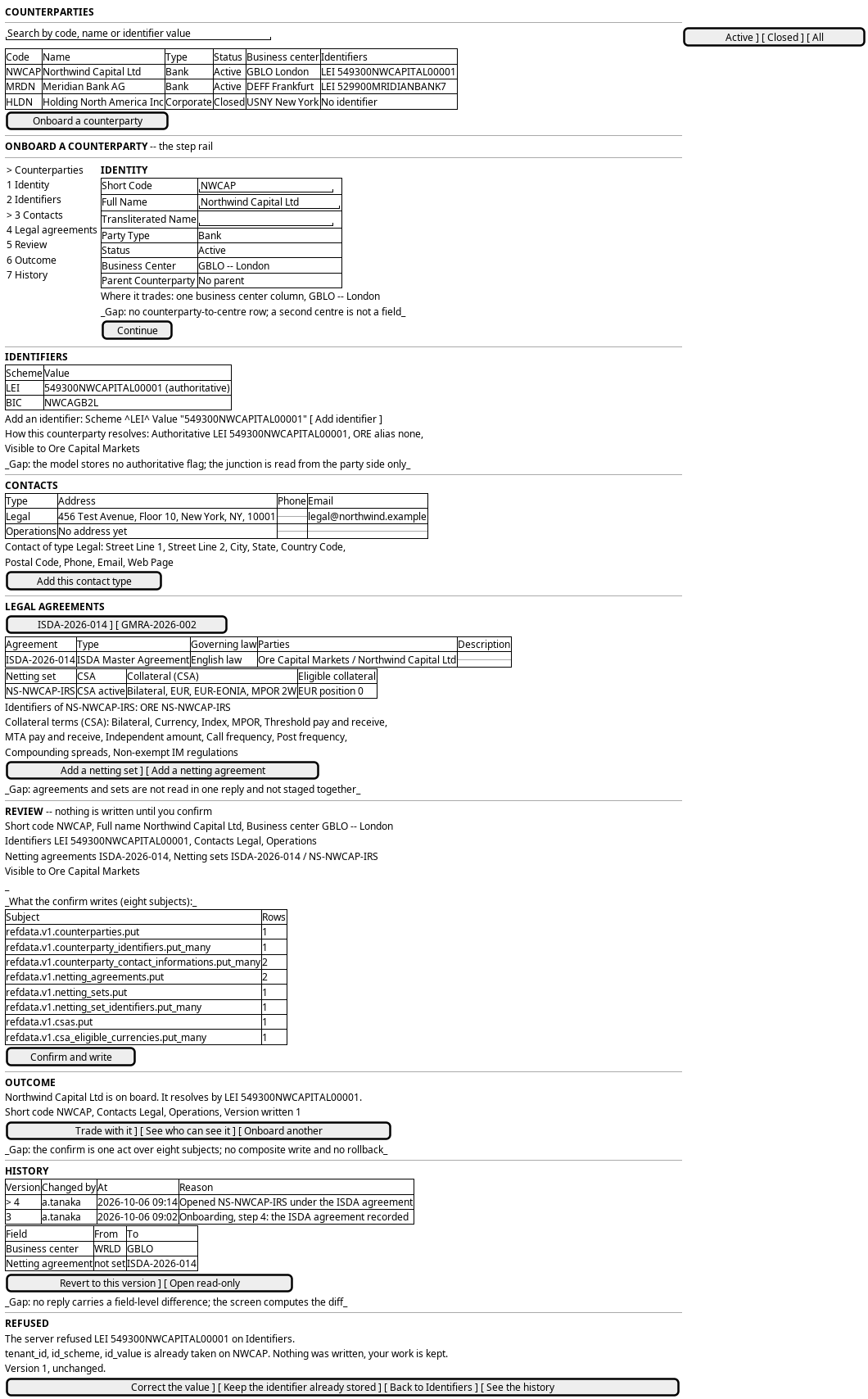
Figure 1: Counterparty onboarding: the counterparty list, the step rail with the identity step, and the identifiers, contacts, agreements, review, outcome, history and refused states.
6. Prototype
The prototype is the design record for the screens above.
- Directory
doc/prototypes/parties/onboard-a-counterparty/- States
landing,counterparty,identifiers,contacts,agreements,review,done,refused,history- Refusals
?fail=duplicate,?fail=missingand?fail=duplicate_set_id, with?fail=1for the first kind
The landing screen carries the list and its search. The journey screen carries the rail and one step at a time. The state is chosen from the query string and is reachable from the foot bar.
7. Entities composed
| Entity | What it contributes | Model |
|---|---|---|
counterparty |
The list row and the identity form: short code, full name, transliterated name, party type, status, business centre, parent counterparty | ores.refdata.counterparty |
counterparty_identifier |
The identifiers list and the add form: scheme, value, description | ores.refdata.counterparty_identifier |
counterparty_contact_information |
The contacts list and the contact editor: type, address, phone, email, web page | ores.refdata.counterparty_contact_information |
netting_agreement |
The agreement panel: number, type, governing law, description | ores.refdata.netting_agreement |
netting_set |
The sets under an agreement: code, call type, initial margin type, risk weight, description | ores.refdata.netting_set |
netting_set_identifier |
A set's names: scheme and value, such as the ORE id | ores.refdata.netting_set_identifier |
csa |
The collateral terms of a set: thresholds, minimum transfer amounts, frequencies, MPOR | ores.refdata.csa |
csa_eligible_currency |
The eligible collateral list: currency and position | ores.refdata.csa_eligible_currency |
business_centre |
The business centre picker and the list column | ores.refdata.business_centre |
party_counterparty |
The visibility rows: which parties may trade with the counterparty | ores.refdata.party_counterparty |
party_type |
The party type picker | ores.refdata.party_type |
party_status |
The status picker | ores.refdata.party_status |
party_id_scheme |
The identifier scheme picker, with max_cardinality and display_order |
ores.refdata.party_id_scheme |
contact_type |
The contact type picker | ores.refdata.contact_type |
currency |
The eligible collateral picker | ores.refdata.currency |
The counterparty and its agreements, sets and CSAs are versioned, so each has a history. The agreement's two parties are fixed. The identifiers, the contacts, the netting set identifiers and the eligible currencies are versioned child rows, and the junction keeps versions too, but no operation reads them for this screen; see What is missing.
8. Operations and messages
| Step | Operation | Subject | Status |
|---|---|---|---|
| See the counterparties | List the counterparties, then the page's identifiers and contacts | refdata.v1.counterparties.list, then refdata.v1.counterparty_identifiers.list and refdata.v1.counterparty_contact_informations.list with counterparty_id_one_of set to the page |
exists |
| Identity | Offer the party types | refdata.v1.party_types.list |
exists |
| Identity | Offer the party statuses | refdata.v1.party_statuses.list |
exists |
| Identity | Offer the business centres | refdata.v1.business_centres.list |
exists |
| Identity | Read the centres the counterparty deals through | refdata.v1.counterparty_business_centres.list_by_counterparty_id |
exists |
| Identity | Write the centres the counterparty deals through | refdata.v1.counterparty_business_centres.put_many |
exists |
| Identity | Offer the parent counterparties | refdata.v1.counterparties.list |
exists |
| Identifiers | Offer the identifier schemes | refdata.v1.party_id_schemes.list |
exists |
| Identifiers | Read the identifiers | refdata.v1.counterparty_identifiers.list_by_counterparty_id |
exists |
| Identifiers | Read who can see this counterparty | refdata.v1.party_counterparties.list_by_party_id |
exists |
| Identifiers | Read who can see it, from the counterparty side | refdata.v1.party_counterparties.list_by_counterparty_id |
exists |
| Contacts | Offer the contact types | refdata.v1.contact_types.list |
exists |
| Legal agreements | List the counterparty's agreements and their sets | refdata.v1.netting_agreements.list_by_counterparty_id, refdata.v1.netting_sets.list_by_netting_agreement_id |
partial |
| Legal agreements | List a set's identifiers | refdata.v1.netting_set_identifiers.list_by_netting_set_id |
exists |
| Legal agreements | Read a set's CSA | refdata.v1.csas.list_by_netting_set_id |
exists |
| Legal agreements | Read the CSA's eligible currencies | refdata.v1.csa_eligible_currencies.list_by_csa_id |
exists |
| Legal agreements | Fill the eligible currency picker | refdata.v1.currencies.list |
exists |
| Confirm | Write the counterparty | refdata.v1.counterparties.put |
exists |
| Confirm | Write the identifiers | refdata.v1.counterparty_identifiers.put_many |
exists |
| Confirm | Write the contacts | refdata.v1.counterparty_contact_informations.put_many |
exists |
| Confirm | Write the agreements | refdata.v1.netting_agreements.put |
exists |
| Confirm | Write the netting sets | refdata.v1.netting_sets.put |
exists |
| Confirm | Write the netting set identifiers | refdata.v1.netting_set_identifiers.put_many |
exists |
| Confirm | Write the collateral terms | refdata.v1.csas.put |
exists |
| Confirm | Write the eligible currencies | refdata.v1.csa_eligible_currencies.put_many |
exists |
| Confirm | Record which parties can see it | refdata.v1.party_counterparties.put |
exists |
| Confirm | Stage the eight writes as one act | refdata.v1.ops.put_counterparty_composite |
exists |
| Check the history | List the versions | refdata.v1.counterparties_versions.list |
exists |
| Check the history | Read one version | refdata.v1.counterparties_versions.get |
exists |
| Check the history | Read the composite as of a version | refdata.v1.ops.get_counterparty_composite_as_of |
exists |
| Check the history | Read the identifiers' versions | refdata.v1.counterparty_identifiers_versions.list |
exists |
| Check the history | Read the contacts' versions | refdata.v1.counterparty_contact_informations_versions.list |
exists |
| Check the history | Read the field-level difference in one reply | refdata.v1.history.get (entity_type ores.refdata.counterparty, ores.refdata.counterparty_identifier, ores.refdata.counterparty_contact_information) |
exists |
| Check the history | Revert by writing the old values | refdata.v1.counterparties.put |
exists |
| Handle a refusal | Read the record, the version and the field the refusal left behind | result.code and result.message on the subject that failed |
exists |
The review step sends no operation of its own: it shows what the confirm will send.
The field-level difference is read, not computed: refdata.v1.history.get
returns every version of the record with the fields that changed from the
version before, and the same request serves the child rows under their own
entity_type. A child row's own versions are also readable from
refdata.v1.counterparty_identifiers_versions.list and
refdata.v1.counterparty_contact_informations_versions.list, which return the
raw rows.
The landing list is read in one call per child type per page: the counterparty
list, then refdata.v1.counterparty_identifiers.list and
refdata.v1.counterparty_contact_informations.list with
counterparty_id_one_of set to the identifiers on the page. A single reply that
carried the counterparty with its identifiers and contacts was the other
candidate, and it is dropped: it would give one entity's list reply a shape no
other entity's list reply has, and the filtered child read already costs one
call per child type per page rather than one per row.
9. What is missing
- A counterparty's agreements and sets are not read in one reply. The screen
reads the agreements, then one call per agreement for its sets, then one call
per set for its identifiers, its CSA and the CSA's eligible currencies. The
candidate is a composite read of the counterparty's agreements, sets and
collateral terms.
refdata.v1.ops.get_counterparty_composite_as_ofcarries the counterparty, its identifiers and its contacts, and not these.
The tenant-administrator item this section used to carry is closed. Operations
now holds the counterparty permissions the journey needs, so the screen is
reachable by the people who run reference data and not only by a tenant
administrator.
10. Related journeys
- Keep a party's details current — the tenant's own legal entity; its identifier and contact panels are the same shape, and it owns the party side of the visibility junction
- New party — a counterparty is visible only to the parties that journey creates, so a person goes there before the counterparty can be traded by a new party
- Maintain a classification list — the party type, party status, contact type and party identifier scheme pickers read lists from there
11. Related knowledge
- Counterparties — the manual chapter: the entity, its hierarchy, its identifiers, its contacts and its history
- Parties — the internal mirror of the counterparty; the identifier schemes and the contact shape live there
- Netting sets — the agreements, the netting sets and the collateral terms this journey records
- Business Centres — the centre code the identity step picks
- Reference Data — versioning, provenance and change reasons
- UX Language
12. See also
- Parties journeys
- User Journeys
- Task: Prototype the refdata party, book, convention and tenor journeys — the task that drew this prototype