User Journey: See one tenant
Table of Contents
This page documents a user journey: A system administrator opens one tenant from the roster and reads its details, its setup run and its parties.
A user journey describes what one person is trying to do, before anything is built. It is a design document that outlives any sprint, so it names the screens, the entity fields each screen shows, and the operations and messages each step needs.
1. Goal
"I want to see everything about this one tenant in one place." The system administrator opens a tenant from the roster and reads one screen. The journey is done when the screen answers two questions: what the tenant is, and how its setup went. The tenant's own data, its parties among it, is read from inside the tenant in Act inside a tenant.
2. Actor and trigger
The system administrator, in system administration mode: the same actor as See the tenants. A tenant administrator reads their own tenant in Tune the tenant and cannot reach this screen.
The trigger is a question about one tenant. The administrator picks Open from the tenant's row menu on the roster, or opens a link to the tenant. The journey ends when the administrator goes back to the roster or goes on to an action on the tenant.
This journey writes nothing.
3. Steps
- Open the tenant. The administrator picks Open in the roster row's menu.
The system shows the tenant's screen at
/tenants/:code. The address names the tenant's code, its stable name in a request, so a link opens the same tenant again. - Read the details. The system reads the tenant and shows its code, name, hostname, type, status and description. The type and the status are painted with their badges, as on the roster. The system also shows whether the tenant is the registration default.
- Read the provenance. The system shows the version, who last changed the row, which service wrote it, the change reason and commentary, and when the change was recorded. The roster leaves these out; this screen is where a person reads them.
- Read the setup run. The system shows the run that provisioned the tenant: its status, the step it reached of how many, and the error when it failed. When the run did not complete, the screen links to the run's page, where the administrator can watch it or retry it. A tenant with no run, such as a tenant created before runs were recorded, says so.
- Go inside for the tenant's data. The screen says that the tenant's parties, accounts and sign-ins are read inside the tenant, and offers Act in this tenant. Row-level security scopes every read from the session's token, so no read here names the tenant.
- A tenant that does not exist. The address names a code that no tenant holds. The screen says that no such tenant exists and links back to the roster. The system tenant opens like any other.
- Leave, or go on. The administrator goes back to the roster, enters the tenant, or picks an action on it: resume setup, and retire or reset when that journey exists.
4. Screens and wireframes
One screen with two panels, the details and the setup run, and the way inside the tenant for its own data. The panels are one answer about one tenant, so they sit together on one page.
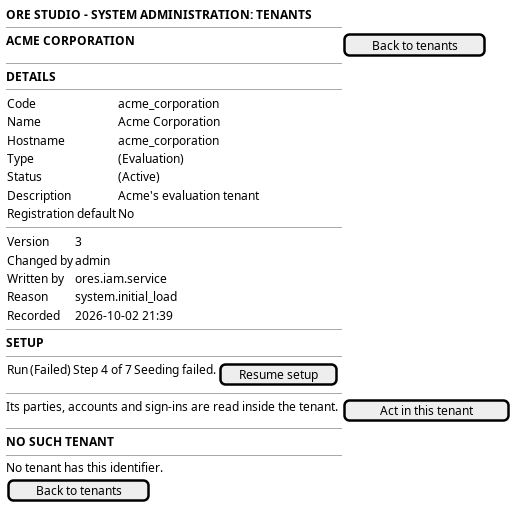
Figure 1: See one tenant: the details with provenance, the setup run, and the way inside.
5. Entities composed
| Entity | What it contributes | Model |
|---|---|---|
tenant |
Every field of the row, read-only, with its provenance | ores.iam.tenant |
tenant_type |
The type badge | ores.iam.tenant_type |
tenant_status |
The status badge | ores.iam.tenant_status |
workflow_instance |
The setup run's status, step and error | ores.workflow.workflow_instance |
6. Operations and messages
| Step | Operation | Subject | Status |
|---|---|---|---|
| Read the details | Read one tenant by its code | iam.v1.tenants.get |
exists |
| Read the provenance | Carried by the tenant row | iam.v1.tenants.get |
exists |
| Read the setup run | Read the runs that target the tenant | workflow.v1.instances.list, filtered on the tenant as target |
exists |
| Go inside for the tenant's data | Enter the tenant, reading only | iam.v1.ops.enter_tenant |
exists |
| A tenant that does not exist | Answer an empty read | iam.v1.tenants.get |
exists |
The browser reads the screen through one BFF route, GET /api/tenants/:code.
It refuses a session outside system administration, as /api/tenants does.
It joins the tenant and its setup run into one answer.
7. What is missing
- Closed: the tenant's parties. A first version read them here through a
cross-tenant read that named the tenant. That read is removed. The parties
are read from inside the tenant with the ordinary
refdata.v1.parties.list, which row-level security scopes from the session's token, in Act inside a tenant. - The tenant read checks no permission.
iam.v1.tenants.getchecks none, likeiam.v1.tenants.list. The BFF's refusal of a session outside system administration is the boundary, as on the roster. - The tenant's administrators are not shown. No read joins a tenant to the accounts that run it. This is the gap the roster names too.
8. Related journeys
- See the tenants — the roster this screen is opened from, and the way back
- Retire or reset a tenant — the destructive action on the tenant read here
- New party — adds a business party to a tenant that holds only its system party
- Tune the tenant — the same tenant row, read by its own administrator
- Act inside a tenant — where the tenant's parties, accounts and sign-ins are read