User Journey: Act inside a tenant
Table of Contents
This page documents a user journey: A system administrator opens one tenant and reads its parties and people in place; the server reads them inside the tenant for each read, and the person never enters or leaves anything.
A user journey describes what one person is trying to do, before anything is built. It is a design document that outlives any sprint, so it names the screens, the entity fields each screen shows, and the operations and messages each step needs.
"* Goal
"I want to see who is in this tenant and how it is organised." The system administrator opens a tenant and reads its parties and its people on the tenant's own screen, as tabs beside its details. The journey is done when the administrator has read what they came for; there is nothing to leave.
The tenant's data is still read from inside the tenant. The server holds a session in the tenant for each read, and only for that read, so the tenant's audit trail says who looked, and the administrator's own session never changes.
1. Actor and trigger
The system administrator: an account that holds the SuperAdmin role in the
system tenant, with the permission iam::tenants:impersonate. The trigger is a
question that only the tenant's own data answers: which parties it holds, who
has access, what its members signed in to. The journey starts on the tenant's
screen in See one tenant and ends
when the administrator leaves the tenant.
The rule behind the journey: a tenant's data is read from inside the tenant. The session's token names the tenant, row-level security scopes every read from it, and no read takes a tenant as a parameter. So the administrator does not get a second, cross-tenant way to read; they get a session in the tenant, and the ordinary reads do the rest.
"* Steps
- Open the tenant. From the roster, or from the home page, the administrator opens a tenant. Its screen opens on the Overview tab: what the tenant is and how its setup went.
- Read its parties. The administrator chooses the Parties tab. The server
enters the tenant, lists its parties with
refdata.v1.parties.lista page at a time, and leaves. Each party names the party it belongs to, and shows its business centre with the flag of the centre's country. - Read its people. The People tab lists the accounts that can sign in to the tenant, the same way, each with their picture or, without one, their initials.
- Move on. The administrator goes back to the roster, or anywhere else. Their session is system administration throughout: the menu, the home page and every other read are unchanged by the tabs.
- Refused. A session that is not in system administration, an account
without
iam::tenants:impersonate, or a tenant no row names is refused with a reason. The system tenant is the system administrator's own, so its parties and people are read as the session, with nothing entered. A suspended or terminated tenant can be read: its data is still there, and reading it is how an administrator decides what to do with it.
The tabs write nothing. A quiet View only label says that the tenant's own
administrators make the changes. Each read inside the tenant carries the
administrator's own read permissions, resolved from their roles in the system
tenant and filtered to the :read codes, so every service refuses a write that
checks its permission. The token names the tenant the administrator acts from
in the claim acting_from_tenant_id, and refresh refuses a token that carries
it. A system administrator changes a tenant in one way only: by removing the
whole tenant, from system administration.
"* Screens and wireframes
No new screen. The tenant's screen gains Parties and People tabs beside its Overview, and the Home screen prototype draws them. The wireframe below is the first design, which entered the tenant with a button and showed a banner on every screen while inside; the tabs replaced both.
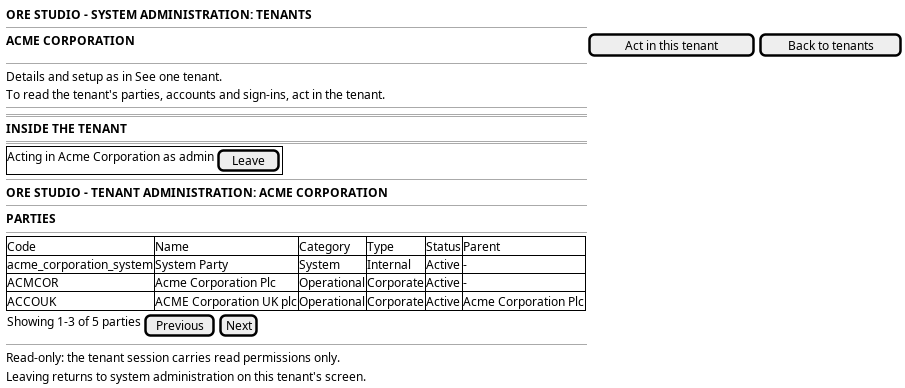
Figure 1: Act inside a tenant, as first designed: the entry on the tenant's screen, and the banner and parties while inside.
2. Entities composed
| Entity | What it contributes | Model |
|---|---|---|
tenant |
The tenant opened, whose screen holds the tabs | ores.iam.tenant |
party |
The tenant's system party the session acts as, and the parties listed inside | ores.refdata.party |
3. Operations and messages
| Step | Operation | Subject | Status |
|---|---|---|---|
| Read a tab | Issue a session scoped to one tenant, record the entry | iam.v1.ops.enter_tenant |
exists |
| Read the tenant | List the tenant's parties, paged | refdata.v1.parties.list |
exists |
| Read the tenant | List the tenant's accounts, paged | iam.v1.accounts.list |
exists |
| After the read | End the tenant session, record the exit | iam.v1.ops.leave_tenant |
exists |
iam.v1.ops.enter_tenant is a domain operation, because it acts on a session
and not on an entity. Its request names the tenant by id. Its reply is the
token, the tenant's name and code, the party the session acts as, and the
access lifetime. The token carries the tenant, the tenant's system party, every
party of the tenant as visible, the administrator as subject and actor, and a
claim that names the tenant the administrator acts from, so audit columns and
the banner can say who is really acting.
The browser reaches the tenant's data through the BFF, as
GET /api/tenants/:code/parties and GET /api/tenants/:code/people. For each
request the BFF enters the tenant, reads, and leaves, whether or not the read
succeeds. The tenant token is held for that read alone and never put on the
browser's session, so any other request the browser makes meanwhile is answered
as system administration. Each read therefore records one entry and one exit
in the tenant's audit trail. The pictures and flags a page names are read in
that same visit and kept by the BFF, so the browser fetches each one from
GET /api/tenants/:code/images/:id with no further entry. Leaving does not
revoke the tenant token, because no token is revoked in this system; it lasts
at most one access lifetime.
4. What is missing
- Closed: a session scoped to another tenant.
iam.v1.ops.enter_tenantandiam.v1.ops.leave_tenant, in the operation modelores.iam.tenant_session_messages, issue and end it. The entry checksiam::tenants:impersonateagainst the database, because a person's token carries no permissions. - Closed: a claim that says who is really acting. The token carries
acting_from_tenant_id, and refresh refuses a token that carries it. - Closed: the cross-tenant party read.
refdata.v1.parties.list-of-tenantis removed; the parties are read inside the tenant. - Closed: a person's token carries their permissions. Login, party selection and refresh read the effective permissions, and an empty list refuses every check (Give a person's token the permissions they hold).
- Closed: no entering or leaving. The tenant's parties and people are tabs on its screen, and the server holds the tenant session for each read (Make the shell speak to people plainly).
- The tenant's accounts are read, not its sessions or sign-ins. The tabs show parties and people. Reading a tenant's sessions and failed sign-ins from system administration has no tab yet.
5. Related journeys
- See one tenant — the screen whose tabs this journey adds
- See the tenants — the roster row's Open leads to the tenant's screen
- See who has access — the tenant's own view of its people
- Rescue access — the tenant administrator's own screen
- Audit sign-ins — where the entry and the exit are recorded
- Choose where I work — the same re-scoping of a session, for a member's own parties