User Journey: Ask for more access
Table of Contents
This page documents a user journey: A member asks for a role beyond the one registration gave them, and a tenant administrator answers.
A user journey describes what one person is trying to do, before anything is built. It is a design document that outlives any sprint, so it names the screens, the entity fields each screen shows, and the operations and messages each step needs.
1. Goal
"I cannot do my job with the access I have." The member asks for a role they do not hold. The journey is done when the request has an answer the member can read: the role is now theirs, or the request was refused and the refusal says why.
2. Actor and trigger
Two people act on one request, at different times. The requester is a member: an
account of type user, signed in inside one tenant, reading their own record.
The trigger is a refusal — a screen answers "permission denied" — or a task the
member cannot finish. It starts at My access, which already lists the roles
they hold, and it ends when they read the answer.
The answerer is a tenant administrator: an account inside the same tenant that
holds iam::roles:assign. The trigger is a request that is waiting. It starts
at the tenant's request queue and it ends when the role is granted, or when the
request is refused.
This is one journey with two actors, because it is one request with one lifecycle and each actor owns one end of it. The screens stay apart: the member never sees the queue, and the administrator never sees the ask. The administrator's unprompted version of the same write is Change someone's access; here the write answers a request instead of starting one.
A request waits on somebody, so this is the case the user_journey contract calls server-side state. The design first put that state in ores.workflow, as an instance that suspends until somebody answers and resumes when they do. It was landed a different way, and the difference is worth stating because it is the design this document now describes.
A request is a record of its own in ores.inbox, not a step of a run. It has a
kind, which says who may decide it and how long it waits; a state; the person
who asked; and the reason. Answering it writes a decision beside it, and the
two together are its history. Nothing suspends and nothing resumes, because
there is no run to suspend: the request is the thing that waits.
Two things followed from that. The engine needed no waiting state, no terminal
state per answer and no "a person decides" step kind, because the waiting is a
row. And the detail of what was asked for stayed with the component that owns
it: an iam.role_grant request is an inbox request plus an IAM row naming the
account and the roles, so IAM keeps its own record of a grant and the inbox
keeps the queue every kind shares.
The member's rail is not resumable across a reload — only the request is.
3. Steps
3.1. The member asks
- Open my access. The member opens My access. The system reads the roles
they hold, and beside them the roles the tenant offers that they do not hold.
The first list is
iam.v1.ops.get_my_rolesand the second isiam.v1.roles.list, filtered to the roles the tenant says may be asked for. - Read what a role grants. The member opens a role and reads the permissions
it bundles, so the ask is an informed one. The read is
iam.v1.ops.get_role_permissions. - Ask for the role. The member picks a role and writes why they need it. The
ask is
iam.v1.ops.ask_for_roles, which is IAM's because the roles asked for are IAM's to validate; it records the account and the roles and raises the inbox request withinbox.v1.ops.raise_approval. IAM refuses a role the tenant has not put on offer. This is the step that leaves somebody waiting, so the request is written down rather than kept in the browser. - Wait. The member leaves. My access shows the request as waiting, with what
was asked for and when. The roles they hold do not change: a request is not a
grant. The member reads what they have asked for with
inbox.v1.ops.list_my_approval_requests, and may withdraw a request withinbox.v1.ops.withdraw_approval, which closes it. - Read the answer. The member returns to My access, or follows a notice, and
reads the answer. What they have been told is
inbox.v1.ops.list_my_notifications. An approval shows the role among the roles they hold. A refusal shows the reason the administrator wrote. - Leave. The request is closed, and it stays in the member's history. A request nobody answers is not the member's to close: the tenant's deployment closes it on a schedule, and the member is told the same way.
3.2. The administrator answers
- Read the queue. The administrator opens Requests and reads what the
tenant's members have asked for: who, which role, why, and how long it has
waited. The system lists the requests waiting in the tenant, oldest first,
with
inbox.v1.ops.list_approval_queue. - Weigh the request. The administrator opens one request and reads the member, the role, the reason, and the permissions the role bundles. The last of these is what turns a role name into a decision.
- Decide. The administrator approves or refuses, with
inbox.v1.ops.decide_approval. An approval grants the role to the member throughiam.v1.ops.assign_role, the ordinary assignment path, so theaccount_rolerow carries the same audit tail every grant carries, and the request closes as approved. A refusal writes the reason the member will read, and the request closes as refused. An administrator who is the requester is refused: four eyes means the answer comes from somebody else. - Leave. The request leaves the waiting list. The grant takes effect at the member's next sign-in, as every assignment does. The request does not disappear: it stays in the queue's answered tail for as long as the installation says, so the administrator sees what they answered, and the notice that links back to it opens.
The ask and the decision are final steps: there is no Back past a request that has been made, or past a decision that has been given. A member who needs the same role again asks again, and the second request is a new one.
4. Screens and wireframes
Two screens, one per actor. The member's screen is My access, extended by two panels: the ask, which pairs a role picker with the reason, and the requests, which lists what the member has asked for and how each request ended. The four panels answer one question — what may I do, and what have I asked for — so they belong on one screen rather than on a screen of their own.
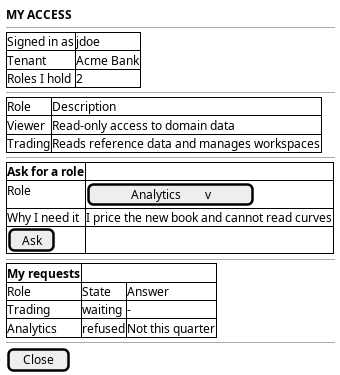
Figure 1: Ask for more access: the roles the member holds, the ask, and the requests the member has made.
The administrator's screen is the queue. It shows the requests waiting in the tenant, the selected request in full, and the decision. The decision is one panel because the administrator reads the reason and answers at once; a request that needs research is left in the queue rather than half-answered.
An answered request leaves the waiting list, but it does not leave the screen.
The notice that says what happened links back to the request, and a request
that vanished would give the administrator nothing to look at, so the queue
carries the requests answered within a window below the waiting ones. How long
that window is, is the installation's, as the variability system setting
inbox.approval_queue.answered_window_seconds.
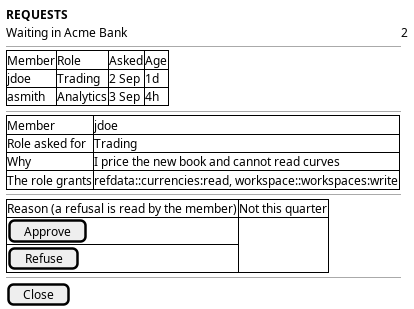
Figure 2: Answer a request: the tenant's waiting requests, the selected request with what the role grants, and the decision.
The queue is the Access group's screen, beside the roster rather than inside it. See who has access answers who is in the tenant; this screen answers what they have asked for.
What was built is these two screens. The member's is MyAccessPage, with the
ask in AskForRoleDialog and the member's own list in MyRequests. The
administrator's is RequestsPage, which opens a request in RequestDetailPage
and shows where it stands with RequestStateChip. The panels are where the
design put them; what the design did not settle, and the build did, is that a
request is a record the inbox reads rather than an instance both screens watch.
5. Entities composed
| Entity | What it contributes | Model |
|---|---|---|
account |
The member's identity in the header, and the requester on each queue row: username and full name | ores.iam.account |
role |
The role asked for, the roles on offer, and the roles the member holds | ores.iam.role |
permission |
What the role grants, so both actors decide from the codes rather than from the name | ores.iam.permission |
account_role |
The assignment an approval writes, with its audit tail | no entity model — junction table |
approval_request |
The request itself: who asked, which kind it is, why, and where it waits | ores.inbox.approval_request |
approval_kind |
What a request of this kind waits for: the permission that decides it, and how long it waits | ores.inbox.approval_kind |
approval_decision |
The answer, with the person who gave it and the reason | ores.inbox.approval_decision |
role_grant_request |
IAM's detail of this kind: the account that would hold the roles | ores.iam.role_grant_request |
notification |
What each person is told, and their own copy of it | ores.inbox.notification |
The request is not an IAM record, and it is not a step of a run either. A
request waits on a person, so it carries the waiting itself: kind_code says
what it is and therefore who may decide it, requested_by is the member,
reason is why, state_code is where it has got to — waiting, approved,
refused, withdrawn or expired — and expires_at is when it stops waiting.
The kind is what makes the queue one queue. It names the permission a decider
must hold and the deadline a request takes, so the inbox can offer the whole
tenant's requests without knowing what a role grant is. The detail of this
kind is IAM's: role_grant_request names the account and one row per role
asked for, keyed by the request. IAM validates the ask against the roles the
tenant has put on offer, and that is a rule about roles, which is IAM's to
state.
No credential appears on either screen, and nothing either screen carries is a secret: a password, the material a password is checked against, a one-time-secret seed and a service's own secret all stay on the server. The member's ask shows the roles on offer, and the administrator's decision shows the reason — neither needs any of them.
6. Operations and messages
| Step | Operation | Subject | Where |
|---|---|---|---|
| Open my access | Read the roles on my account | iam.v1.ops.get_my_roles |
ores.iam.authorization_messages |
| Open my access | List the roles the tenant offers | iam.v1.roles.list |
ores.iam.authorization_messages |
| Read what a role grants | Read the permissions one role bundles | iam.v1.ops.get_role_permissions |
ores.iam.authorization_messages |
| Ask for the role | Ask for the roles named | iam.v1.ops.ask_for_roles |
ores.iam.role_grant_request |
| Ask for the role | Raise the request the ask makes | inbox.v1.ops.raise_approval |
ores.inbox.approval_operations |
| Wait | Read my own requests and their answers | inbox.v1.ops.list_my_approval_requests |
ores.inbox.approval_operations |
| Wait | Read the roles my request asks for, and what became of them | iam.v1.ops.get_request_roles |
ores.iam.role_grant_request |
| Read the story | Read every version my request wrote | inbox.v1.ops.get_approval_history |
ores.inbox.approval_operations |
| Wait | Withdraw my request | inbox.v1.ops.withdraw_approval |
ores.inbox.approval_operations |
| Read the answer | Read what I have been told | inbox.v1.ops.list_my_notifications |
ores.inbox.approval_operations |
| Read the queue | List the requests waiting in the tenant, and the ones answered recently | inbox.v1.ops.list_approval_queue |
ores.inbox.approval_operations |
| Decide | Answer a request, with a reason | inbox.v1.ops.decide_approval |
ores.inbox.approval_operations |
| Decide | Grant the roles the request asks for | iam.v1.ops.assign_role |
ores.iam.authorization_messages |
| Nobody answers | Warn the deciders of the requests close to their deadline | inbox.v1.ops.remind_expiring_approvals |
ores.inbox.approval_operations |
| Nobody answers | Close the requests past their deadline | inbox.v1.ops.expire_overdue_approvals |
ores.inbox.approval_operations |
The ask is two subjects because two components own a part of it. IAM owns the
question "may this role be asked for", so iam.v1.ops.ask_for_roles is IAM's;
the inbox owns waiting, so the request it raises is the inbox's. Nothing
suspends, so nothing follows a run's steps.
The story of a request is read through an operation of its own for the same
reason the roles are. The entity read of approval requests and the generic
history read both gate on the administrator's permission, so the person who
raised a request cannot read their own request's versions through either; and
the only place a granted role is tied to the request that asked for it is the
junction row IAM marks applied. inbox.v1.ops.get_approval_history is entitled
to the person who raised the request, so a member reads their own trail and a
request they did not raise is answered as absent.
The roles a request asks for are read through an operation rather than through
the generated read of role_grant_request_role. That read is gated on
iam::role_grant_request_roles:read and IAM isolates those rows by tenant
alone, so granting it would let any member read what every other member asked
for. iam.v1.ops.get_request_roles is entitled to the person who raised the
request and to whoever may read the roles of any, so one read serves the
member's own screen and the administrator's queue, and a caller entitled to
neither is told the request does not exist.
iam.v1.ops.assign_role checks iam::roles:assign before it writes, so the
administrator's decision carries the check the member's ask must not.
inbox.v1.ops.expire_overdue_approvals is the one subject here no person calls:
the scheduler fires it, so it presents no session, and it closes only what is
already past its deadline, which is why that is affordable. The reads a person
makes of their own requests and notices are the inbox's, and each is scoped to
the person the session names.
7. The seven gaps, and where each stands
This document was written before anything was built, so it listed seven things the journey needed and did not have. All seven are closed. The list is kept because a reader arriving from the older text will have it in mind, and because two of the seven were closed by changing the design rather than by building what the gap asked for.
| # | Gap | State | What answered it |
|---|---|---|---|
| 1 | No request subject exists | closed | iam.v1.ops.ask_for_roles asks, and the inbox's operations raise, list, withdraw and decide. The approval needed no new write, so iam.v1.ops.assign_role is still the grant. |
| 2 | The workflow engine cannot wait on a person | closed, by design | Nothing had to suspend. An approval request is its own record with a state, so ores.workflow was never the holder and needed no waiting state. |
| 3 | The requester may answer their own request | closed | The four-eyes guard refuses a decision by the person who asked, so an administrator cannot escalate through a request of their own. |
| 4 | Nothing says which roles may be asked for | closed | is_requestable on the role row, in the shape is_registration_default already had. IAM refuses a role the tenant has not put on offer. |
| 5 | Nothing tells either person that something happened | closed, and larger than this journey | Notifications are a record of their own in ores.inbox, with a kind per kind of event, raised to a person or to whoever holds a permission. |
| 6 | No query returns a request as a row | closed, by design | The request became a table, so the queue is a read of it rather than a projection over an instance's payload. |
| 7 | A request that nobody answers waits forever | closed | The kind carries a deadline, the request takes it, and a scheduled sweep closes what nobody answered. A second sweep, on its own schedule and its own window, warns the people who may answer a request that is close to running out. |
The deadline and its warning are two behaviours, and they are built as two: the sweep that closes a queue that stopped moving is housekeeping, and the sweep that warns somebody it is about to stop moving is a nudge with its own timing and its own audience. Both are the installation's to schedule, and both are described in Approval request expiry. The warning is raised once per request, and the notice is what says so.
8. Related journeys
- Know what I may do — where the member reads the roles they hold, which is where the ask starts and where the answer is read.
- Change someone's access — the administrator's unprompted grant, and the assignment the approval writes through.
- Shape the role catalogue — where the role the member asks for is defined, and where the permissions it bundles are decided.
- See who has access — the roster the administrator arrives from, and returns to.
- Sign up — the registration that gave the member the default role this request goes beyond.
- Register a service account — the non-human account that receives roles by assignment and cannot ask for them.
9. Related knowledge
- Registration and Onboarding Defaults — why the default role is a floor and not a ceiling, and why the ask is its own journey.
- Journey execution — the composition classes, and the rule that a journey waiting on a person keeps its state on the server. This journey does, but the state is a request of its own rather than a workflow instance.
- Approval requests — the record that holds the waiting, and the kinds that share one queue.
- The entry journeys — the state table that states the same rule.
- Identity and Access Management
- Role-Based Access Control
- Accounts and Roles — the user guide chapter
- How do I add a PlantUML diagram?
- Access journeys — the group hub
10. See also
- ores.iam.role — the role asked for and the roles on offer
- ores.iam.account — the member who asks and the administrator who answers
- ores.iam.permission — the codes a role bundles
- ores.inbox.approval_request — where a request waits, and what answered the workflow question
- Approval requests — the record, its kinds, and the rule that answers one
- Approval request expiry — the design of the deadline this journey's gap 7 asked for: the kind's deadline, the two close paths, the sweep that closes what nobody answered, and the sweep that warns the deciders before it does
- Task: Create the role-request journey — the task this document answers
- See the story of a request prototype — the whole journey drawn as one request's story, and what each of the two readers may open
- User Journeys