User Journey: Keep what the grid runs
Table of Contents
+#+updated: 2026-10-07 +#+startup: inlineimages
This page documents a user journey: A signed-in person reads the apps the grid may run, their versions and packages, and the concurrency policy that governs how many of a thing run together; a super administrator writes the catalogue.
A user journey describes what one person is trying to do, before anything is built. It is a design document that outlives any sprint, so it names the screens, the entity fields each screen shows, and the operations and messages each step needs.
1. Goal
"I want to know what the grid may run, and how much of it may run at once." The person opens one screen and reads the apps the grid knows, the versions of each app, the platforms each version is packaged for, and the concurrency policy that governs a run when another run of the same thing is already in flight. A tenant needs this before it submits anything, because the catalogue is what tells it what it may ask for. A super administrator also writes the catalogue. The journey is done when the person knows what may run, and, for the writer, when the catalogue states it.
2. Actor and trigger
Two things are true of this journey, and they do not split it. Reading the catalogue is every signed-in person's: a tenant needs to know what it may submit, so the reads admit everyone. Writing the catalogue is the super administrator's: the version, the platform and the package are the installation's, and a tenant does not publish them. That is one journey with a permission on the write, not two journeys with two screens.
The catalogue rows are the installation's. The apps, their versions, the
platforms and the packages are a global registry: they live under the system
tenant and every tenant reads them, which is what
:system_tenant_visible: true states on the app, app_version,
app_version_platform and platform repositories. Their reads do not narrow
to the session's tenant, and the write does. The concurrency policy is shared
reference data of the same kind, seeded under the system tenant
(Tenant ownership and the
information flow).
The trigger is a submission: a person is about to dispatch a batch and needs to know which app version and platform to name, or a super administrator has a new engine build to publish. The journey ends when the catalogue has answered the reader, or when the writer's change is stored.
This journey reads everything and writes the catalogue. A reader writes nothing. A writer creates and retires apps, versions, platforms and packages; the journey does not run a job.
3. Steps
- Open the catalogue. The person opens the screen. The system lists the apps
the grid knows, each with its
nameanddescription, and, for each, its versions. Every session reads the same list, because the registry is the installation's. - Read an app's versions. The system states each version's
wrapper_version,engine_versionandmin_ram_mb. The version is the engine build a job pins, and the memory it needs is the requirement a capacity plan reads (ores.compute.app_version). - Read a version's platforms and packages. The system states each platform
row of the version: the platform's
code,display_name,os_family,cpu_archandis_active, and the package'spackage_uriandsha256. The wrapper downloads the package that matches its own triplet and verifies it against the digest, so the two fields are what the grid runs (ores.compute.app_version_platform, ores.compute.platform). - Read a version with no package. A version whose platform rows carry no package can be dispatched and never run: the dispatcher stores the workunit, publishes no assignment, and the job sits unsent forever. The system must mark that version, because the catalogue is where the mistake is visible before a batch is wasted (Compute job lifecycle).
- Read the versions in flight. The system draws a node-by-version matrix:
which release is running on which node. The job's engine build is on the
workunit's
app_version_id, and the running wrapper's release and its host are on the service heartbeat, so the two halves of the matrix come from two reads (ores.telemetry.service_samples). - Read the jobs per release. The system draws the jobs grouped by the
release they pinned: one bar per
app_version, each marked as its app's newest or an older one, and a count of how many jobs still run an older release. The job's release is the workunit'sapp_version_id, a fact about the work written when the job was stored, so the chart counts what actually runs and never guesses from the machine. The wrapper heartbeat carries the release and the host, so a node's running build is known; that build is the wrapper's, not the app version this job pinned, and the node sample carries the host and no release. A count above zero on an older bar is a half-finished upgrade, and the chart is where it shows. The newest release is the highestengine_versionof the app, which is the version the submit handler already picks; What is missing states why the model should say so itself. - Read the concurrency policy. The system states the concurrency policy that
governs a run of one definition when another is already in flight. The
policy is reporting's:
skiprecords the new run as skipped,queuelets it wait in the queued state, andfailrecords it as failed without executing. A report definition carries the policy code (ores.reporting.concurrency_policy, Report definition and schedule). - Read how close a policy is to its limit. The system draws the in-flight work against the policy's cap. The policy states a behaviour, not a number, so the screen must say what the cap is or that there is none. This panel is the one the use cases name and the data does not yet answer; What is missing states why.
- Publish or retire, a super administrator only. The writer adds an app, a
version or a platform row, attaches a package and its digest, or retires a
platform with
is_active. The package upload is the shell'scompute publish-package, which computes and verifies the SHA256 server-side, and the generated writes cover the rows. A non-writer finds the controls withheld and the screen says why: the catalogue is the installation's. - An empty catalogue. No app is registered, or an app has no version. The system says the grid has nothing to run and does not offer a dispatch. That is the first-run state, before any package is published.
- Leave, or go on. A reader who now knows the version continues in Follow a job or Plan the grid's capacity. The super administrator who needs the deployment's own build continues in Check the versions and the database.
4. Screens and wireframes
One screen. The app list, the version table, the platform and package table, the versions-in-flight matrix, the jobs-per-release bars and the concurrency panel are panels of that screen, because the person reads them as one answer. The screen reads for everyone and writes for the super administrator: the write controls are the only part of the screen withheld from a reader, and they are withheld by permission and not by a second screen.
The panels are the charts Compute journeys names for keeping what the grid runs:
| Panel | Chart | Answers |
|---|---|---|
| Node grid | Versions in flight | Which release is running where? |
| Release bars | Jobs per release | How many jobs still run an older release? |
| Concurrency | Concurrency against the cap | Am I throttling myself? |
The versions-in-flight matrix is a node-by-version grid. The jobs-per-release
bars are drawn from the workunits' app_version_id, not from the nodes, so the
panel states the release each job runs and marks each app version newest or
older. The concurrency panel plots in-flight work against a cap, and the cap
must be a real number the screen can cite.
Every list on the screen pages on the server, per the Record screen standard. The app list, the version table and the platform and package table each carry First, Previous, Next, Last, a page size and Load all, with the page and the page size held in the address. A new search, a new filter, a new order or a new page size returns to page one, and Load all is offered only when the server's total is 1000 or less. No list reads with a fixed large limit, and none pages to the end to show everything.
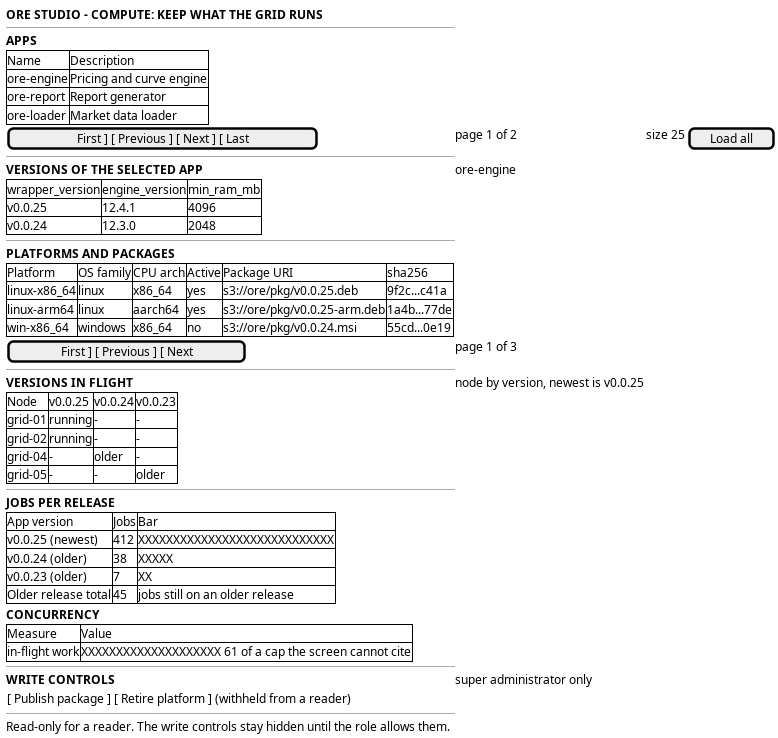
Figure 1: Keep what the grid runs: the app list, the version table, the platform and package table, the versions-in-flight matrix, the jobs-per-release bars and the concurrency panel.
5. Prototype
A static prototype argues one screen of this journey: the page of one app version, with its release note, its platforms and packages, and the other versions of its app. It does not draw the app list, the versions-in-flight matrix, the jobs-per-release bars or the concurrency panel.
- Source
doc/prototypes/compute/app-version/- Open
index.html, with?role=operator|tenant|member,?state=loaded|loading|empty|error|refusedand?version=newest|older|nopackage
The use-case analysis on Compute journeys stays the design record for the rest of the screen.
6. Entities composed
| Entity | What it contributes | Model |
|---|---|---|
app |
The engine family the grid knows: name and description |
ores.compute.app |
app_version |
One build of an app: wrapper_version, engine_version and min_ram_mb |
ores.compute.app_version |
app_version_platform |
A version's package for one platform: platform_id, package_uri and sha256 |
ores.compute.app_version_platform |
platform |
A target triplet: code, display_name, os_family, cpu_arch, abi and is_active |
ores.compute.platform |
workunit |
The job that pins a version: app_version_id and target_redundancy |
ores.compute.workunit |
result |
A run of that job, and the node it ran on: server_state, outcome and host_id |
ores.compute.result |
host |
The node in the versions-in-flight matrix: external_id and display_name |
ores.compute.host |
service_sample |
The running wrapper's release and host, for the matrix | ores.telemetry.service_samples |
concurrency_policy |
The behaviour of a run when another is in flight: code, name, description and display_order |
ores.reporting.concurrency_policy |
The catalogue is the installation's. An app version is addressed by
(=name, engine_version, wrapper_version)= on the write, and a platform row
is replaced wholesale when a package is republished: the previous platforms are
preserved and the published one is updated, so a version's package set changes
without losing the others.
7. Operations and messages
| Step | Operation | Subject | Status |
|---|---|---|---|
| Open the catalogue | Read the apps | compute.v1.apps.list |
exists |
| Read an app's versions | Read the versions | compute.v1.app_versions.list |
exists |
| Read a version's platforms and packages | Read the platform rows of a version | compute.v1.app_version_platforms.list |
exists |
| Read the platforms | Read the platform registry | compute.v1.platforms.list |
exists |
| Read the versions in flight | Read the host registry | compute.v1.hosts.list |
exists |
| Read the versions in flight | Read the running wrappers' release and host | telemetry.v1.services.list |
exists |
| Read the versions in flight | Read which build each job pinned, over a range | (no aggregate subject) | missing |
| Read the jobs per release | Read the jobs grouped by the release they pinned, with each app version marked newest or older | (no aggregate subject) | missing |
| Read the concurrency policy | Read the policies | reporting.v1.concurrency_policies.list |
exists |
| Read how close a policy is to its limit | Read the in-flight work against the policy's cap | (no cap row exists) | missing |
| Publish a package and register the rows | Upload the package, verify the digest, register the app, version and platform rows | compute publish-package (shell) |
exists |
| Read a version's release note | Read the note stored on the version | (the version has no release_note column) |
missing |
| Write a row | Write an app, a version or a platform row | compute.v1.apps.put, compute.v1.app_versions.put, compute.v1.platforms.put, compute.v1.app_version_platforms.put |
exists |
| Retire a platform | Mark a triplet inactive | compute.v1.platforms.put |
exists |
| Withhold the writes | Check the caller's permission | compute::apps:write, compute::app_versions:write, compute::platforms:write and compute::app_version_platforms:write, checked by the handlers |
exists |
compute publish-package is the one write that is not a generated entity
operation. It uploads the tarball to storage under the app's package key,
computes and verifies the SHA256 server-side, and registers the app,
app_version and app_version_platform rows. The generated put operations
cover the rows on their own. The shell uploads the package bytes over HTTP to
storage, and no browser upload path exists: the shell is the only client today.
reporting.v1.concurrency_policies.list is reporting's read, not compute's. The
policy is a property of a report definition, and the grid reads the definition's
policy code to explain why a run of the same definition did or did not start.
The browser reads the screen through a hand-written BFF route on the journey runtime. No route serves a compute screen yet.
8. What is missing
- There is no concurrency cap in the grid. The use case names a policy that
"caps how many of a thing run together", and no such row exists. The only
concurrency policy is reporting's, and its three codes,
skip,queueandfail, state what happens to a new run when another is in flight. They state a behaviour and not a number, so the chart "Concurrency against the cap" has no cap to read. The nearest numbers are the report quotas and the grid's per-tenant assignment cap in Report execution at scale, and those are capacity-test targets with no table (ores.reporting.concurrency_policy). The journey states this rather than inventing a cap. - The versions-in-flight matrix needs a range and a join. The node sample carries no release, so the matrix cannot be drawn from it. The wrapper release and its host are on the service heartbeat, and the engine build a job pinned is on the workunit. A range read that joins results to workunits and app versions is the missing piece.
- A package cannot be published from a browser. The upload is a shell verb, which uploads over HTTP to storage. The journey's writer reaches the package step through the shell and the rows through a screen, and the two are not one action. A browser package upload, or an explicit statement that publishing stays a shell operation, is the missing decision.
- A version with no package is not marked. The catalogue can state a version whose platform rows carry no package, and the dispatcher will store its jobs and never publish an assignment. The screen must state that, and the model could state it too.
- The registry has no history view. A package's digest changes when it is
republished, and the model keeps the current row only. The journey shows the
current catalogue and cannot say what a job ran if the version's package was
replaced. The result's
output_uriand the log lines are the only record of the old run. - Nothing marks a release newest. The jobs-per-release chart marks each bar
as the app's newest release or an older one, and the
app_versionmodel states no flag and no ordering that says which build that is. The only rule today is the highestengine_version, andengine_versionis text, so the comparison is a string comparison. That is the rule the submit handler already uses when it picks a version for a report, so the chart and the dispatcher would agree; a model that states the newest version, or a version-aware type, would make the mark a fact rather than a convention (ores.compute.app_version). - A release has no note. A job pins an app version, and a person who asks
what changed in it finds only the engine and wrapper version strings. The
app_versionmodel holds no release note. A text column namedrelease_noteon the version, not on the package, would hold it, because one note describes a release that is packaged for several platforms.compute publish-packagewould write the note with the bundle, so the release and its note cannot drift apart. The prototype draws the page with the note (ores.compute.app_version).
9. Related journeys
- Watch the grid: the load the catalogue's builds run in
- Follow a job: a job that pinned one of these versions
- Diagnose and reproduce a failure: a failure traced to one version or package
- Plan the grid's capacity: the memory a version needs, against what the nodes have
- Check the versions and the database: the deployment's own build, beside the catalogue's builds
- See the running services: the wrapper instances whose release the matrix reads
10. Related knowledge
- Compute journeys: the use cases and the charts this journey implements
- ores.compute.app
- ores.compute.app_version
- ores.compute.app_version_platform
- ores.compute.platform
- ores.compute.workunit
- ores.compute.result
- ores.compute.host
- ores.telemetry.service_samples
- ores.reporting.concurrency_policy
- Report definition and schedule
- Report execution at scale
- Compute job lifecycle: the package upload, the digest and the dispatch
- Tenant ownership and the information flow
- User Journeys
- Journey execution
11. See also
- User Journey Extraction Standard: the checklist this journey is written against
- Task: Extract the ores.compute user journeys: the story that owns this work
- Operations journeys: the group that owns the versions screen