User Journey: Plan the grid's capacity
Table of Contents
This page documents a user journey: A signed-in person compares what the compute nodes have against what a job needs and what is scheduled to arrive soon, and judges whether the grid can absorb it.
A user journey describes what one person is trying to do, before anything is built. It is a design document that outlives any sprint, so it names the screens, the entity fields each screen shows, and the operations and messages each step needs.
1. Goal
"I want to know whether the grid can take what is coming." The person picks a horizon and reads one screen: what capacity the nodes have, how much of it the grid is using, what a job needs to run, and what is scheduled to arrive inside the horizon. The journey is done when the person can say whether the grid has headroom for the work that is about to arrive, and which resource is the constraint.
2. Actor and trigger
The actor is what the rows admit, and the session decides the rows. A tenant sees its own arrivals; the super administrator sees the installation's fleet. This is one journey: the activity is the same "can the grid take this" at two visible sets.
The fleet rows are the installation's: the nodes and their capacity describe machines the installation owns, so they are read whole. The arrivals are a tenant's, so they narrow to the session's tenant. The allocation by tenant is not this journey's panel: it moved to the Watch the grid screen's Usage tab, where the installation reads the usage ledger it keeps about its own operation. This journey reads the fleet and the arrivals (Tenant ownership and the information flow).
The trigger is a change to either side: a node was added or drained, a release needs more memory than the fleet has, or a schedule is about to fire a large batch. The person opens the capacity screen to compare the two sides. The journey ends when the headroom question is answered.
This journey writes nothing. It reads the host registry, the app version requirements, the samples and the scheduler's status. It does not add a node, change a schedule or stop a job.
3. Steps
- Open the capacity screen and pick a horizon. The person opens the screen and picks how far ahead to look, for example the next day or the next week. The system answers over that horizon and draws the arrivals and the usage against one time axis.
- Read what the nodes have. The system states each node's capacity from the
host registry:
cpu_count,ram_mbandgpu_type, with the node'sexternal_idanddisplay_name. This is the grid's ceiling, and it does not depend on any sample (ores.compute.host). - Read the headroom. The system draws used against total capacity in each
interval. The total is the host registry's. The usage the grid records is
coarse:
grid_samplestates how many hosts were online and how many were idle, so the headroom is drawn in hosts and not in cores, memory or GPUs. The screen must say which unit it is drawing, because a headroom in hosts is not a headroom in memory. - Read what a job needs. The system states the requirements a job carries.
The app version states a
min_ram_mb, and its platform row states the triplet the package was built for:code,os_familyandcpu_arch. A job is aworkunitthat names itsapp_version_id, itspriorityand itstarget_redundancy(ores.compute.app_version, ores.compute.platform). - Read the requirements matrix. The system draws the open jobs against the
nodes that can hold them: memory against
ram_mb, platform against the node's triplet, and a GPU need againstgpu_type. A job whosemin_ram_mbis above every node's memory, or whose platform no online node runs, is a job the grid cannot start, and the matrix is where that shows. - Read the upcoming arrivals. The system draws a timeline of the scheduled
runs ahead of now. The scheduler answers with each job's
job_name, itsschedule_expression, itsnext_fire_at, itslast_run_statusand itsrunning_count, so the person sees what fires and when (ores.scheduler.job_definition, ores.scheduler.scheduling_operations). What each arrival needs is not on the scheduler's answer: a scheduled run submits a batch, and the batch's jobs and their requirements exist only after submission. The timeline shows when, and the requirements matrix shows what, and the two join only for work that has been submitted. - Judge the constraint. The person compares the three: the ceiling, the usage and the arrivals. The answer is a sentence about one resource, for example "the grid has memory for tomorrow's batch and no node runs its platform".
- No capacity data. No sample is stored for the horizon, or no host row describes the fleet. The screen says the capacity is unmeasured and does not draw a ceiling from an empty table.
- Leave, or go on. A constraint that is a busy grid continues in Watch the grid. A constraint that is a release's memory need continues in Keep what the grid runs.
4. Screens and wireframes
One screen. The horizon bar, the host capacity table, the headroom chart, the requirements matrix and the arrivals timeline are panels of that screen, because the person reads them as one answer. The screen is read-only: it creates nothing, changes nothing and destroys nothing. The allocation chart left this screen for the watch screen's Usage tab.
The panels are the charts Compute journeys names for planning capacity:
| Panel | Chart | Answers |
|---|---|---|
| Headroom | Capacity headroom | Can the grid take more? |
| Arrivals | Upcoming arrivals | What kicks in soon? |
| Matrix | Requirements matrix | What does each job need? |
The headroom chart is a stacked area of used against total. The grid does not measure a node's used cores, memory or GPUs, so the panel can draw only the part the samples support, in hosts, and it must not draw a used line it cannot fill.
Every list on the screen pages on the server, per the Record screen standard. The host capacity table, the requirements matrix and the arrivals timeline each carry First, Previous, Next, Last, a page size and Load all, with the page and the page size held in the address. A new search, a new filter, a new order or a new page size returns to page one, and Load all is offered only when the server's total is 1000 or less. No list reads with a fixed large limit, and none pages to the end to show everything.
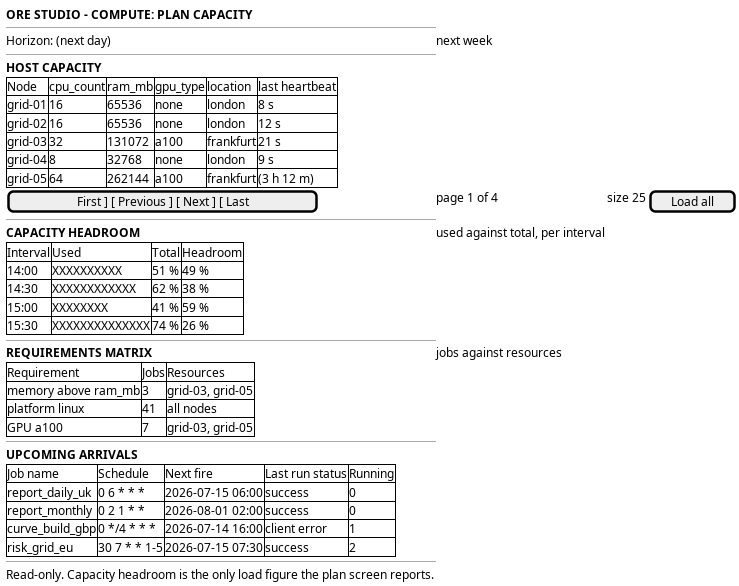
Figure 1: Plan the grid's capacity: the horizon bar, the host capacity table, the headroom chart, the requirements matrix and the arrivals timeline.
5. Prototype
None. This journey is not built and has no clickable prototype. Its design record is the use-case analysis on Compute journeys.
6. Entities composed
| Entity | What it contributes | Model |
|---|---|---|
host |
The grid's ceiling: external_id, display_name, location, cpu_count, ram_mb and gpu_type |
ores.compute.host |
grid_sample |
The usage the grid records: total_hosts, online_hosts and idle_hosts per interval |
ores.compute.grid_sample |
node_sample |
A node's interval, for the load behind the usage: tasks_since_last, avg_task_duration_ms and input_bytes_fetched |
ores.compute.node_sample |
workunit |
A job waiting for capacity: app_version_id, priority and target_redundancy |
ores.compute.workunit |
batch |
The container of the waiting jobs: external_ref and status |
ores.compute.batch |
app_version |
What a job needs to run: wrapper_version, engine_version and min_ram_mb |
ores.compute.app_version |
app_version_platform |
The platform a job's package was built for, with package_uri and sha256 |
ores.compute.app_version_platform |
platform |
The triplet the nodes must match: code, os_family, cpu_arch and is_active |
ores.compute.platform |
job_definition |
A scheduled arrival: job_name, schedule_expression, action_type and is_active |
ores.scheduler.job_definition |
job_schedule_status |
The live status of a scheduled job: job_name, schedule_expression, last_run_status, next_fire_at and running_count |
ores.scheduler.scheduling_operations |
The host is the only row that states capacity. The node sample states what a node did, not what it used: it carries task counts, durations and bytes, and no cores, memory or GPU in use. The requirements matrix therefore compares a job's stated need against a node's stated capacity, and the headroom chart can report usage only in the units the samples carry.
7. Operations and messages
| Step | Operation | Subject | Status |
|---|---|---|---|
| Read what the nodes have | Read the host registry | compute.v1.hosts.list |
exists |
| Read the headroom | Read the grid samples in the horizon | (no range read) | missing |
| Read the headroom | Read the node samples in the horizon | (no range read) | missing |
| Read what a job needs | Read the app versions and their platform rows | compute.v1.app_versions.list, compute.v1.app_version_platforms.list |
exists |
| Read what a job needs | Read the waiting jobs | compute.v1.workunits.list, compute.v1.batches.list |
exists |
| Read the arrivals | Read the scheduler's job status | scheduler.v1.status |
exists |
| Read the arrivals | Read what a scheduled run will need | (nothing until it submits) | missing |
| Refresh | Read the horizon again | (the reads above) | missing |
scheduler.v1.status carries no request fields and answers with every job the
caller can see, each with its schedule, its last run and its next_fire_at.
It is the arrivals read, and it is the scheduler's, not the grid's.
The grid's own reads are the host registry, which is complete, and the sample range read, which does not exist. The requirements matrix reads two entity lists that already exist. The allocation chart's reads live with the watch screen's Usage tab, which owns that chart now.
The browser reads the screen through a hand-written BFF route on the journey runtime. No route serves a compute screen yet.
8. What is missing
- No measured usage per resource. The host states total cores, memory and GPU, and no row states how much of any of them a node is using. The node sample reports tasks, durations and bytes. The headroom chart cannot draw a used line in cores, memory or GPUs today, and the candidate is to carry the node's in-use figures on the sample or a new resource sample.
- The arrivals have no requirements until they are submitted. The scheduler says when a job fires and nothing about what the run will need. The requirements matrix and the arrivals timeline therefore describe different sets: submitted jobs on one, scheduled jobs on the other. This is the open question the use cases raise, that "what is scheduled to kick in soon" is the scheduler's question and the grid's is what it does to the load (Compute journeys).
- The grid serves one tenant's slice. The grid read filters by the session tenant, so a headroom chart drawn from it would report one tenant's hosts as the fleet (The grid read is scoped to the session tenant).
- The quotas and the fair share are targets, not rows. The design for thousands of runs gives each tenant a weight and a cap on its assignments in flight, and each tenant and party a limit on running runs. Those numbers are capacity-test targets, and no table holds them, so the requirements matrix cannot state a tenant's own cap (Report execution at scale).
9. Related journeys
- Watch the grid: the load the plan is measured against
- Follow a job: one of the jobs the plan counts
- Diagnose and reproduce a failure: a job that failed because no node could hold it
- Keep what the grid runs: the app versions whose requirements the plan reads
- Watch the compute grid: the current fleet, in the operations group
- Watch the message bus: work that was planned and never left
unsent - See the running services: a node that is missing rather than busy
10. Related knowledge
- Compute journeys: the use cases and the charts this journey implements
- ores.compute.host
- ores.compute.grid_sample
- ores.compute.node_sample
- ores.compute.workunit
- ores.compute.batch
- ores.compute.app_version
- ores.compute.app_version_platform
- ores.compute.platform
- ores.scheduler.job_definition
- Compute job lifecycle
- Report execution at scale: the quotas and the grid's fair share, as design targets
- Tenant ownership and the information flow
- User Journeys
- Journey execution
11. See also
- User Journey Extraction Standard: the checklist this journey is written against
- Task: Extract the ores.compute user journeys: the story that owns this work
- Operations journeys: the group that owns the fleet survey